សេចក្តីផ្តើម
The SHOKZ OpenFit 2+ are open-ear headphones designed for comfort and situational awareness, featuring Dolby Audio and advanced sound technology. This manual provides instructions for setting up, operating, and maintaining your OpenFit 2+ headphones to ensure optimal performance and longevity.

Image: SHOKZ OpenFit 2+ Open-Ear Headphones and charging case, highlighting their open-ear comfort and ultimate sound capabilities.
មាតិកាកញ្ចប់
Verify that all items are present in your OpenFit 2+ package:
- OpenFit 2+ Earbuds (1 pair)
- OpenFit 2+ Charging Case (1)
- ខ្សែសាក USB-C (1)
- កាបូបយួរ (1)
- សៀវភៅណែនាំអ្នកប្រើ (ឯកសារនេះ)

Image: A visual representation of the SHOKZ OpenFit 2+ package contents, showing the earbuds, charging case, USB-C cable, and a black carrying bag.
រៀបចំ
1. សាកថ្មកាស
Before first use, fully charge your OpenFit 2+ headphones. The charging case supports both USB-C cable charging and wireless charging.
- ការសាក USB-C៖ ភ្ជាប់ខ្សែ USB-C ដែលបានផ្តល់ឱ្យទៅប្រអប់សាកថ្ម និងប្រភពថាមពល។
- ការសាកឥតខ្សែ៖ ដាក់ស្រោមសាកនៅលើបន្ទះសាកឥតខ្សែដែលត្រូវគ្នា។
The LED indicator on the charging case will show the charging status. A full charge provides up to 11 hours of playback for the earbuds, with the charging case extending total playtime to up to 48 hours. A 10-minute quick charge provides approximately 2 hours of music playtime.

Image: The SHOKZ OpenFit 2+ charging case being wirelessly charged on a charging pad, indicated by a green LED light.
2. ការផ្គូផ្គងជាមួយឧបករណ៍របស់អ្នក។
The OpenFit 2+ uses Bluetooth 5.4 for a fast and stable connection.
- សូមប្រាកដថាកាសស្តាប់ត្រចៀកស្ថិតនៅក្នុងប្រអប់សាកថ្ម ហើយប្រអប់នោះមានថាមពល។
- Open the charging case. The earbuds will automatically enter pairing mode (LEDs will flash).
- On your device (smartphone, tablet, computer), go to Bluetooth settings and select "OpenFit 2+" from the list of available devices.
- Once connected, a voice prompt will confirm "Connected."
MultiPoint Pairing: The OpenFit 2+ supports connecting to two devices simultaneously. To enable this, use the Shokz App to manage your connections and seamlessly switch between devices like your phone and laptop.

Image: SHOKZ OpenFit 2+ earbuds shown alongside a smartphone and a laptop, illustrating the Bluetooth 5.4 connectivity and MultiPoint pairing feature.
សេចក្តីណែនាំប្រតិបត្តិការ
ការពាក់កាសស្តាប់ត្រចៀក
The OpenFit 2+ features flexible ear hooks for a secure and comfortable fit. Gently place the earbud over your ear, ensuring the speaker rests comfortably near your ear canal without entering it. Adjust the ear hook for a snug fit.

Image: A diagram demonstrating the proper method for wearing the SHOKZ OpenFit 2+ headphones, highlighting the placement of the earbud and the adjustment of the ear hook.

Image: A person wearing the SHOKZ OpenFit 2+ headphones, illustrating the ergonomic design and secure fit provided by the flexible ear hooks.
ការត្រួតពិនិត្យ
The OpenFit 2+ features physical multifunction buttons for easy control of audio playback and calls. You can customize button functions and EQ settings using the Shokz App.
- លេង/ផ្អាក៖ ចុចតែមួយដងលើកាសទាំងពីរ។
- រំលងបទ៖ Double press (typically right earbud for next, left for previous, customizable).
- លៃតម្រូវកម្រិតសំឡេង៖ Press and hold (typically right earbud for volume up, left for volume down, customizable).
- ឆ្លើយ/បញ្ចប់ការហៅទូរសព្ទ៖ ចុចតែមួយដងលើកាសទាំងពីរ។
- បដិសេធការហៅទូរសព្ទ៖ ចុចឱ្យជាប់នៅលើកាសទាំងពីរ។
- ធ្វើសកម្មភាពជំនួយការសម្លេង៖ Triple press (customizable).

រូបភាព៖ លម្អិត view of the physical multifunction button on a SHOKZ OpenFit 2+ earbud, indicating its location for control.
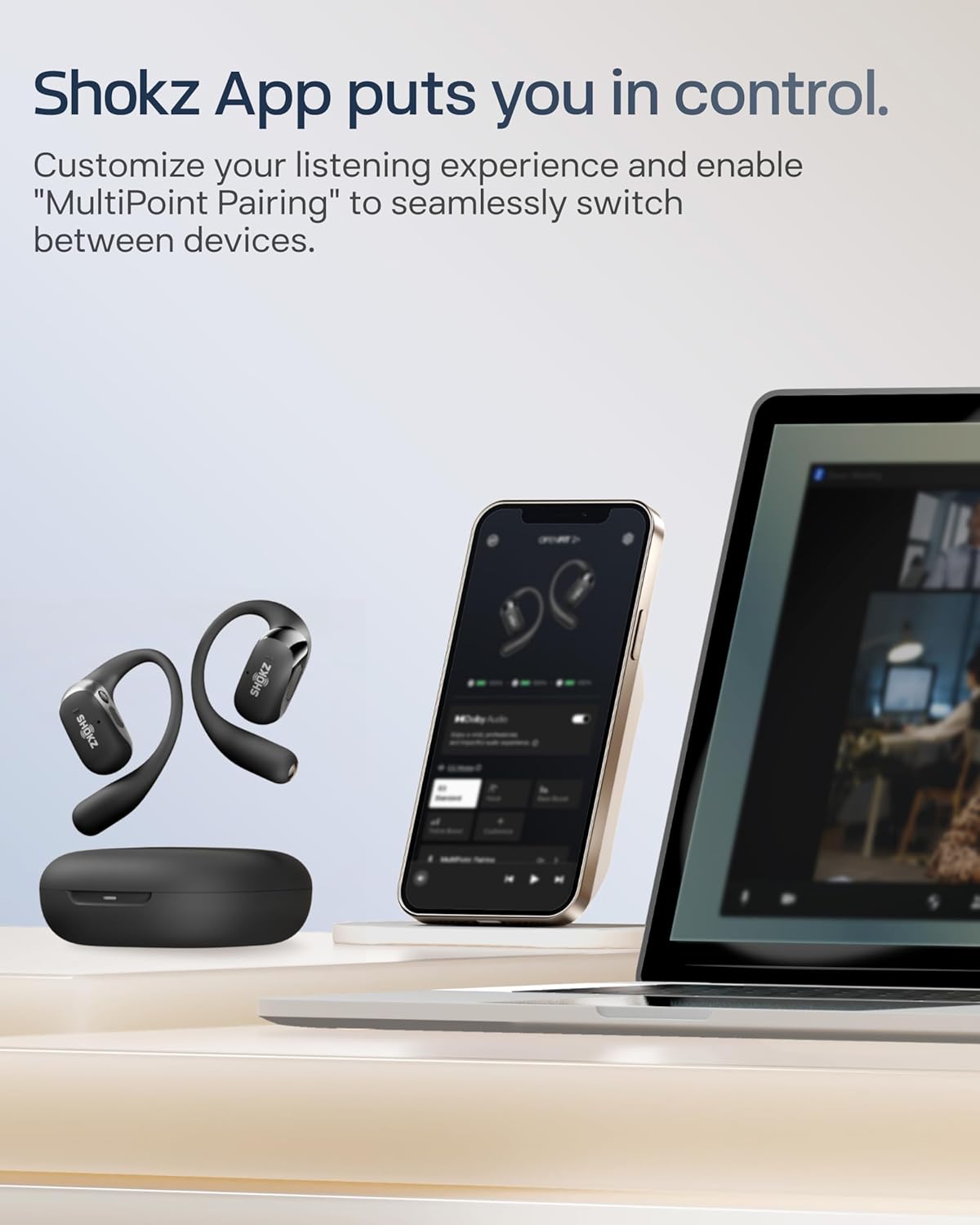
Image: The SHOKZ OpenFit 2+ earbuds and charging case are shown with a smartphone displaying the Shokz App, which allows for customization of settings.
លក្ខណៈពិសេសអូឌីយ៉ូ
The OpenFit 2+ incorporates several technologies for an enhanced listening experience:
- អូឌីយ៉ូ Dolby៖ Enabled for rich, expansive sound, transforming stereo into clear, lifelike audio. Activate via the Shokz App.
- DualBoost Technology: Features a 17.3mm low-frequency driver for deep bass and an independent tweeter for crisp highs.
- OpenBass 2.0: An AI algorithm designed to deliver powerful bass.
- DirectPitch 2.0: Concentrates sound directly to your ears, minimizing sound leakage while maintaining situational awareness.

Image: An internal diagram of the SHOKZ OpenFit 2+ earbud, highlighting the separate high-frequency and low-frequency audio units.
មុខងារហៅទូរស័ព្ទ
Four AI-enhanced microphones filter out background noise, ensuring clear communication even in noisy environments.

Image: A woman engaged in a phone call while wearing SHOKZ OpenFit 2+ headphones, demonstrating the AI-powered call clarity feature.
ថែទាំ
ធន់នឹងទឹក (IP55)
The OpenFit 2+ headphones are rated IP55, meaning they are resistant to sweat and splashes. This makes them suitable for workouts and outdoor activities. However, they are not designed for submersion in water.
- Avoid prolonged exposure to heavy rain or direct water jets.
- Do not wear while swimming or showering.
- ត្រូវប្រាកដថារន្ធសាកស្ងួតមុនពេលបញ្ចូលថ្មដើម្បីការពារការខូចខាត។

Image: A SHOKZ OpenFit 2+ earbud covered in water droplets, visually representing its IP55 water resistance rating.
ការសម្អាត និងការរក្សាទុក
- ជូតកាស និងប្រអប់សាកថ្មដោយប្រើក្រណាត់ទន់ និងស្ងួត។
- កុំប្រើសារធាតុសម្អាត ឬសារធាតុរំលាយ។
- សូមទុកកាសស្តាប់ត្រចៀកនៅក្នុងប្រអប់សាកថ្មរបស់វានៅពេលមិនប្រើប្រាស់ ដើម្បីការពារវា និងរក្សាវាឱ្យសាកថ្មបាន។
- ជៀសវាងសីតុណ្ហភាពខ្លាំង។
ការដោះស្រាយបញ្ហា
If you encounter issues with your OpenFit 2+ headphones, try the following solutions:
- គ្មានថាមពល៖ ត្រូវប្រាកដថាប្រអប់សាក និងកាសស្តាប់ត្រចៀកត្រូវបានសាកពេញ។
- មិនអាចផ្គូផ្គង៖
- សូមប្រាកដថាប៊្លូធូសត្រូវបានបើកនៅលើឧបករណ៍របស់អ្នក។
- Ensure the earbuds are in pairing mode (LEDs flashing).
- Forget "OpenFit 2+" from your device's Bluetooth list and try pairing again.
- ចាប់ផ្តើមឧបករណ៍របស់អ្នកឡើងវិញ។
- គ្មានសំឡេង/កម្រិតសំឡេងទាប៖
- Check the volume levels on both your headphones and your connected device.
- ត្រូវប្រាកដថាកាសត្រូវបានភ្ជាប់យ៉ាងត្រឹមត្រូវទៅនឹងឧបករណ៍របស់អ្នក។
- សម្អាតកំទេចកំទីពីធុងបាស។
- បញ្ហាគុណភាពការហៅទូរសព្ទ៖
- ត្រូវប្រាកដថាមីក្រូហ្វូនមិនត្រូវបានរារាំង។
- ផ្លាស់ទីទៅបរិយាកាសស្ងប់ស្ងាត់ជាងនេះ ប្រសិនបើអាចធ្វើបាន។
- កាសមិនសាកថ្ម៖
- ត្រូវប្រាកដថាកាសស្តាប់ត្រចៀកត្រូវបានដាក់ក្នុងប្រអប់សាកថ្មបានត្រឹមត្រូវ។
- Check that the charging case itself is charged.
- សម្អាតទំនាក់ទំនងសាកថ្មទាំងនៅលើកាសស្តាប់ត្រចៀក និងស្រោម។
For further assistance, refer to the official SHOKZ support webគេហទំព័រ។
លក្ខណៈបច្ចេកទេស
| លក្ខណៈ | លម្អិត |
|---|---|
| ឈ្មោះម៉ូដែល | OpenFit 2+ |
| លេខម៉ូដែលធាតុ | SHOKZ T921 |
| បច្ចេកវិទ្យាតភ្ជាប់ | ឥតខ្សែ (ប៊្លូធូស 5.4) |
| ជួរប៊្លូធូស | 33 ហ្វីត (10 ម៉ែត្រ) |
| ប្រភេទកម្មវិធីបញ្ជាអូឌីយ៉ូ | Dynamic Driver (DualBoost Technology) |
| ការឆ្លើយតបប្រេកង់ | 2402 MHz |
| ភាពរសើប | 96.5 dB |
| អាយុកាលថ្ម (កាសស្តាប់ត្រចៀក) | រហូតដល់ 11 ម៉ោង។ |
| រយៈពេលលេងសរុប (ជាមួយករណីសាកថ្ម) | រហូតដល់ 48 ម៉ោង។ |
| ពេលវេលាសាកថ្ម | Approximately 1 Hour (earbuds) |
| ការសាកថ្មរហ័ស | 10 នាទីសម្រាប់ការលេង 2 ម៉ោង។ |
| ចំណុចប្រទាក់សាក | USB-C, សាកឥតខ្សែ |
| កម្រិតធន់នឹងទឹក។ | IP55 |
| ប្រភេទត្រួតពិនិត្យ | ការគ្រប់គ្រងប៊ូតុង, ការគ្រប់គ្រងកម្មវិធី |
| ការដាក់ត្រចៀក | បើកត្រចៀក |
| រូបរាងកាស | ទំពក់ |
| ទម្ងន់វត្ថុ (កាស) | 9.4g each (approx.) |
| សមត្ថភាពថ្មរបស់ប្រអប់ | 600 លានamp ម៉ោង |
| វិមាត្រនៃករណី | 15.2 x 7.6 x 2.3 សង់ទីម៉ែត្រ (ប្រហែល) |
| ទម្ងន់ករណី | 53 ក្រាម។ |
| សម្ភារៈ | កុំព្យូទ័រ, ស៊ីលីកុន |
| ឧបករណ៍ដែលត្រូវគ្នា។ | Android, Mac, PC, Watch, iPhone |
ព័ត៌មានសុវត្ថិភាព
- កុំរុះរើឬកែប្រែផលិតផល។
- Keep away from extreme temperatures, direct sunlight, and fire.
- Avoid using at excessively high volumes for prolonged periods to prevent hearing damage.
- Maintain awareness of your surroundings when using open-ear headphones, especially in traffic or hazardous environments.
- រក្សាឱ្យឆ្ងាយពីដៃកុមារ និងសត្វចិញ្ចឹម។
ការធានា និងការគាំទ្រ
SHOKZ products typically come with a limited warranty. For detailed warranty information, product registration, and technical support, please visit the official SHOKZ webគេហទំព័រ៖
You can also find FAQs and contact customer service through their webគេហទំព័រ។


