
1. សេចក្តីផ្តើម
The LAUNCH X431 PRO3S+ Elite is an advanced, all-in-one bidirectional scan tool designed for comprehensive vehicle diagnostics and maintenance. Featuring the SmartLinkC V2.0 communication interface, it supports a wide range of protocols including J2534, CANFD, DoIP, D-PDU, and FCA. This device offers OE-level full system diagnostics, intelligent topology mapping, over 60 service functions, and extensive vehicle coverage, making it an essential tool for professional mechanics and serious DIY enthusiasts.

Figure 1.1: LAUNCH X431 PRO3S+ Elite highlighting key features like Topology Mapping, J2534 Protocols, and 3000+ Active Tests.
2. ការដំឡើង និងការកំណត់រចនាសម្ព័ន្ធដំបូង
2.1 មាតិកាកញ្ចប់
Before starting, verify all items are present in the package:
- X431 PRO3S+ ELITE Display Tablet
- SmartLink C V2.0 Communication Interface
- កាបូបស្ពាយ
- ឧបករណ៍ភ្ជាប់ HD15F ទៅ OBDII 16
- ខ្សែ DB15F ទៅ HD15F
- UK/EU/US Power Plugs
- ខ្សែបណ្តាញ
- ប្រភេទ A - ខ្សែ USB ប្រភេទ B
- ប្រភេទ A - ខ្សែ USB ប្រភេទ C
- សៀវភៅណែនាំអ្នកប្រើប្រាស់
- PIN Envelope (for software activation)
- មគ្គុទ្ទេសក៍ចាប់ផ្តើមរហ័ស
- Non-16 Pin Adapter Box containing: BENZ-38, BMW-20, HONDA-3, TOYOTA-17, GM/VAZ-12, TOYOTA-22, CHRYSLER-6, KIA-20, BENZ-14, FORD 6+1, NISSAN14+16, MITSUBISHI/HYUNI-12+16 connectors
- ក្លីបខ្សែភ្លើង
- ហ្វុយស៊ីស
Video 2.1: Unboxing the LAUNCH X431 PRO3S+ ELITE SMARTLINKC and reviewing its contents.
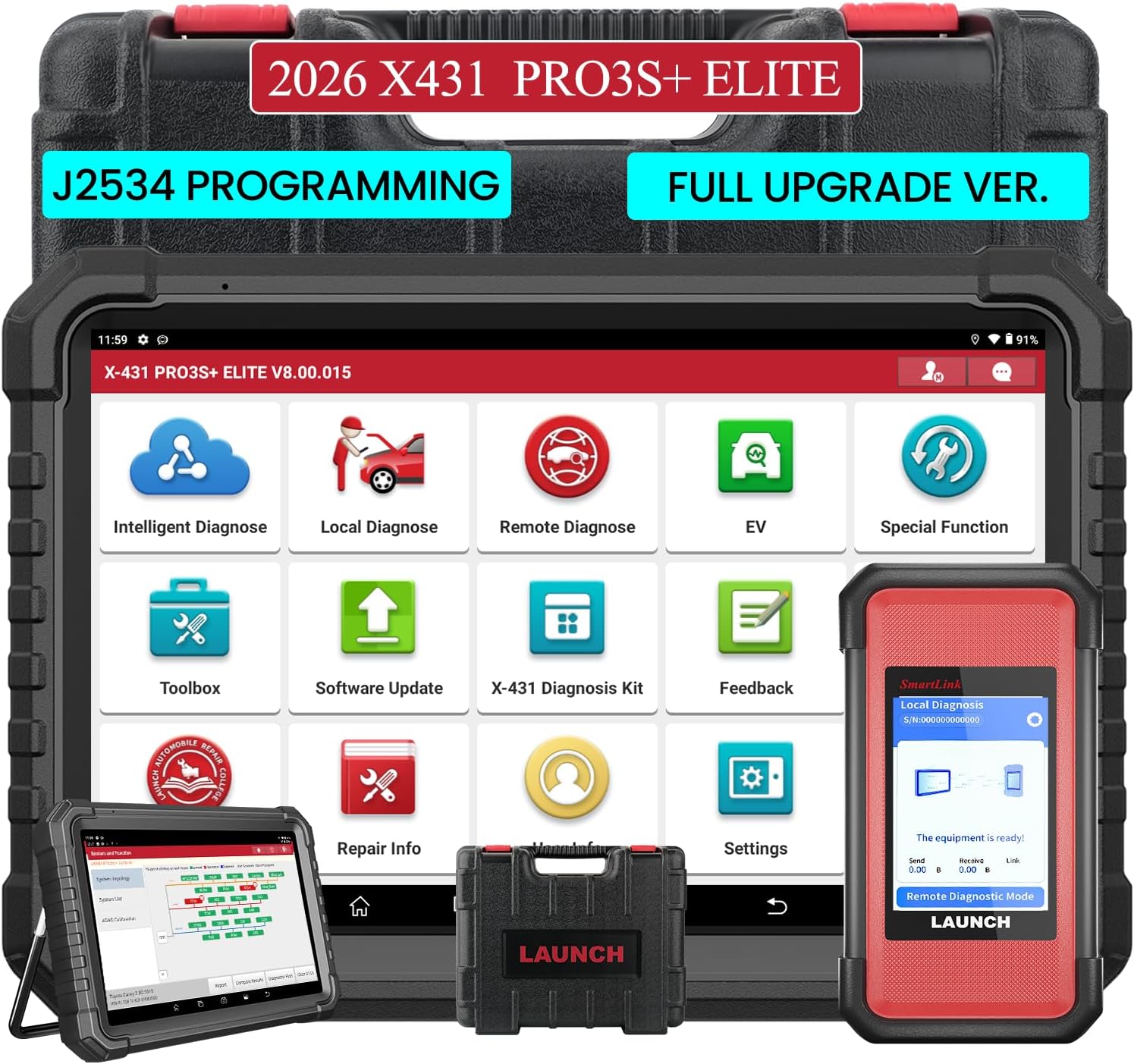
Figure 2.1: The LAUNCH X431 PRO3S+ Elite Display Tablet and the SmartLink C V2.0 communication interface.

រូបភាពទី 2.2: ខាងក្រោយ view of the tablet showing the kickstand and the SmartLink C V2.0 module.
2.2 ការបើកដំណើរការ និងការដំឡើងដំបូង
- ចុចប៊ូតុងថាមពលនៅលើថេប្លេតឱ្យជាប់ ដើម្បីបើកវា។
- សូមអនុវត្តតាមការណែនាំនៅលើអេក្រង់ ដើម្បីជ្រើសរើសភាសា តំបន់ពេលវេលា និងភ្ជាប់ទៅបណ្តាញ Wi-Fi របស់អ្នក។
- Register your device using the serial number and activation code found in the PIN envelope.
- Perform a system update to ensure all software and diagnostic applications are up to date.
Video 2.2: A detailed guide on how to use the LAUNCH X431 PRO3S+ ELITE, including initial setup steps.
3. សេចក្តីណែនាំប្រតិបត្តិការ
3.1 ការតភ្ជាប់ទៅយានយន្ត
- កំណត់ទីតាំងរន្ធ OBD-II របស់យានយន្ត (ជាធម្មតានៅក្រោមផ្ទាំងគ្រប់គ្រង)។
- Connect the SmartLink C V2.0 to the vehicle's OBD-II port using the appropriate connector (OBDII 16-pin or a specific non-16 pin adapter).
- Ensure the SmartLink C V2.0 is powered on (it typically draws power from the vehicle's OBD-II port).
- On the X431 PRO3S+ Elite tablet, select 'Local Diagnose' or 'Intelligent Diagnose' to establish communication with the vehicle.

Figure 3.1: The LAUNCH X431 PRO3S+ Elite supports a wide range of vehicle makes and models, including HD Trucks and New Energy Vehicles.
3.2 មុខងារវិនិច្ឆ័យ
The device offers a comprehensive suite of diagnostic capabilities:
- ការធ្វើរោគវិនិច្ឆ័យឆ្លាតវៃ៖ Automatically identifies vehicle VIN, reads all system fault codes, and provides a health report.
- ការធ្វើផែនទី Topology៖ Visually displays the vehicle's system network, showing the status of each control unit (normal, abnormal, scanned, not equipped) for quick identification of issues.
- អាន និងសម្អាតលេខកូដ៖ Access and clear Diagnostic Trouble Codes (DTCs) from all available vehicle systems (Engine, ABS, SRS, Transmission, etc.).
- ការផ្សាយបន្តផ្ទាល់ទិន្នន័យ៖ View real-time data parameters in various formats (text, graph, analog) to monitor vehicle performance and pinpoint intermittent issues.
- Active Test / Bi-directional Control: Send commands to vehicle components to test their functionality (e.g., activate cooling fan, open/close windows, test fuel pump).
- Special Functions (60+): Perform various maintenance and service functions such as Oil Reset, ABS Brake Bleed, EPB Reset, SAS Calibration, BMS Reset, Injector Reset, Throttle Adaptation, and more.
- ការសរសេរកូដ ECU៖ Match component control modules, customize OE settings, perform adaptive data setting, and activate advanced functions.
- J2534 Programming: Utilize the SmartLinkC V2.0 as a J2534 PassThru device for OEM diagnostic software to perform ECU programming and reprogramming.
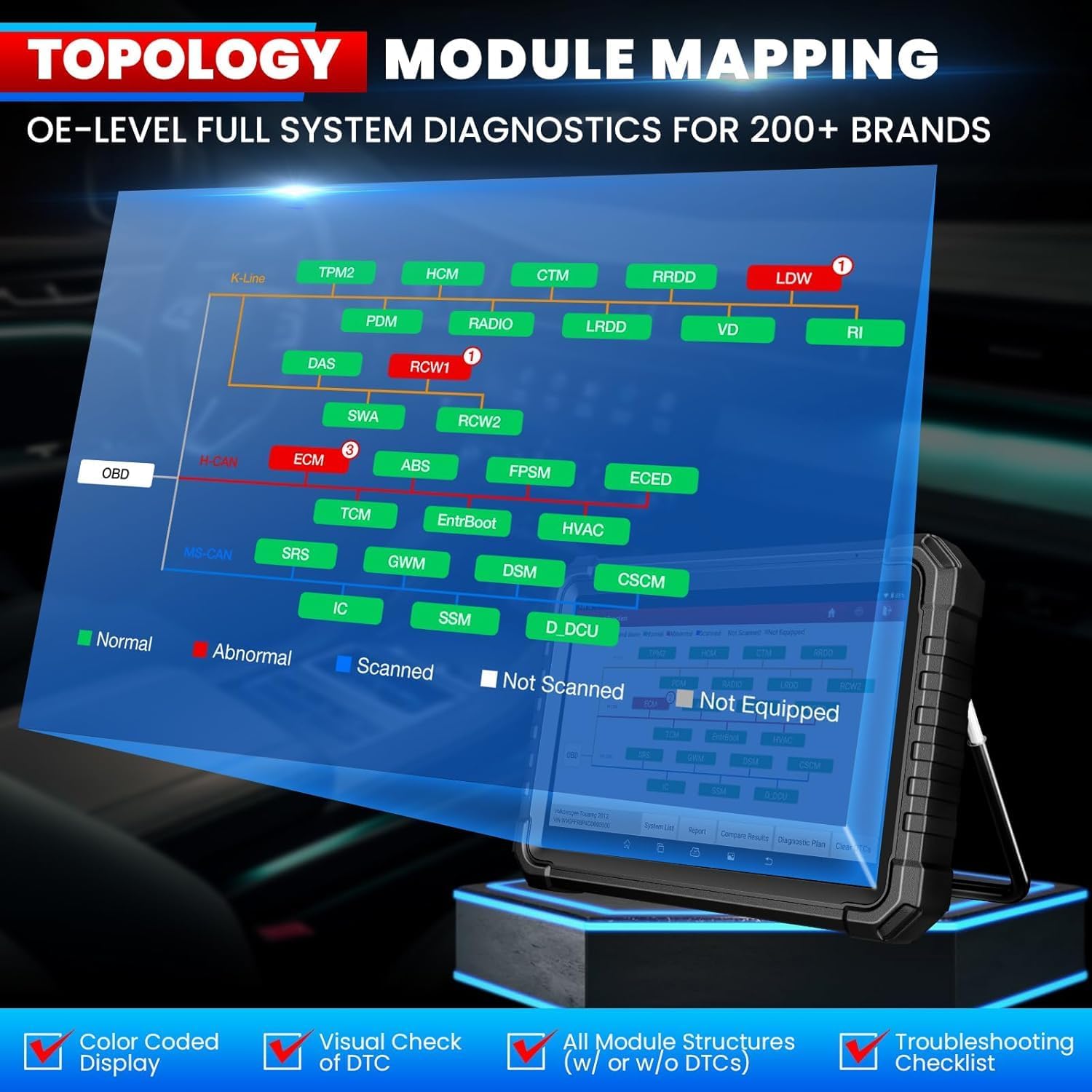
Figure 3.2: Intelligent Topology Mapping provides a visual overview of vehicle systems and their status.

Figure 3.3: Demonstrates Bi-Directional Control (Active Test) capabilities and OE-Level All System Diagnostics.

Figure 3.4: A selection of over 60 hot service functions, including Oil Reset, ABS Bleeding, and EPB Reset.
៣.៤ ការធ្វើរោគវិនិច្ឆ័យពីចម្ងាយ
The SmartLink C V2.0 supports remote diagnosis, allowing you to connect with other professionals or receive remote assistance for complex issues.
4. ការថែទាំ
4.1 ការធ្វើបច្ចុប្បន្នភាពកម្មវិធី
Your LAUNCH X431 PRO3S+ Elite includes 2 years of free software updates. Regularly check for and install updates to ensure optimal performance and access to the latest vehicle models and functions. Connect the tablet to a stable Wi-Fi network and navigate to the 'Software Update' section in the main menu.
Video 4.1: This video confirms the authenticity of LAUNCH products and highlights the importance of software updates.
4.2 ការថែទាំឧបករណ៍
- Keep the tablet and SmartLink C V2.0 clean and free from dust and debris.
- Store the device in its carrying case when not in use to prevent damage.
- ជៀសវាងការប៉ះពាល់ឧបករណ៍ទៅនឹងសីតុណ្ហភាពខ្លាំង ឬត្រូវពន្លឺព្រះអាទិត្យដោយផ្ទាល់សម្រាប់រយៈពេលដ៏យូរ។
- Charge the tablet regularly to maintain battery health.
5. ការដោះស្រាយបញ្ហា
- ឧបករណ៍មិនបើក៖ Ensure the battery is charged or connect the device to a power source.
- កំហុសក្នុងការទំនាក់ទំនងជាមួយយានយន្ត៖ Verify the SmartLink C V2.0 is securely connected to the OBD-II port and the correct adapter is used. Check vehicle ignition status.
- បញ្ហាអាប់ដេតកម្មវិធី៖ Ensure a stable Wi-Fi connection. If registration issues occur, contact customer service for assistance.
- Product already registered: If prompted that the product has already been registered during initial setup, contact customer service for a replacement service or to clear the registered information.
6. លក្ខណៈបច្ចេកទេស
| លក្ខណៈ | ការបញ្ជាក់ |
|---|---|
| ម៉ាក | បើកដំណើរការ |
| គំរូ | X-431 PRO3(PRO3S + ELITE) / LAUNCH PRO3S+ ELITE SMARTLINKC |
| ប្រព័ន្ធប្រតិបត្តិការ | ប្រព័ន្ធប្រតិបត្តិការ Android 10.0 |
| ស៊ីភីយូ | ប្រព័ន្ធដំណើរការ ៤ ស្នូល, ២.០ GHz |
| ការតភ្ជាប់ | វ៉ាយហ្វាយ 2.4GHz / 5GHz |
| សមត្ថភាពថ្ម | 6300mAh / 7.6V |
| ទំហំអេក្រង់ | 10.1 Inches Touchscreen |
| កាមេរ៉ា | 8MP |
| អង្គចងចាំផ្ទុក | RAM 4GB + ROM 64GB |
| ពិធីការដែលគាំទ្រ | J2534, CANFD/DoIP/D-PDU/FCA |
| ភាសាដែលគាំទ្រ | 25+ Software Languages (e.g., EN, DE, FR, SP, JP) |
| វិមាត្រផលិតផល | 7"L x 14"W x 17.3"H |
| ទំងន់ធាតុ | 15 ផោន |
| ប្រភេទរថយន្តសម | សមជាសកល |
7. ការធានា និងការគាំទ្រ
The LAUNCH X431 PRO3S+ Elite comes with a commitment to customer satisfaction:
- ការអាប់ដេតកម្មវិធី៖ Enjoy 2 years of free software updates to keep your device current with the latest vehicle models and diagnostic functions.
- គោលការណ៍ត្រឡប់មកវិញ៖ គោលនយោបាយត្រឡប់មកវិញ និងជំនួសរយៈពេល 90 ថ្ងៃអាចរកបាន។
- សេវាកម្មអតិថិជន៖ LAUNCH provides 100% customer service and online support (7/24/365).
For any questions or assistance, please refer to the contact information provided in the product documentation or on the official LAUNCH webគេហទំព័រ។