
1. ព័ត៌មានសុវត្ថិភាពសំខាន់ៗ
Please read all safety instructions before using the projector. Keep this manual for future reference.
- កុំបិទរន្ធខ្យល់។ ធានាឱ្យមានកន្លែងទំនេរគ្រប់គ្រាន់នៅជុំវិញម៉ាស៊ីនបញ្ចាំងសម្រាប់លំហូរខ្យល់ត្រឹមត្រូវ។
- Avoid direct exposure to the projector lens light.
- កុំដាក់ម៉ាស៊ីនបញ្ចាំងនៅជិតប្រភពកំដៅ ឬនៅក្រោមពន្លឺព្រះអាទិត្យដោយផ្ទាល់។
- ប្រើតែអាដាប់ទ័រថាមពលដែលផ្តល់ជាមួយឧបករណ៍។
- កុំព្យាយាមបើក ឬជួសជុលម៉ាស៊ីនបញ្ចាំងដោយខ្លួនឯង។ បញ្ជូនសេវាកម្មទាំងអស់ទៅកាន់បុគ្គលិកដែលមានសមត្ថភាព។
- ទុកម៉ាស៊ីនបញ្ចាំងអោយឆ្ងាយពីទឹក ឬវត្ថុរាវផ្សេងៗ។
2. មាតិកាកញ្ចប់
ផ្ទៀងផ្ទាត់ថាធាតុទាំងអស់មាននៅក្នុងកញ្ចប់៖
- Aurzen Roku TV Smart Projector (D1R Cube)
- ខ្សែថាមពល
- Remote Control (2 AAA Batteries Required, not included)
- សៀវភៅណែនាំអ្នកប្រើ (ឯកសារនេះ)
3. ផលិតផលលើសview
The Aurzen D1R Cube is a compact smart projector featuring built-in Roku TV for integrated streaming. It offers 1080P Full HD resolution, Dolby Audio, and a sealed optical engine for enhanced durability and clarity.
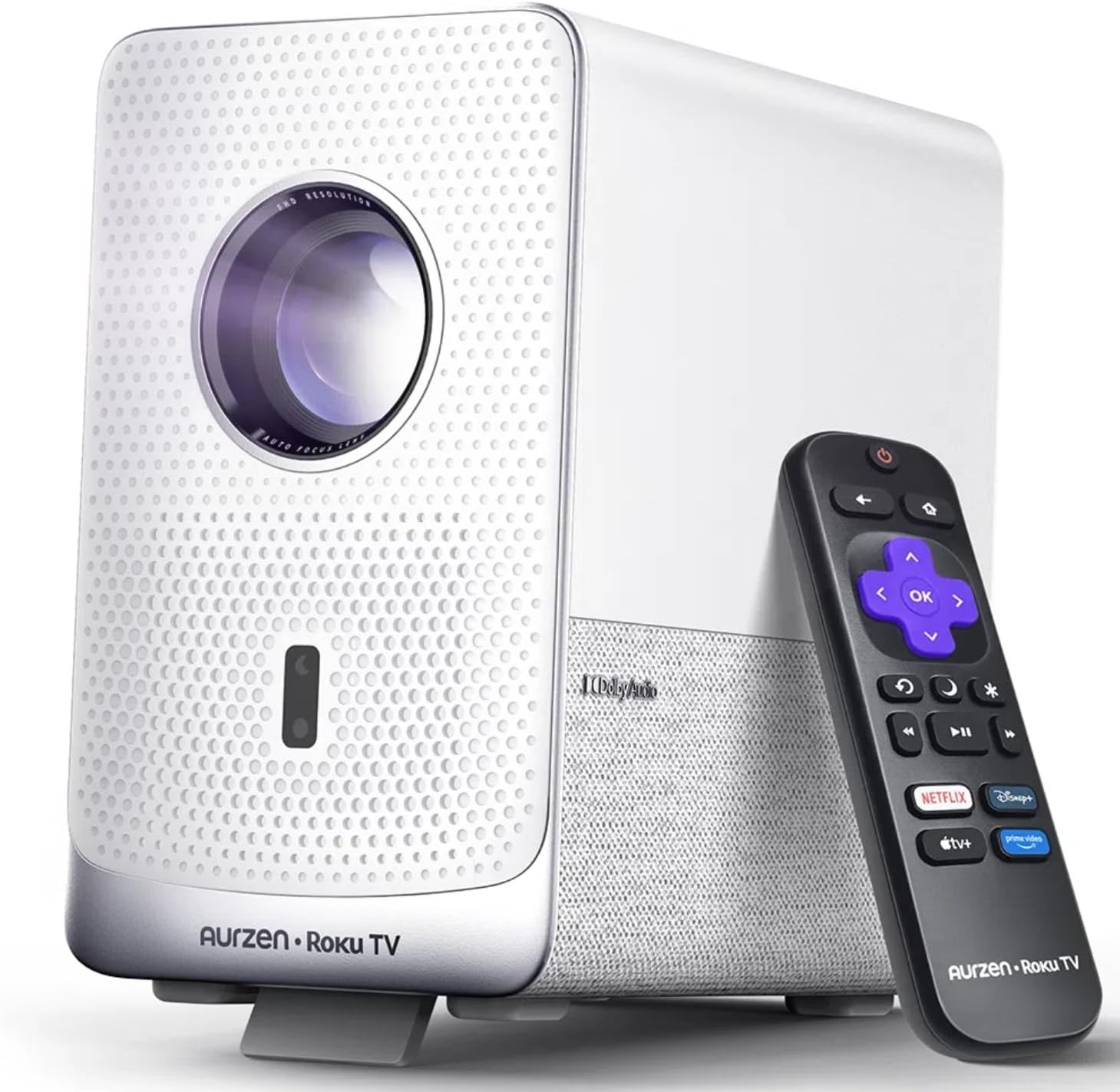
Image: The Aurzen D1R Cube Smart Projector shown with its remote control. The projector is white with a textured front panel and a visible lens.
លក្ខណៈសំខាន់ៗ៖
- Roku TV Built-in: ចូលប្រើប្រាស់សេវាកម្មផ្សាយដ៏ពេញនិយមដោយផ្ទាល់។
- Sealed Optical Engine: Protects against dust, maintaining image quality and extending lifespan.
- 1080P FHD Resolution: Delivers crisp and clear visuals.
- អូឌីយ៉ូ Dolby៖ Provides enhanced sound experience.
- Auto Focus & Keystone Correction: Automatic image adjustment for quick setup.
- Dual-band WiFi & Bluetooth 5.2: For seamless connectivity.
- Apple AirPlay៖ Effortless content sharing from Apple devices.
- ភាពឆបគ្នារបស់ Smart Home៖ Works with Apple HomeKit, Siri, Alexa, and Google Assistant.

Image: An internal diagram illustrating the sealed optical engine of the Aurzen D1R Cube projector, highlighting its dust-proof design.
4. រៀបចំ
4.1 ទីតាំងដំបូង
ដាក់ម៉ាស៊ីនបញ្ចាំងលើផ្ទៃរាបស្មើ។ សម្រាប់ភាពល្អប្រសើរ viewing, position it directly in front of your projection surface (wall or screen). The projector features automatic focus and keystone correction to adjust the image, but a relatively straight angle is recommended.

Image: A visual representation of the projector's auto-focus and auto-keystone correction features, showing how the image automatically adjusts to create a perfect rectangular display.
4.2 ការតភ្ជាប់ថាមពល
- ភ្ជាប់ខ្សែថាមពលទៅនឹងច្រកបញ្ចូលថាមពលរបស់ម៉ាស៊ីនបញ្ចាំង។
- ដោតចុងម្ខាងទៀតនៃខ្សែថាមពលទៅក្នុងព្រីអគ្គិសនីដែលសមស្រប។
- The projector will power on automatically or can be turned on using the power button on the device or remote.
4.3 ការដំឡើងការបញ្ជាពីចម្ងាយ
Insert two AAA batteries (not included) into the remote control. Ensure correct polarity. The remote is pre-paired with the projector.
4.4 Initial Roku TV Setup
Upon first power-on, follow the on-screen instructions to set up your Roku TV. This includes:
- ការជ្រើសរើសភាសារបស់អ្នក។
- Connecting to a Wi-Fi network (a stable internet connection is required).
- Activating your Roku account. If you do not have one, you will be prompted to create a free account.
- Installing desired streaming channels.
5. សេចក្តីណែនាំប្រតិបត្តិការ
5.1 ការបើក/បិទ
ចុចប៊ូតុងថាមពលនៅលើម៉ាស៊ីនបញ្ចាំងឬឧបករណ៍បញ្ជាពីចម្ងាយដើម្បីបើកឬបិទឧបករណ៍។
5.2 Roku Home Screen Navigation
Use the directional pad and OK button on the remote to navigate the Roku home screen. Access streaming channels, search for content, and adjust settings.

Image: A screenshot of the Roku TV home screen, displaying various streaming app icons and navigation options.
៥.៣ កម្មវិធីស្ទ្រីម
The Roku TV platform provides access to a wide range of streaming applications such as Netflix, Prime Video, Disney+, Hulu, YouTube, and more. Select an app from the home screen to begin streaming.

រូបភាព៖ ការបង្ហាញក្រាហ្វិកasing various popular streaming service logos available on the Roku TV platform, including Netflix, Disney+, and Hulu.
5.4 ការភ្ជាប់ឧបករណ៍ខាងក្រៅ
The projector includes HDMI and USB ports for connecting external devices.
- HDMI៖ Connect gaming consoles, Blu-ray players, or other HDMI-enabled devices. Select the corresponding HDMI input from the Roku TV menu.
- USB៖ ចាក់មេឌៀ files (photos, videos, music) from a USB storage device.
5.5 ការតភ្ជាប់ប៊្លូធូស
Connect Bluetooth headphones or speakers for an enhanced audio experience.
- Go to the Roku TV settings menu.
- Select 'Remotes & devices' then 'Bluetooth devices'.
- ដាក់ឧបករណ៍ប៊្លូធូសរបស់អ្នកទៅក្នុងរបៀបផ្គូផ្គង។
- Select your device from the list on the projector screen to pair.

Image: A diagram illustrating the Bluetooth connectivity of the Aurzen D1R Cube projector, showing it connecting to various external audio devices.
5.6 Apple AirPlay
Effortlessly share content from your Apple devices (iPhone, iPad, Mac) to the projector using Apple AirPlay.
- Ensure your Apple device and the projector are connected to the same Wi-Fi network.
- On your Apple device, open the content you wish to share (e.g., photos, videos).
- ប៉ះរូបតំណាង AirPlay (ជាធម្មតាចតុកោណកែងដែលមានព្រួញចង្អុលឡើងលើ).
- Select your Aurzen D1R Cube projector from the list of available devices.

Image: A family watching content projected from an Apple device onto a large screen via Apple AirPlay using the Aurzen D1R Cube projector.
5.7 ការគ្រប់គ្រងសំឡេង និងការរួមបញ្ចូលផ្ទះឆ្លាតវៃ
The projector supports voice control via the Roku mobile app and is compatible with Apple HomeKit, Siri, Alexa, and Google Assistant for broader smart home integration.
- កម្មវិធីទូរស័ព្ទ Roku៖ Download the Roku mobile app to use voice commands, type easily, and control your projector from your smartphone.
- Smart Home Assistants: Link your Roku account to your preferred smart home ecosystem (Apple Home, Amazon Alexa, Google Home) to control the projector with voice commands.
6. ការថែទាំ
6.1 Sealed Optical Engine
The Aurzen D1R Cube features a sealed optical engine designed to prevent dust accumulation on internal components. This reduces the need for routine internal cleaning and helps maintain consistent image quality over time.

Image: A side-by-side comparison showing the difference in dust accumulation between a sealed optical engine (left) and an open optical engine (right) after a period of use.
6.2 ការសម្អាតទូទៅ
- ខាងក្រៅ៖ Wipe the exterior of the projector with a soft, dry cloth. Do not use abrasive cleaners or solvents.
- កញ្ចក់៖ Gently clean the projector lens with a lens cleaning cloth or specialized lens cleaning solution. Avoid touching the lens with your fingers.
- ខ្យល់ចេញចូល៖ Ensure ventilation openings are clear of dust and debris. Use a soft brush or compressed air to gently clean them if necessary.
6.3 ការផ្ទុក
When not in use for extended periods, store the projector in a cool, dry place, away from direct sunlight and extreme temperatures. Consider using a protective cover or case to prevent dust accumulation.
7. ការដោះស្រាយបញ្ហា
If you encounter issues with your Aurzen D1R Cube projector, refer to the following common solutions:
| បញ្ហា | ដំណោះស្រាយដែលអាចកើតមាន |
|---|---|
| គ្មានថាមពល | Ensure the power cord is securely connected to both the projector and the electrical outlet. Test the outlet with another device. |
| គ្មានរូបភាព | Check if the projector is powered on. Verify the input source (HDMI, USB) is correctly selected. Ensure the lens cap is removed. |
| រូបភាពមិនច្បាស់ | The projector has auto-focus. If the image remains blurry, try repositioning the projector or restarting it to trigger auto-focus again. Ensure the lens is clean. |
| គ្មានសំឡេង | Check the volume level on the projector and any connected external audio devices. Ensure Bluetooth audio is correctly paired or external speakers are properly connected. |
| បញ្ហាការតភ្ជាប់ Wi-Fi | Ensure your Wi-Fi router is working. Restart the projector and your router. Verify the Wi-Fi password is correct in the Roku TV settings. |
| ពីចម្ងាយមិនឆ្លើយតប | Replace the AAA batteries in the remote control. Ensure there are no obstructions between the remote and the projector. |
For further assistance, please refer to the online support resources or contact Aurzen customer service.
8. លក្ខណៈបច្ចេកទេស
Detailed technical specifications for the Aurzen D1R Cube Smart Projector:
| លក្ខណៈ | ការបញ្ជាក់ |
|---|---|
| ម៉ាក | អូរហ្សេន |
| គំរូ | D1R Cube |
| បង្ហាញគុណភាពបង្ហាញអតិបរមា | ១៩២០ x ១០៨០ (១០៨០ភិចសែល) |
| បច្ចេកវិទ្យាតភ្ជាប់ | WiFi (Dual-band 2.4G/5G), Bluetooth 5.2, HDMI, USB, Audio |
| លក្ខណៈពិសេស | Roku TV Smart Projector, Sealed Optical Engine, Dolby Audio, Apple AirPlay, Smart Home Compatibility |
| ទំងន់ធាតុ | 5.68 ផោន |
| វិមាត្រផលិតផល | 7.42 x 7 x 7.83 អ៊ីញ |
| ពណ៌ | ស |
9. ការធានា និងការគាំទ្រ
9.1 ការធានាផលិតផល
Aurzen products are covered by a manufacturer's warranty. Please refer to the warranty card included with your product or visit the official Aurzen webគេហទំព័រសម្រាប់លក្ខខណ្ឌធានាជាក់លាក់។
9.2 ជំនួយអតិថិជន
For technical support, troubleshooting assistance, or warranty claims, please contact Aurzen customer service through their official channels. You can find more information and contact options on the Aurzen Brand Store on Amazon.