
1. ព័ត៌មានសុវត្ថិភាពសំខាន់ៗ
Please read this manual thoroughly before installation and use. Keep this manual for future reference.
- សមត្ថភាពទំងន់: Do not exceed the maximum weight capacity of 33 lbs (15 kg) per arm. Exceeding this limit may result in serious injury or product damage.
- ទំហំម៉ូនីទ័រ៖ ជើងទ្រនេះត្រូវបានរចនាឡើងសម្រាប់ម៉ូនីទ័រដែលមានទំហំចន្លោះពី 13 ទៅ 39 អ៊ីញ។
- ភាពឆបគ្នា VESA៖ Ensure your monitor has VESA mounting patterns of 75x75 mm or 100x100 mm. If your monitor does not have these patterns, a VESA adapter (sold separately) may be required.
- កម្រាស់តុ៖ C-clamp is suitable for desks 0.39"-1.77" thick. The grommet mount is suitable for desks 0.39"-1.77" thick with a hole diameter of 0.39"-2.36".
- Desk Material: Do not install this product on tempered glass desks or other fragile table tops. Ensure your desk is structurally sound to support the combined weight of the mount and monitors.
- សន្និបាត៖ Assemble the product according to the instructions. Incorrect assembly can lead to product failure or injury.
- ផ្នែកផ្លាស់ទី៖ រក្សាដៃ និងម្រាមដៃឱ្យនៅឆ្ងាយពីផ្នែកដែលកំពុងផ្លាស់ទី កំឡុងពេលកែតម្រូវ ដើម្បីការពារការខ្ទាស់។
2. ផលិតផលលើសview
The MOUNT PRO Dual Monitor Desk Mount provides an ergonomic solution for mounting two monitors, offering extensive adjustability and integrated features for an organized workspace.
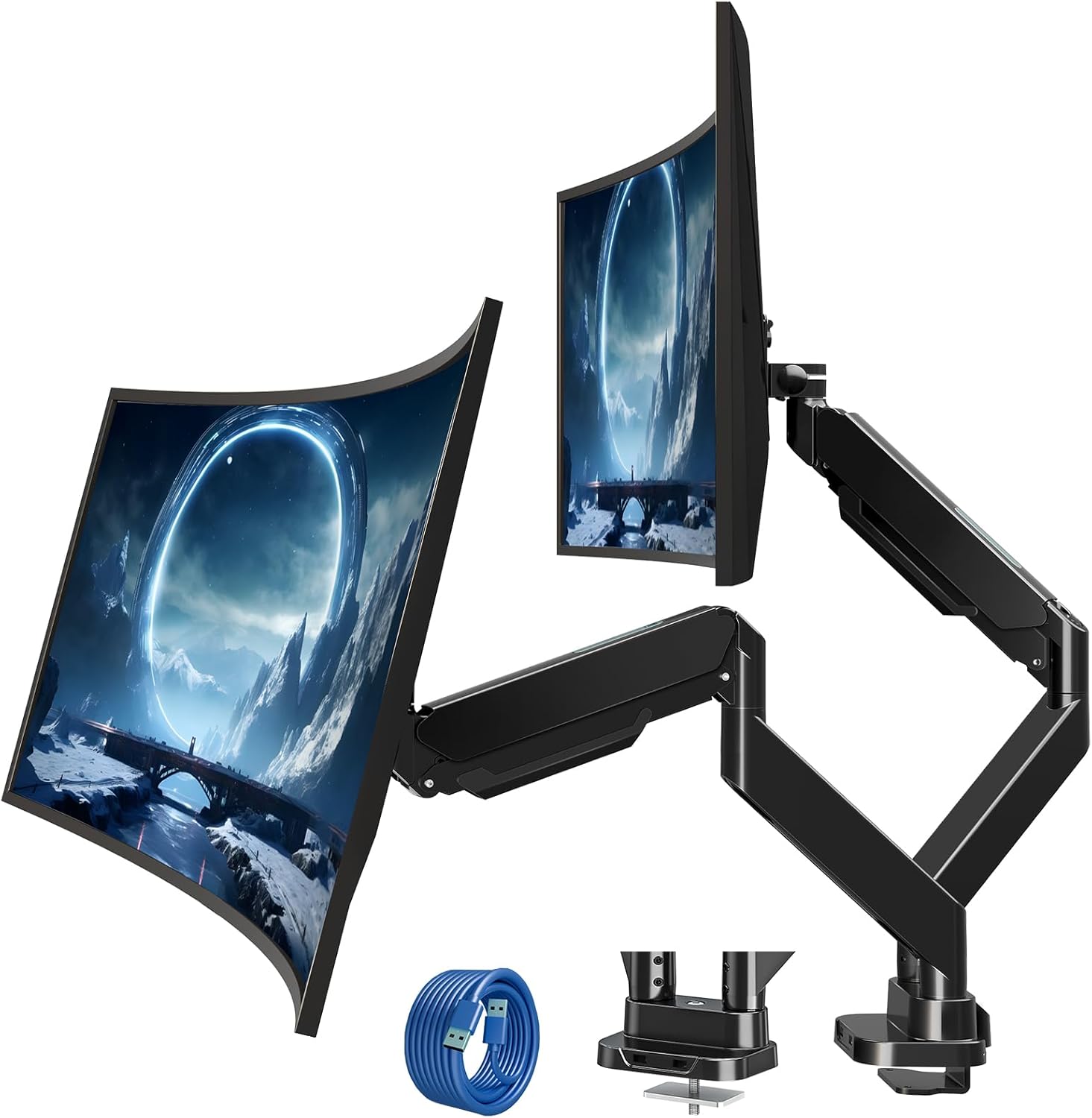
Figure 2.1: MOUNT PRO Dual Monitor Desk Mount with two monitors.
2.1 លក្ខណៈសំខាន់ៗ
- Supports two flat or curved monitors from 13" to 39" in size.
- Each arm supports monitors weighing between 4.4 lbs (2 kg) and 33 lbs (15 kg).
- Compatible with VESA patterns 75x75 mm and 100x100 mm.
- Full range of motion: tilt +90°/-45°, swivel 180°, rotation 360°.
- Adjustable height and extension for optimal viewមុំ។
- Integrated cable management system.
- Two USB ports at the base for convenient charging and data transfer.

Figure 2.2: Compatibility details for monitor size, weight, and VESA standards.

Figure 2.3: The mount's capability to support large and heavy monitors, up to 33 lbs per arm.
3. មាតិកាកញ្ចប់
Verify that all components are present and undamaged. If any parts are missing or damaged, please contact customer support.
- Monitor Arms (x2)
- តុ Clamp មូលដ្ឋាន
- គ្រឿងបរិក្ខារម៉ោន Grommet
- បន្ទះ VESA (x2)
- ខ្សែភ្ជាប់យូអេសប៊ី
- កញ្ចប់ផ្នែករឹង (វីស, washers, spacers)
- Allen Keys (various sizes)
- សៀវភៅណែនាំ
4. ការណែនាំតំឡើង
4.1 ការត្រួតពិនិត្យការដំឡើងជាមុន
Before beginning installation, confirm your monitor and desk meet the following requirements:
- ទំហំម៉ូនីទ័រ៖ 13"-39"
- ត្រួតពិនិត្យទម្ងន់៖ ៦.៦-៣០.៩ ផោន (ក្នុងមួយដៃ)
- លំនាំ VESA៖ 75x75 mm or 100x100 mm
- កម្រាស់តុ (C-clamp/Grommet): 0.39"-1.77"
- Grommet Hole Diameter (Grommet mount only): 0.39"-2.36"

Figure 4.1: Compatibility requirements for monitors and desk.
៣.១ ភាពឆបគ្នានៃតុ
Ensure your desk edge or grommet hole is suitable for installation. Avoid installing on desks with fragile materials like tempered glass.

Figure 4.2: Desk edge requirements for secure clamp ការដំឡើង។
4.3 ជម្រើសម៉ោន
ម៉ោនផ្តល់នូវវិធីសាស្រ្តដំឡើងពីរ: C-clamp ឬ grommet ម៉ោន។
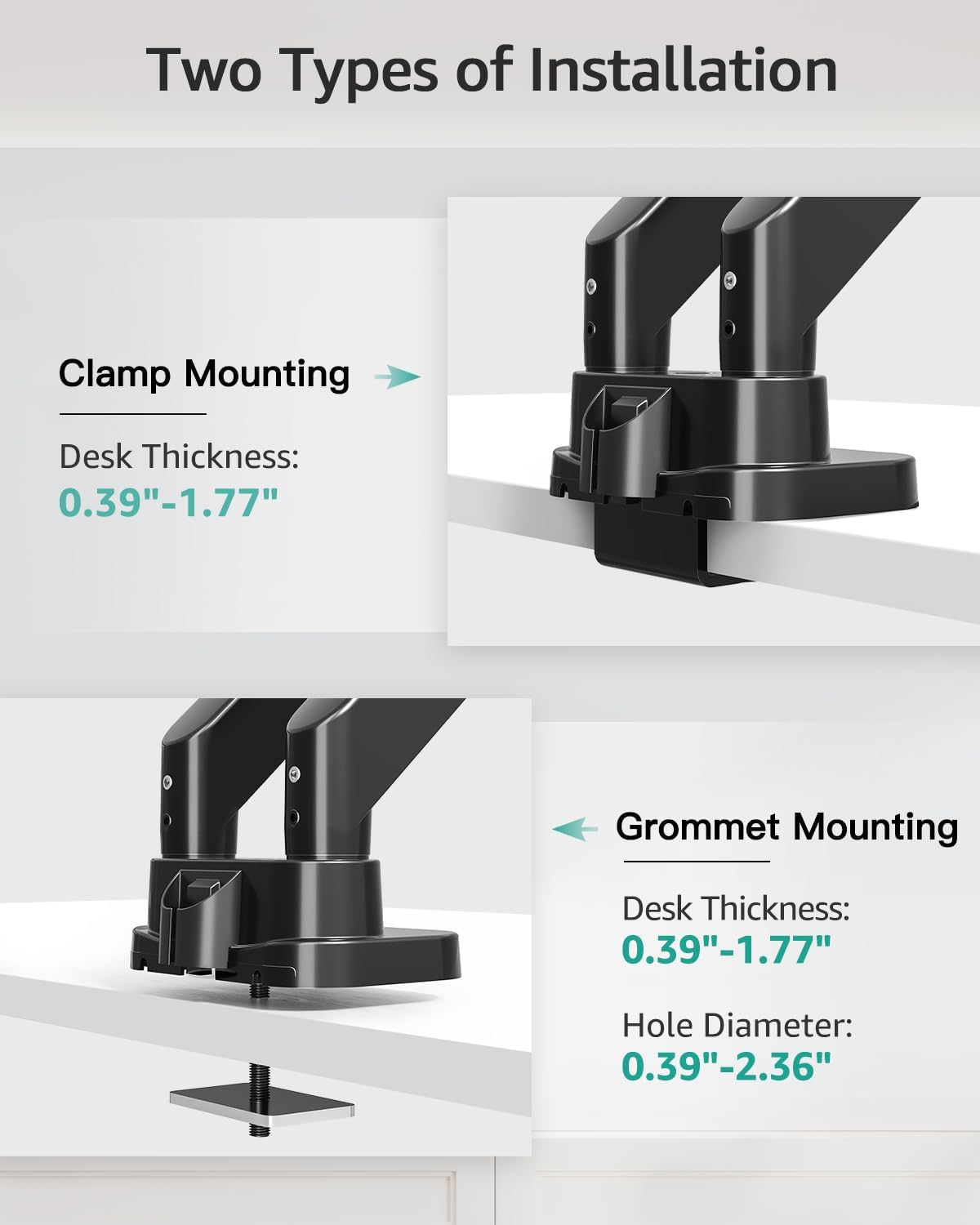
Figure 4.3: Visual representation of C-clamp និងវិធីសាស្រ្តដំឡើង grommet ។
4.3.1 C-Clamp ការដំឡើង
- ភ្ជាប់ C-clamp to the desk base.
- Position the base on the desired location on your desk.
- រឹតបន្តឹង C-clamp screw until the mount is securely fastened to the desk.
៥.១.២ ការដំឡើងរន្ធ
- Disassemble the C-clamp from the base and attach the grommet plate.
- Insert the grommet bolt through the desk hole.
- Secure the mount from underneath the desk using the provided washer and nut.

Figure 4.4: Steps for easy base installation using either C-clamp or grommet method.
៤.៣ ការភ្ជាប់ម៉ូនីទ័រ
- Attach the VESA plate to the back of your monitor using the appropriate screws and spacers from the hardware kit. Ensure the screws are tightened securely.
- Slide the monitor with the attached VESA plate onto the monitor arm's VESA head. The quick-release design allows for easy attachment.
- Ensure the monitor is securely locked in place.

Figure 4.5: Detail of VESA quick release boards and monitor locking mechanism.
5. ប្រតិបត្តិការ និងការកែតម្រូវ
The MOUNT PRO Dual Monitor Desk Mount offers a wide range of adjustments to customize your viewបទពិសោធន៍។
5.1 Monitor Positioning (Tilt, Swivel, Rotation)
Each monitor arm allows for flexible positioning:
- លំអៀង៖ Adjust the monitor angle up to 90° upwards and 45° downwards.
- បង្វិល៖ Rotate the monitor horizontally up to 180° left or right.
- ការបង្វិល៖ បង្វិលម៉ូនីទ័រ 360° ដើម្បីប្តូររវាងទិសផ្ដេក និងបញ្ឈរ។

Figure 5.1: Illustrates the full range of motion including swivel, tilt, and 360° rotation.
5.2 Height and Extension Adjustment
The gas spring arms allow for smooth vertical and horizontal adjustments.
- កម្ពស់អតិបរមា៖ Monitors can be raised up to 21.5 inches from the desk surface.
- ផ្នែកបន្ថែមអតិបរមា៖ Arms can extend up to 20.9 inches.

Figure 5.2: Maximum height and extension capabilities of the monitor arm.
៥.១ ការកែតម្រូវភាពតានតឹងនៃស្ព្រីងហ្គាស
The gas spring tension must be adjusted to match the weight of your monitor for optimal stability and ease of movement. Hold the arm in a horizontal position during adjustment.
- For lighter monitors (monitor raises up): Turn the adjustment screw clockwise towards the "-" symbol to reduce tension.
- For heavier monitors (monitor drops down): Turn the adjustment screw counter-clockwise towards the "+" symbol to increase tension.
A scale line on the arm indicates the approximate gas spring force value, with each division representing about 2 lbs. Adjust until the arm holds the monitor's position stably.

Figure 5.3: Gas spring tension adjustment mechanism with a visual scale.
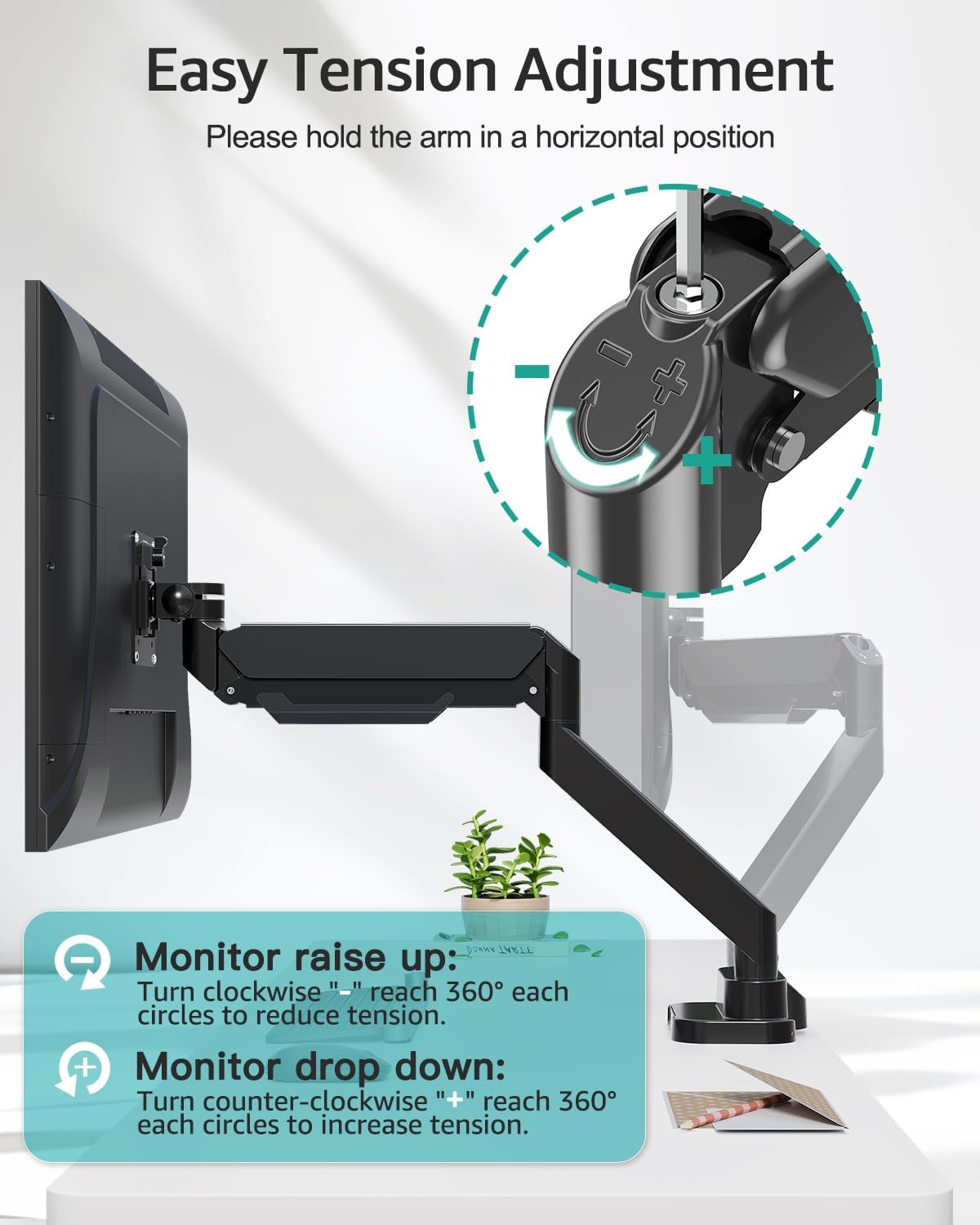
Figure 5.4: Detailed instructions for adjusting tension to suit monitor weight.
5.4 ការគ្រប់គ្រងខ្សែ
Route your monitor cables through the integrated cable management channels along the arms to maintain a tidy workspace.
ច្រក USB 5.5
The base of the mount includes two USB ports. Connect the provided USB extension cable from the mount's base to your computer to enable these ports for charging devices or data transfer.

Figure 5.5: Cable management system and integrated USB ports for desktop organization.
6. ការថែទាំ
- ពិនិត្យវីស និងការភ្ជាប់ទាំងអស់ឱ្យបានទៀងទាត់ ដើម្បីប្រាកដថាពួកវានៅតឹង និងសុវត្ថិភាព។
- សម្អាតម៉ោនដោយប្រើក្រណាត់ទន់ damp ក្រណាត់។ ជៀសវាងសារធាតុសម្អាត ឬសារធាតុរំលាយ។
- Periodically verify that the gas spring tension is still appropriate for your monitor's weight.
7. ការដោះស្រាយបញ្ហា
7.1 Monitor Sags or Does Not Stay in Position
- ដំណោះស្រាយ៖ The gas spring tension is too low for the monitor's weight. Increase the tension by turning the adjustment screw counter-clockwise towards the "+" symbol (refer to Section 5.3).
7.2 Monitor Arm is Too Stiff or Hard to Move
- ដំណោះស្រាយ៖ The gas spring tension is too high for the monitor's weight. Decrease the tension by turning the adjustment screw clockwise towards the "-" symbol (refer to Section 5.3).
7.3 Mount Feels Unstable on Desk
- ដំណោះស្រាយ៖ រឹតបន្តឹង C-clamp or grommet bolt. Ensure the desk thickness is within the specified range (0.39"-1.77") and the desk material is sturdy.
7.4 Monitor Does Not Fit VESA Plate
- ដំណោះស្រាយ៖ Verify your monitor's VESA pattern is 75x75 mm or 100x100 mm. If not, a VESA adapter may be required. Some monitors may require removing a cover or original stand before attaching the VESA plate.
8. លក្ខណៈបច្ចេកទេស
| លក្ខណៈ | ការបញ្ជាក់ |
|---|---|
| ម៉ាក | ម៉ោន PRO |
| គំរូ | B0F7LRZF4F |
| តាមដានភាពឆបគ្នានៃទំហំ | 13" - 39" (flat or curved) |
| Weight Capacity (per arm) | ១១ - ៦៦ ផោន (៥ - ៣០ គីឡូក្រាម) |
| ភាពឆបគ្នា VESA | 75x75 mm, 100x100 mm |
| មុំលំអៀង | +90 ° / -45 ° |
| មុំបង្វិល | 180° |
| ការបង្វិល | 360° |
| កម្ពស់អតិបរមា | ៣៩៣ អ៊ីញ |
| ផ្នែកបន្ថែមអតិបរមា | ៣៩៣ អ៊ីញ |
| កម្រាស់តុ (Cl)amp/ក្រមម៉េត) | 0.39 "- 1.77" |
| អង្កត់ផ្ចិតរន្ធ Grommet | 0.39 "- 2.36" |
| សម្ភារៈ | លោហៈ |
| ពណ៌ | ខ្មៅ |
| ទំងន់ធាតុ | 14.63 ផោន |
9. ការធានា និងការគាំទ្រ
MOUNT PRO products are designed and manufactured to high-quality standards. This product is covered by a limited warranty from the date of purchase. For warranty details, technical support, or to report missing/damaged parts, please contact MOUNT PRO customer service through the retailer where the product was purchased or visit the official MOUNT PRO webគេហទំព័រ។
Please have your model number (B0F7LRZF4F) and purchase information ready when contacting support.