
1. សេចក្តីណែនាំអំពីសុវត្ថិភាព
Always observe basic safety precautions when using electrical tools to reduce the risk of fire, electric shock, and personal injury. Read all instructions before operating this tool.
- សុវត្ថិភាពតំបន់ការងារ៖ រក្សាកន្លែងធ្វើការឱ្យស្អាត និងមានពន្លឺល្អ។ តំបន់ដែលមានភាពរញ៉េរញ៉ៃ ឬងងឹតនាំឱ្យមានគ្រោះថ្នាក់។ កុំដំណើរការឧបករណ៍ថាមពលនៅក្នុងបរិយាកាសផ្ទុះ ដូចជានៅក្នុងវត្តមាននៃវត្ថុរាវ ឧស្ម័ន ឬធូលីដែលអាចឆេះបាន។
- សុវត្ថិភាពអគ្គិសនី៖ ឧបករណ៍ដោតថាមពលត្រូវតែផ្គូផ្គងនឹងព្រី។ កុំកែប្រែដោតតាមវិធីណាមួយឡើយ។ កុំបំពានខ្សែ។ កុំប្រើខ្សែសម្រាប់កាន់ ទាញ ឬដកឧបករណ៍ថាមពល។ ទុកខ្សែឱ្យឆ្ងាយពីកំដៅ ប្រេង គែមមុតស្រួច ឬផ្នែកដែលផ្លាស់ទី។
- សុវត្ថិភាពផ្ទាល់ខ្លួន៖ Always wear eye protection. Use hearing protection when operating for extended periods. Wear a dust mask if operations create dust. Dress properly. Do not wear loose clothing or jewelry. Keep hair and clothing away from moving parts.
- ការប្រើប្រាស់ និងថែទាំឧបករណ៍៖ កុំបង្ខំឧបករណ៍ថាមពល។ ប្រើឧបករណ៍ថាមពលត្រឹមត្រូវសម្រាប់កម្មវិធីរបស់អ្នក។ ផ្តាច់ឌុយចេញពីប្រភពថាមពល មុនពេលធ្វើការកែតម្រូវ ផ្លាស់ប្តូរគ្រឿងបន្លាស់ ឬរក្សាទុកឧបករណ៍ថាមពល។
- ថែទាំ៖ Maintain power tools. Check for misalignment or binding of moving parts, breakage of parts, and any other condition that may affect the power tool's operation. If damaged, have the power tool repaired before use.
2. ផលិតផលលើសview
The CAARLA HGS28E Electric Die Grinder is a robust tool designed for precision grinding, carving, and polishing tasks on various metal surfaces. It features a powerful 500W motor and a durable construction for reliable performance.

Figure 2.1: CAARLA HGS28E Electric Die Grinder and included accessories (wrenches, carbon brushes, nuts).
2.1 សមាសធាតុ
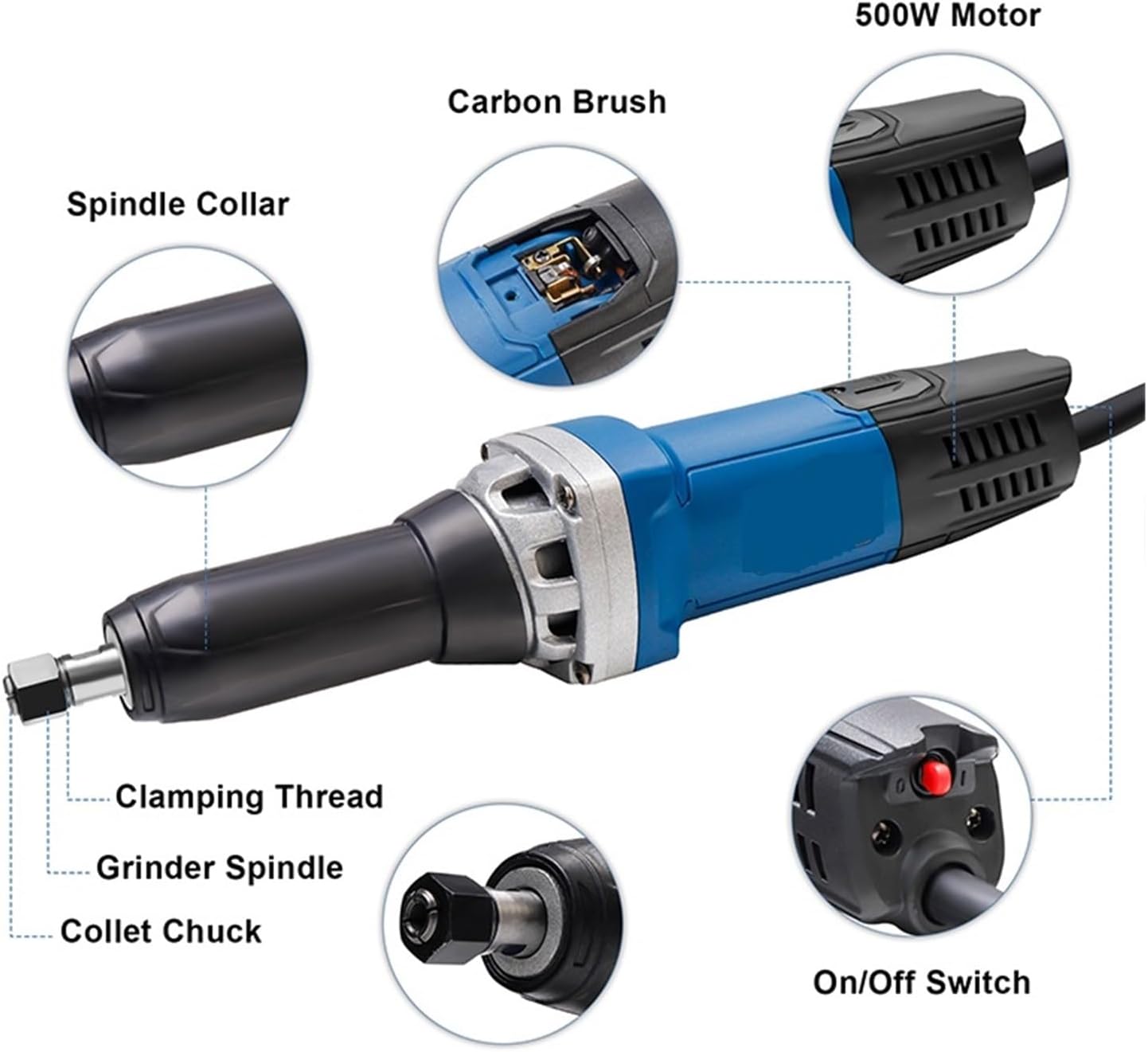
Figure 2.2: Key components of the HGS28E Die Grinder, including the Spindle Collar, Carbon Brush access, 500W Motor, On/Off Switch, Collet Chuck, Grinder Spindle, and Clamping Thread.
- Spindle Collar: Secures the collet chuck assembly.
- ការចូលប្រើជក់កាបូន៖ Allows for easy inspection and replacement of carbon brushes.
- ម៉ូទ័រ 500W: Provides powerful rotation for grinding and polishing.
- កុងតាក់បើក/បិទ៖ គ្រប់គ្រងថាមពលទៅឧបករណ៍។
- Collet Chuck: Holds various grinding bits and accessories.
- Grinder Spindle: The rotating shaft that drives the collet chuck.
- Clamping Thread: Used to tighten and secure the collet chuck.
3. រៀបចំ
3.1 ការវេចខ្ចប់
- Carefully remove the die grinder and all accessories from the packaging.
- Inspect the tool for any signs of damage that may have occurred during shipping. Do not operate if damaged.
- Verify that all listed components are present: die grinder unit, two wrenches, and two spare carbon brushes.
3.2 ការភ្ជាប់គ្រឿងបន្លាស់
- Ensure the die grinder is unplugged from the power source.
- Loosen the collet chuck nut using the provided wrenches.
- Insert the desired grinding bit or accessory into the collet chuck. Ensure the shank is fully seated.
- Tighten the collet chuck nut firmly with the wrenches to secure the accessory. Do not overtighten.
3.3 ការតភ្ជាប់ថាមពល
- Confirm that the power supply matches the tool's rated voltage (220V, 50Hz) ។
- ដោតខ្សែភ្លើងចូលទៅក្នុងព្រីភ្លើងដែលសមស្រប។
4. ប្រតិបត្តិការ
Before starting, ensure all safety precautions are followed and the work piece is securely clamped ។
4.1 ការបើក/បិទ
- To turn on the die grinder, press the On/Off switch located on the tool body.
- To turn off the die grinder, release or press the On/Off switch again, depending on its type (toggle or momentary).
- Allow the tool to reach full speed before making contact with the workpiece.
4.2 Grinding and Polishing Techniques
- Apply light, consistent pressure. Excessive force can damage the tool or workpiece and reduce efficiency.
- Move the tool smoothly across the surface to ensure even material removal and a consistent finish.
- For detailed work, use smaller bits and maintain a steady hand.
- Regularly check the condition of the grinding bit and replace it if it becomes dull or damaged.
5. ការថែទាំ
Regular maintenance ensures the longevity and optimal performance of your die grinder. Always unplug the tool before performing any maintenance.
5.1 ការសម្អាត
- After each use, clean the tool with a dry cloth to remove dust and debris.
- Use compressed air to clear ventilation openings and prevent dust buildup inside the motor housing.
- ហាមប្រើសារធាតុគីមីខ្លាំង ឬថ្នាំលាងសម្អាត។
5.2 ការជំនួសជក់កាបូន
Carbon brushes are wear items and will need periodic replacement. The tool may show reduced power or intermittent operation when brushes are worn.

Figure 5.1: Location for carbon brush installation on the HGS28E Die Grinder.
- Unplug the die grinder from the power source.
- Locate the carbon brush covers on the sides of the motor housing (refer to Figure 5.1).
- Use a screwdriver to remove the carbon brush covers.
- Carefully pull out the old carbon brushes.
- បញ្ចូលជក់កាបូនថ្មី ធានាថាពួកវាតម្រង់ទិសត្រឹមត្រូវ។
- Replace the carbon brush covers and tighten them securely.
6. ការដោះស្រាយបញ្ហា
| បញ្ហា | មូលហេតុដែលអាចកើតមាន | ដំណោះស្រាយ |
|---|---|---|
| ឧបករណ៍មិនចាប់ផ្តើមទេ។ | គ្មានការផ្គត់ផ្គង់ថាមពល។ Faulty On/Off switch. ជក់កាបូន។ | ពិនិត្យមើលរន្ធដោតភ្លើង និងខ្សែភ្លើង។ ទាក់ទងបុគ្គលិកសេវាកម្មដែលមានសមត្ថភាព។ Replace carbon brushes (see Section 5.2). |
| កាត់បន្ថយថាមពល ឬប្រតិបត្តិការបណ្តោះអាសន្ន។ | ជក់កាបូន។ ការឡើងកំដៅខ្លាំង។ ការតភ្ជាប់រលុង។ | ជំនួសជក់កាបូន។ អនុញ្ញាតឱ្យឧបករណ៍ត្រជាក់ចុះ។ ទាក់ទងបុគ្គលិកសេវាកម្មដែលមានសមត្ថភាព។ |
| រំញ័រខ្លាំងពេក។ | Damaged or unbalanced grinding bit. Loose collet chuck. | Replace grinding bit. Tighten collet chuck nut. |
7. លក្ខណៈបច្ចេកទេស
| លក្ខណៈ | លម្អិត |
|---|---|
| លេខម៉ូដែល | HGS28E |
| បានវាយតម្លៃវ៉ុលtage | 220V |
| ប្រេកង់ | 50 ហឺត |
| ថាមពលបញ្ចូលដែលបានវាយតម្លៃ | 500 វ៉ |
| ល្បឿនគ្មានផ្ទុក | 27000 RPM |
| Collet Chuck Diameter | 8 ម។ |
| ល្បឿនអថេរ | ទេ |
| ប្រភេទម៉ូទ័រ | ជក់ |
| ទម្ងន់ | 1.9 KGS (4.19 pounds) |
| ការប្រើប្រាស់ | ផលិតកម្មពាណិជ្ជកម្ម |
| ក្រុមហ៊ុនផលិត | CAARLA |
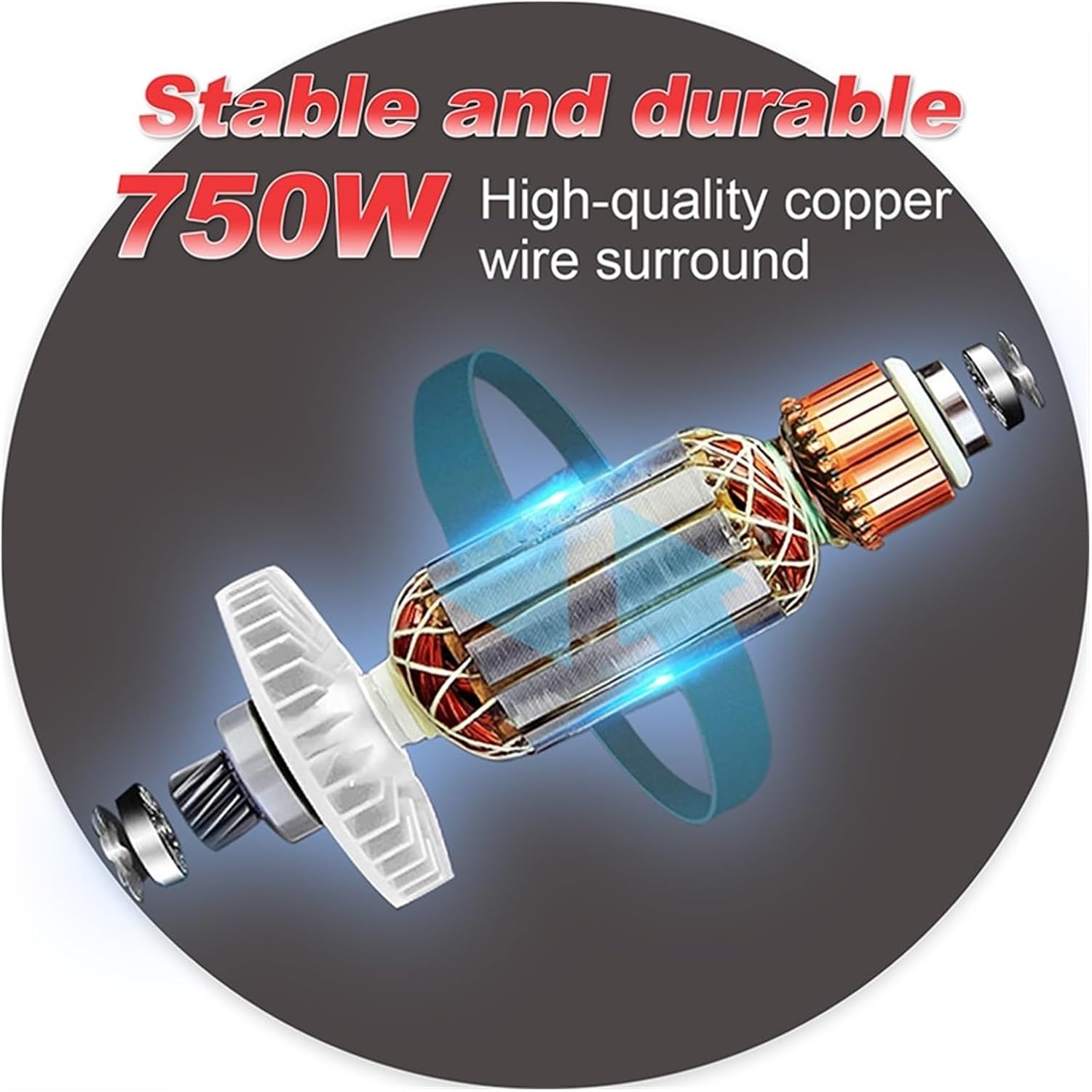
Figure 7.1: Illustration of the internal motor construction, highlighting the high-quality copper wire winding for stable and durable performance.
8. ការធានា និងការគាំទ្រ
For warranty information, technical support, or service inquiries, please refer to the documentation provided with your purchase or contact CAARLA customer service. Keep your proof of purchase for warranty claims.
For further assistance, please visit the official CAARLA webគេហទំព័រ ឬទាក់ទងអ្នកចែកចាយក្នុងស្រុករបស់អ្នក។