
សេចក្តីផ្តើម
This manual provides instructions for the HCDZ Replacement Remote Control, designed for use with Vamvo L3600US, L3600, 3600L, and WF-VF320 LCD Home Theater Video Projectors. This remote is an infrared (IR) replacement and requires no programming.
មាតិកាកញ្ចប់៖
- 1 x HCDZ Replacement Remote Control
- Note: Batteries and additional instructions are not included in the package.
ការដំឡើង៖ ការដំឡើងថ្ម
To begin using your remote control, you must install two AAA batteries. Ensure correct polarity when inserting the batteries.

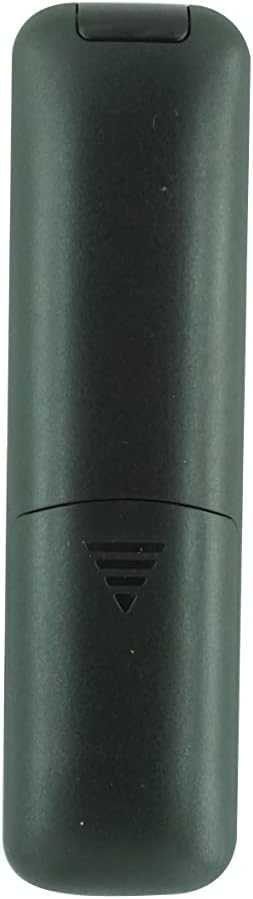
រូបភាព៖ ខាងក្រោយ view នៃឧបករណ៍បញ្ជាពីចម្ងាយដោយដោះគម្របថ្មចេញ ដោយបង្ហាញរន្ធថ្ម AAA ពីរ។
- កំណត់ទីតាំងប្រអប់ថ្មនៅខាងក្រោយឧបករណ៍បញ្ជាពីចម្ងាយ។
- រុញគម្របថ្មចុះក្រោម ឬចុចគន្លឹះហើយលើកដើម្បីបើក។
- Insert two new AAA batteries, matching the positive (+) and negative (-) terminals as indicated inside the compartment.
- ជំនួសគម្របថ្ម ដោយធានាថាវាចុចជាប់នឹងកន្លែងដោយសុវត្ថិភាព។
Important Battery Safety Information:
- កុំលាយថ្មថ្មីជាមួយថ្មចាស់។
- ប្រសិនបើឧបករណ៍បញ្ជាពីចម្ងាយមិនត្រូវបានប្រើក្នុងរយៈពេលយូរ សូមដកថ្មចេញ ដើម្បីការពារការលេចធ្លាយ និងការច្រេះ។
សេចក្តីណែនាំប្រតិបត្តិការ
This HCDZ replacement remote control is designed for immediate use with compatible Vamvo projectors once batteries are installed. No programming or pairing is required.
រូបភាព៖ ខាងមុខ view of the HCDZ replacement remote control, showing its button layout.
To operate your projector:
- Point the remote control directly at the infrared (IR) sensor on your Vamvo projector.
- Press the desired function button (e.g., Power, Volume, Menu, Source) to control the projector.
- Ensure there are no obstructions between the remote control and the projector's IR sensor.
ការថែទាំនិងការថែទាំ
ការថែទាំត្រឹមត្រូវនឹងពន្យារអាយុកាលនៃឧបករណ៍បញ្ជាពីចម្ងាយរបស់អ្នក៖
- ការផ្ទុក៖ Do not leave the remote in extremely hot or humid environments.
- ការប៉ះពាល់: Avoid exposing the remote sensor to direct sunlight or strong lighting apparatuses, as this may cause malfunction.
- ការសម្អាត៖ ជូតឧបករណ៍បញ្ជាពីចម្ងាយដោយក្រណាត់ទន់ និងស្ងួត។ កុំប្រើឧបករណ៍សម្អាតរាវ ឬវត្ថុសំណឹក។
- ការដកថ្មចេញ៖ If the remote will not be used for an extended period, remove the batteries to prevent potential damage from leakage and corrosion.
ការដោះស្រាយបញ្ហា
If your remote control is not functioning as expected, try the following steps:
- គ្មានការឆ្លើយតប៖
- ជំនួសថ្មរបស់ឧបករណ៍បញ្ជាពីចម្ងាយដោយថ្មថ្មី។
- Check the battery terminals inside the compartment to ensure they are clean and making proper contact.
- Limited Range or Intermittent Function:
- Move closer to the projector. The maximum effective range is approximately 8 meters.
- Remove any physical obstructions (e.g., furniture, objects) between the remote control and the projector's IR sensor.
- Projector Not Responding:
- Ensure the power cord to your projector is securely plugged in and the projector is turned on.
- Verify that the remote control is pointed directly at the projector's IR sensor.
លក្ខណៈបច្ចេកទេស
| ម៉ាក | HCDZ |
| ភាពឆបគ្នានៃម៉ូដែល | Vamvo L3600US, L3600, 3600L, WF-VF320 Projectors |
| បច្ចេកវិទ្យាតភ្ជាប់ | អ៊ីនហ្វ្រារ៉េដ (IR) |
| ប្រភេទឧបករណ៍បញ្ជា | ការគ្រប់គ្រងប៊ូតុង |
| លក្ខណៈពិសេស | No programming needed; works out of the package |
| ជួរអតិបរមា | 8 ម៉ែត្រ (ប្រហែល 26 ហ្វីត) |
| ចំនួនឧបករណ៍ដែលគាំទ្រ | 1 (Projector) |
| ថ្មដែលត្រូវការ | ថ្ម 2 x AAA (មិនរួមបញ្ចូល) |
| ក្រុមហ៊ុនផលិត | HCDZ |
| ASIN | B0DLB2R6PB |
ព័ត៌មានធានា
This HCDZ Replacement Remote Control comes with a ការធានារយៈពេល 3 ខែ ចាប់ពីថ្ងៃទិញ។ ការធានានេះគ្របដណ្តប់លើពិការភាពផលិតកម្មក្រោមការប្រើប្រាស់ធម្មតា។ វាមិនគ្របដណ្តប់លើការខូចខាតដែលបណ្តាលមកពីការប្រើប្រាស់ខុស គ្រោះថ្នាក់ ការកែប្រែដោយគ្មានការអនុញ្ញាត ឬការលេចធ្លាយថ្មទេ។
សូមរក្សាភស្តុតាងនៃការទិញរបស់អ្នកសម្រាប់ការទាមទារធានាណាមួយ។
គាំទ្រ
For further assistance or if you encounter issues not covered in this manual, please refer to the support resources provided by your retailer or the HCDZ brand. You may also consult the user manual for your Vamvo projector for specific operational details.
For general inquiries, please visit the HCDZ Store on Amazon.