
1. សេចក្តីផ្តើម
Thank you for choosing the Generic T1000 Ultra Smartwatch. This manual provides essential information for setting up, operating, and maintaining your device. Please read it carefully before use to ensure optimal performance and longevity of your smartwatch.
2. ព័ត៌មានសុវត្ថិភាព
- Do not attempt to disassemble, repair, or modify the device. This may void the warranty and cause damage.
- ទុកឧបករណ៍ឱ្យឆ្ងាយពីសីតុណ្ហភាពខ្លាំង ពន្លឺព្រះអាទិត្យដោយផ្ទាល់ និងសំណើមខ្ពស់។
- ជៀសវាងការលាតត្រដាងឧបករណ៍ទៅនឹងផលប៉ះពាល់ខ្លាំង ឬការធ្លាក់ចុះ។
- សូមប្រើតែគ្រឿងបន្ថែមសាកថ្មដែលបានផ្តល់ជូន ឬត្រូវបានអនុម័តប៉ុណ្ណោះ។
- Consult a medical professional before starting any new fitness regimen, especially if you have pre-existing health conditions.
- This device is not a medical instrument and should not be used for diagnostic or treatment purposes.
3. មាតិកាកញ្ចប់
ត្រូវប្រាកដថាធាតុទាំងអស់មាននៅក្នុងកញ្ចប់៖
- Generic T1000 Ultra Smartwatch
- Wireless Charging Cable/Base
- សៀវភៅណែនាំអ្នកប្រើ (ឯកសារនេះ)
4. ផលិតផលលើសview
The Generic T1000 Ultra Smartwatch features a modern square design with a touchscreen display, offering various smart functionalities including Bluetooth calls, NFC, fitness tracking, and built-in GPS.

Figure 4.1: Generic T1000 Ultra Smartwatch packaging, displaying the watch face on the box.

Figure 4.2: Generic T1000 Ultra Smartwatch and its wireless charging cable as found inside the product box.
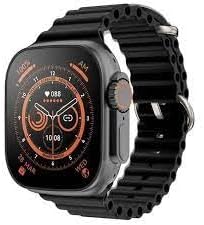
រូបភាពទី 4.3: ផ្នែកខាងមុខ view of the Generic T1000 Ultra Smartwatch displaying a digital watch face.
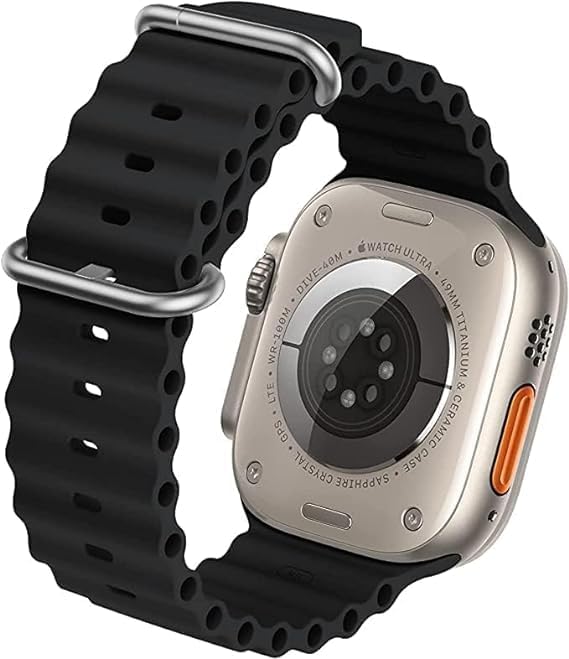
រូបភាពទី 4.4: ខាងក្រោយ view of the Generic T1000 Ultra Smartwatch, showing the heart rate sensors and charging contacts.
5. រៀបចំ
១. សាកថ្មនាឡិកាឆ្លាតវៃ
Before first use, fully charge your smartwatch. Place the watch on the provided wireless charging base. Ensure the charging contacts on the back of the watch align with the charger. The screen will indicate charging status. A full charge typically takes 2-3 hours.
5.2. បើក/បិទថាមពល
- ដើម្បីបើកដំណើរការ៖ ចុចប៊ូតុងចំហៀងឱ្យជាប់រហូតដល់អេក្រង់ភ្លឺ។
- ដើម្បីបិទថាមពល៖ ចុចឱ្យជាប់ប៊ូតុងចំហៀង បន្ទាប់មកជ្រើសរើស 'បិទថាមពល' នៅលើអេក្រង់។
5.3. ការដំឡើងកម្មវិធី
To unlock full functionality, download the companion app on your smartphone. Scan the QR code in the watch's settings or search for the app name (usually found in the watch's 'About' section or quick start guide) in your phone's app store (Google Play Store for Android, Apple App Store for iOS).
5.4. ការផ្គូផ្គងជាមួយស្មាតហ្វូន
- ត្រូវប្រាកដថាប៊្លូធូសត្រូវបានបើកនៅលើស្មាតហ្វូនរបស់អ្នក។
- Open the companion app on your smartphone and follow the on-screen instructions to add a new device.
- On your smartwatch, navigate to the Bluetooth settings or pairing mode.
- Select your smartwatch from the list of available devices in the app.
- បញ្ជាក់សំណើផ្គូផ្គងទាំងលើស្មាតហ្វូន និងនាឡិកាឆ្លាតវៃរបស់អ្នក។
6. សេចក្តីណែនាំប្រតិបត្តិការ
6.1. ការរុករកមូលដ្ឋាន
- អេក្រង់ប៉ះ៖ អូសទៅឆ្វេង/ស្តាំ ឡើងលើ/ចុះក្រោម ដើម្បីរុករកម៉ឺនុយ និងអេក្រង់។ ប៉ះដើម្បីជ្រើសរើស។
- ប៊ូតុងចំហៀង៖ ចុចដើម្បីត្រឡប់ទៅអេក្រង់ដើម ឬដាស់ឧបករណ៍។ ចុចឱ្យយូរសម្រាប់ជម្រើសថាមពល។
6.2. Bluetooth Calls
Once paired, you can make and receive calls directly from your smartwatch. Access the dialer or call log from the main menu. Ensure your watch is within Bluetooth range of your phone for call functionality.
6.3. ការជូនដំណឹង
Enable app notifications in the companion app on your smartphone. Your smartwatch will display incoming calls, messages, and app alerts. Swipe down from the top of the watch face to view មជ្ឈមណ្ឌលជូនដំណឹងរបស់អ្នក។
6.4. ការតាមដានលំហាត់ប្រាណ
The smartwatch includes a pedometer and optical heart rate sensor. Access the fitness tracking features through the dedicated app icons. Data will sync with the companion app on your smartphone for detailed analysis.
៣.៤. មុខងារ NFC
The smartwatch supports NFC (Near Field Communication). Refer to the specific instructions within the watch's settings or companion app for details on how to use NFC features, such as mobile payments or access control, if supported by your region and service providers.
6.6. GPS
The built-in GPS allows for accurate tracking of outdoor activities without needing your phone. Ensure GPS is enabled in the watch settings for activities like running or cycling.
7. ការថែទាំ
7.1. ការសម្អាត
Wipe the smartwatch and band regularly with a soft, damp cloth. Avoid using harsh chemicals or abrasive materials, which can damage the device. Ensure the watch is dry before charging.
7.2. ធន់នឹងទឹក។
The T1000 Ultra Smartwatch is water-resistant up to 50 meters. This means it can be used for shallow-water activities like swimming. However, it is not suitable for diving, high-speed water sports, or exposure to hot water/steam (e.g., showers, saunas). Water resistance is not a permanent condition and may decrease over time.
8. ការដោះស្រាយបញ្ហា
- មើលមិនបើក៖ ត្រូវប្រាកដថានាឡិកាត្រូវបានសាកពេញ។ ភ្ជាប់វាទៅនឹងឆ្នាំងសាក ហើយរង់ចាំពីរបីនាទីមុនពេលព្យាយាមបើកវាម្តងទៀត។
- មិនអាចផ្គូផ្គងជាមួយទូរស័ព្ទ៖ Check if Bluetooth is enabled on both devices. Ensure the watch is in pairing mode and within range. Try restarting both the watch and phone.
- ទិន្នន័យសម្បទាមិនត្រឹមត្រូវ៖ Ensure the watch is worn snugly on your wrist. Calibrate the pedometer in the companion app if available.
- ការជូនដំណឹងមិនបង្ហាញ៖ Verify that notifications are enabled in both your phone's settings and the smartwatch's companion app. Ensure the watch is connected via Bluetooth.
- បញ្ហាសាកថ្ម៖ Check the charging cable and adapter for damage. Ensure the watch is correctly placed on the wireless charging base.
9. លក្ខណៈបច្ចេកទេស
| លក្ខណៈ | លម្អិត |
|---|---|
| ឈ្មោះម៉ាក | ទូទៅ |
| ឈ្មោះម៉ូដែល | T1000 ជ្រុល |
| លេខម៉ូដែល | T1000 |
| ប្រព័ន្ធប្រតិបត្តិការ | ប្រព័ន្ធប្រតិបត្តិការ Smartwatch |
| លក្ខណៈពិសេស | Smart, Wireless, Wireless Charging, Bluetooth |
| បច្ចេកវិទ្យាតភ្ជាប់ | NFC, ប៊្លូធូស |
| ស្តង់ដារទំនាក់ទំនងឥតខ្សែ | ប៊្លូធូស |
| ជីភីអេស | GPS ដែលភ្ជាប់មកជាមួយ |
| រូបរាងធាតុ | ការ៉េ |
| រចនាប័ទ្ម | ទំនើប |
| ពណ៌ | ខ្មៅ |
| ប្រភេទសម្ភារៈក្រុម | ជ័រ |
| ប្រភេទសម្ភារៈករណី | ផ្លាស្ទិច |
| កម្រិតធន់នឹងទឹក។ | ធន់នឹងទឹក។ |
| ជម្រៅធន់នឹងទឹក។ | 50 ម៉ែត្រ |
| ការបញ្ចូលចំណុចប្រទាក់មនុស្ស | អេក្រង់ប៉ះ |
| ប្រភេទកដៃ | តមបក់ |
| កម្មវិធីដែលបានគាំទ្រ | កម្មវិធីតាមដានលំហាត់ប្រាណ |
| Satellite Navigation System Support | ប្រព័ន្ធកំណត់ទីតាំងសកល (GPS) |
| ប្រភេទឧបករណ៍បញ្ជា | ប៉ះការគ្រប់គ្រង |
| ប្រភេទម៉ែត្រ | ឧបករណ៍ចាប់សញ្ញាអត្រាបេះដូងអុបទិក |
| ប្រភេទបិទ | តមបក់ |
| Wireless Service Provider | ដោះសោ |
| Connectivity Feature | ប៊្លូធូស, NFC |
| ទំហំស៊ីមកាត | អ៊ីស៊ីម |
| ឧបករណ៍ដែលត្រូវគ្នា។ | ស្មាតហ្វូន |
| ម៉ូដែលទូរស័ព្ទដែលត្រូវគ្នា។ | ឆបគ្នាជាមួយស្មាតហ្វូន Android និង iOS |
| ទស្សនិកជនគោលដៅ | Adults (Unisex) |
| ការពិពណ៌នាអំពីជួរអាយុ | មនុស្សពេញវ័យ |
| Wearable Computer Type | នាឡិកាឆ្លាតវៃ |
| ប្រភេទបង្ហាញ | OLED or LCD |
| ពន្លឺអេក្រង់អតិបរមា | 500 nits |
| ប្រភេទការធានា | មានកំណត់ |
10. ការធានា និងការគាំទ្រ
The Generic T1000 Ultra Smartwatch comes with a limited warranty. Please refer to the warranty card included in your package for specific terms and conditions. For technical support, troubleshooting assistance, or warranty claims, please contact the retailer or manufacturer's customer service through the contact information provided with your purchase.


