
VOLT PLUS TECH F9
VOLT PLUS TECH F9 Wireless V5.3 Bluetooth Earbuds User Manual
ម៉ូដែល: F9
1. សេចក្តីផ្តើម
Thank you for choosing the VOLT PLUS TECH F9 Wireless V5.3 Bluetooth Earbuds. This manual provides essential information for setting up, operating, and maintaining your new earbuds. Please read it carefully before use.
មាតិកាកញ្ចប់
- 2 x កាសស្តាប់ត្រចៀកឥតខ្សែ
- 1 x 2000mAh Power Bank Charging Case
- ខ្សែសាកយូអេសប៊ី ១ ស៊ី
- 3 x Pairs of Ear Adapters (Small, Medium, Large)
- 1 x សៀវភៅណែនាំអ្នកប្រើប្រាស់

Image 1.1: Contents included in the VOLT PLUS TECH F9 Earbuds package.
2. ផលិតផលលើសview
The VOLT PLUS TECH F9 earbuds feature a compact design with a multi-functional charging case that also serves as a power bank. The case includes an LED display to show battery levels.
លក្ខណៈពិសេសនៃកាសស្តាប់ត្រចៀក
- ការគ្រប់គ្រងការប៉ះឆ្លាតវៃ៖ សម្រាប់ការគ្រប់គ្រងតន្ត្រី ការហៅទូរសព្ទ និងជំនួយការសំឡេង។
- មីក្រូហ្វូន៖ ភ្ជាប់មកជាមួយសម្រាប់ការហៅទូរសព្ទ។
- សូចនាករ LED៖ On each earbud for status.
លក្ខណៈពិសេសនៃករណីសាក
- 2000mAh Power Bank: Charges earbuds and can provide emergency charge for mobile devices.
- អេក្រង់ឌីជីថល LED៖ បង្ហាញថ្មសាកtage នៃករណីសាកថ្ម និងស្ថានភាពសាកនៃកាសនីមួយៗ។
- បញ្ចូល USB-C៖ សម្រាប់ការសាកថ្មករណី។

រូបភាពទី 2.1: ជាងview of the earbuds and charging case with LED display.

Image 2.2: The bright LED display on the charging case indicates battery levels.
3. ការដំឡើង និងការផ្គូផ្គង
ការបញ្ចូលថ្មដំបូង
- មុនពេលប្រើលើកដំបូង សូមសាកថ្មពេញប្រអប់ និងកាសស្តាប់ត្រចៀក។
- Connect the USB-C charging cable to the charging case and a power source. The LED display will show the charging progress.
- Place the earbuds into the charging case. They will begin charging automatically. The LED indicators on the earbuds will light up, and the case display will show their charging status.
ប៊្លូធូសដាក់គូ
- បើកដោយស្វ័យប្រវត្តិ៖ Open the charging case, and the earbuds will automatically power on and enter pairing mode.
- បើកប៊្លូធូស៖ On your device (e.g., smartphone), go to Bluetooth settings and enable Bluetooth.
- ជ្រើសរើសឧបករណ៍៖ Look for "F9" or similar in the list of available devices and select it to connect.
- ការបញ្ជាក់៖ Once connected, you will hear a confirmation tone, and the earbud LED indicators will change.
The earbuds feature Bluetooth V5.3 for a stable and efficient connection. They will automatically reconnect to the last paired device when taken out of the case.

Image 3.1: Fast Bluetooth auto-pairing process.
4. សេចក្តីណែនាំប្រតិបត្តិការ
The F9 earbuds utilize smart touch controls for various functions.
មុខងារបញ្ជាប៉ះ
| សកម្មភាព | កាសត្រចៀកខាងឆ្វេង (L) | កាសត្រចៀកខាងស្តាំ (R) |
|---|---|---|
| ចាក់/ផ្អាកតន្ត្រី | ចុចម្តង | |
| ចម្រៀងបន្ទាប់ | ចុចពីរដងយ៉ាងលឿន | គ្មាន |
| ចម្រៀងពីមុន | គ្មាន | ចុចពីរដងយ៉ាងលឿន |
| កម្រិតសំឡេងឡើង | គ្មាន | ចុចបីដង |
| កម្រិតសំឡេងចុះក្រោម | ចុចបីដង | គ្មាន |
| ឆ្លើយ/បញ្ចប់ការហៅទូរសព្ទ | Click/Double click | |
| បដិសេធការហៅ | ចុចឱ្យជាប់រយៈពេល 2 វិនាទី | |
| បើកដំណើរការជំនួយការសំឡេង (Siri/Google Assistant) | ចុចពីរដងយ៉ាងលឿន | |

Image 4.1: Smart touch control guide for earbud functions.
២.៥. សាកថ្ម
ការបញ្ចូលថ្មកាសស្តាប់ត្រចៀក
Place the earbuds into the charging case. They will automatically begin charging. The LED display on the case will show the charging status for each earbud.
Charging the Case (Power Bank)
Connect the provided USB-C cable to the charging port on the case and to a USB power adapter. The LED display will show the battery percentage of the case as it charges.
Using the Case as a Power Bank
The 2000mAh charging case can also be used to provide an emergency charge to your mobile phone or other small devices. Connect your device's charging cable to the USB output port on the charging case.

Image 5.1: Charging your phone using the earbud charging case.
អាយុកាលថ្ម
A full charge provides approximately 5 hours of music time and 6 hours of talk time for the earbuds. The 2000mAh charging case can recharge the earbuds multiple times, extending total usage to over 24 hours.
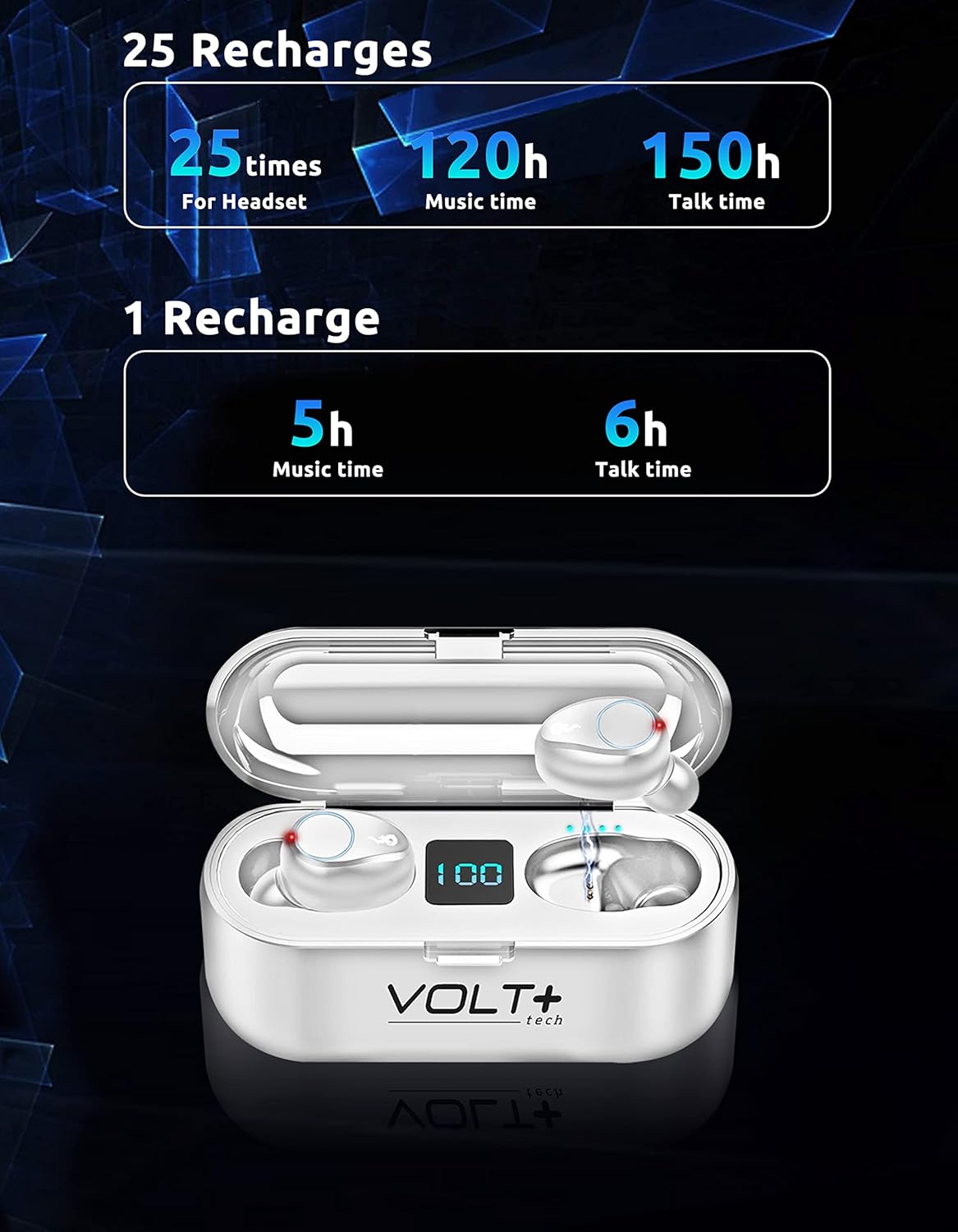
Image 5.2: Battery life and recharge capabilities.
6. ការថែទាំនិងការថែទាំ
ការសម្អាត
- សម្អាតកាសស្តាប់ត្រចៀក និងស្រោមសាកថ្មឱ្យបានទៀងទាត់ដោយក្រណាត់ទន់ ស្ងួត និងគ្មានជាតិសរសៃ។
- យកគន្លឹះត្រចៀកចេញ ហើយសម្អាតពួកវាជាមួយនឹងសាប៊ូស្រាល និងទឹក បន្ទាប់មកស្ងួតឱ្យបានស្អាតមុននឹងភ្ជាប់ម្តងទៀត។
- ត្រូវប្រាកដថាទំនាក់ទំនងសាកថ្មនៅលើកាសស្តាប់ត្រចៀក និងស្រោមទូរស័ព្ទគឺស្អាត និងគ្មានកំទេចកំទី។
ធន់នឹងទឹក (IPX7)
The earbuds are IPX7 waterproof, meaning they can withstand immersion in water up to 1 meter for 30 minutes. This makes them suitable for rainy outdoor sports and sweating during workouts. However, the charging case is not waterproof. Do not immerse the charging case in water.

Image 6.1: IPX7 waterproof rating of the earbuds.
ការផ្ទុក
Store the earbuds in their charging case when not in use to protect them and keep them charged. Avoid extreme temperatures and direct sunlight.
7. ការដោះស្រាយបញ្ហា
កាសស្តាប់ត្រចៀកមិនផ្គូផ្គង
- ត្រូវប្រាកដថាកាសស្តាប់ត្រចៀកទាំងពីរត្រូវបានគិតប្រាក់។
- បិទប៊្លូធូសនៅលើឧបករណ៍របស់អ្នក បន្ទាប់មកបើកវាឡើងវិញ។
- Forget the "F9" device in your device's Bluetooth settings and try pairing again.
- ដាក់កាសស្តាប់ត្រចៀកត្រឡប់ទៅក្នុងប្រអប់វិញ បិទគម្រប រង់ចាំពីរបីវិនាទី បន្ទាប់មកបើកដើម្បីចាប់ផ្តើមមុខងារផ្គូផ្គងឡើងវិញ។
Only One Earbud Working
- ត្រូវប្រាកដថាកាសស្តាប់ត្រចៀកទាំងពីរត្រូវបានគិតប្រាក់។
- Try placing both earbuds back into the charging case, close the lid, and then take them out again to allow them to re-sync with each other.
- If the issue persists, try resetting the earbuds (refer to specific reset instructions if available in a full manual, or try forgetting the device and re-pairing).
Charging Case Not Charging
- សូមពិនិត្យមើលខ្សែ USB-C និងឧបករណ៍ភ្ជាប់ថាមពលសម្រាប់ការខូចខាត។
- Ensure the cable is securely connected to both the case and the power source.
- សាកល្បងប្រើខ្សែ USB-C ឬអាដាប់ទ័រថាមពលផ្សេង។
គុណភាពសំឡេងខ្សោយ
- Ensure earbuds are properly seated in your ears. Try different sized ear tips.
- Clean the earbud mesh to remove any wax or debris.
- Ensure your device is within the Bluetooth range (up to 33 feet/10 meters) and there are no significant obstructions.
8. លក្ខណៈបច្ចេកទេស
| លក្ខណៈ | លម្អិត |
|---|---|
| ឈ្មោះម៉ូដែល | F9 |
| កំណែប៊្លូធូស | 5.3 |
| ជួរប៊្លូធូស | 33 ហ្វីត (10 ម៉ែត្រ) |
| ករណីសាកថ្ម សមត្ថភាពថ្ម | 2000 mAh |
| Earbud Battery Life (Single Charge) | Approx. 5 hours music, 6 hours talk time |
| អាយុកាលថ្មសរុប (ជាមួយស្រោម) | ជាង 24 ម៉ោង។ |
| ពេលវេលាសាកថ្ម | Approx. 30 minutes (earbuds) |
| កម្រិតធន់នឹងទឹក។ | IPX7 (សម្រាប់តែកាសស្តាប់ត្រចៀក) |
| ការគ្រប់គ្រងសំលេងរំខាន | Active Noise Cancellation, Passive Noise Cancellation, Sound Isolation (CVC 8.0) |
| ប្រភេទកម្មវិធីបញ្ជាអូឌីយ៉ូ | អ្នកបើកបរថាមវន្ត |
| ទំហំកម្មវិធីបញ្ជាអូឌីយ៉ូ | 26 មីលីម៉ែត្រ |
| ភាពរសើប | 103 dB |
| ឧបសគ្គ | 25.94 Ohms |
| វិធីសាស្រ្តត្រួតពិនិត្យ | ប៉ះ |
| ឧបករណ៍ដែលត្រូវគ្នា។ | Android, iOS, Mac, Windows, Nubia Red Magic 5G |
| វិមាត្រកាស | ប្រហែល 0.9 x 0.5 អ៊ីញ |
| វិមាត្រករណី | ប្រហាក់ប្រហែល។ ៧.២ x ៤.៨ x ១.០ អ៊ីញ |
| ទំងន់ធាតុ | 4 អោន (សរុប) |

Image 8.1: Physical dimensions of the earbuds and charging case.
9. ព័ត៌មានធានា
VOLT PLUS TECH products are designed and manufactured to the highest quality standards. This product is covered by a limited warranty from the date of purchase. Please retain your proof of purchase for warranty claims. The warranty covers manufacturing defects but does not cover damage caused by misuse, accidents, unauthorized modifications, or normal wear and tear.
៥.៧. ជំនួយអតិថិជន
If you encounter any issues or have questions regarding your VOLT PLUS TECH F9 Wireless Bluetooth Earbuds, please contact our customer support team. Refer to the contact information provided on the product packaging or our official webគេហទំព័រសម្រាប់ជំនួយ។
Ask a question about this manual
Ask about setup, troubleshooting, compatibility, parts, safety, or missing instructions. Manuals+ will review the question and use this page’s manual context to help answer it.