
1. សេចក្តីផ្តើម និងជាងview
This manual provides essential instructions for the safe and efficient use of your Maxcom MM135L Basic Mobile Phone. The MM135L is designed for straightforward communication, featuring a user-friendly interface, large keys, and a 1.77-inch screen. It supports 2G networks and includes dual SIM capability, an SOS button for emergencies, and convenient USB-C charging. Please read this manual thoroughly before operating the device.
2. មាតិកាកញ្ចប់
ផ្ទៀងផ្ទាត់ថាធាតុទាំងអស់មាននៅក្នុងកញ្ចប់៖
- Maxcom MM135L Mobile Phone
- Battery (Lithium-Ion, 600 mAh)
- ខ្សែ USB
- ឧបករណ៍បំលែងស៊ីមកាត
- សៀវភៅណែនាំអ្នកប្រើ (ឯកសារនេះ)
១.១. ប្លង់ឧបករណ៍
Familiarize yourself with the physical components of your Maxcom MM135L phone.
រូបភាពទី 3.1: ខាងក្រោយ view of the Maxcom MM135L phone, showing the blue textured back cover, Maxcom logo, and speaker grille at the top.

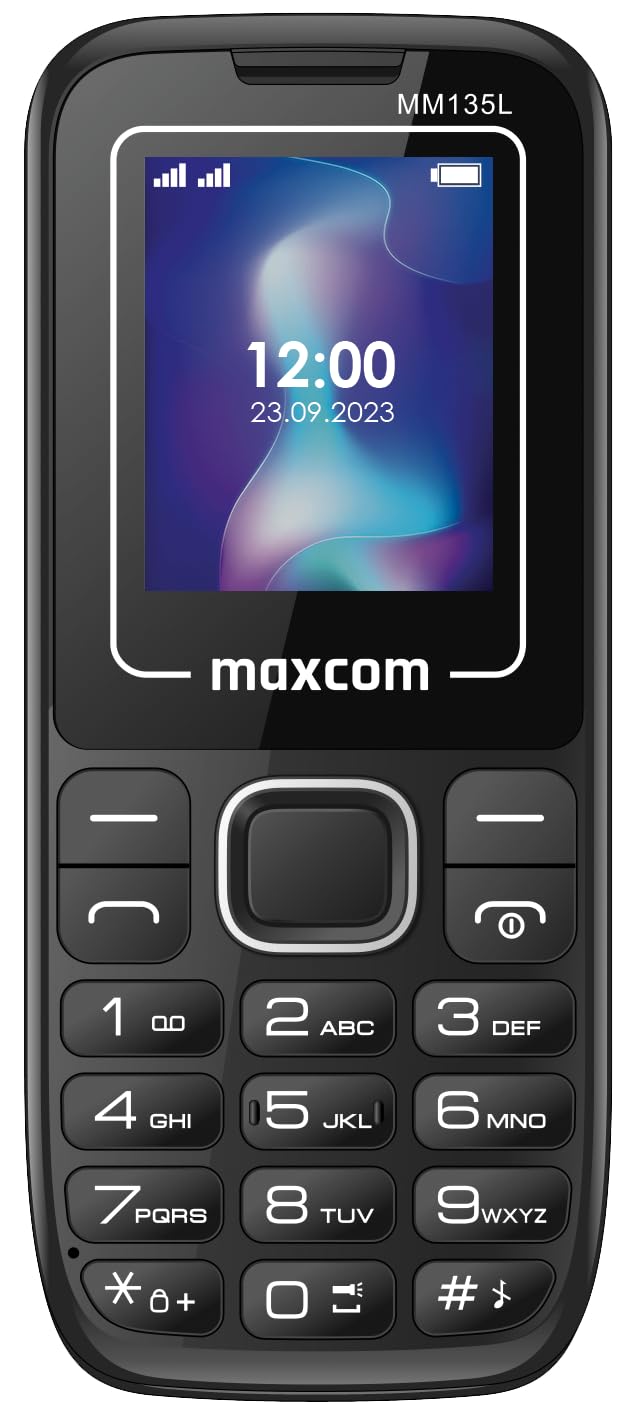
រូបភាពទី 3.2: ផ្នែកខាងមុខ view of the Maxcom MM135L phone, displaying the screen, large numeric keypad, and call/end buttons.

Figure 3.3: Bottom edge of the phone, featuring the USB-C charging port and a 3.5mm headphone jack.

Figure 3.4: Top edge of the phone, highlighting the integrated flashlight.
សមាសធាតុសំខាន់ៗ៖
- អេក្រង់បង្ហាញ៖ 1.77-inch LCD for clear text and call information.
- ក្ដារចុចលេខ៖ Large, tactile buttons for easy dialing and texting.
- ប៊ូតុងហៅ/បញ្ចប់៖ Dedicated buttons for managing calls.
- គ្រាប់ចុចរុករក៖ សម្រាប់ការរុករកម៉ឺនុយ។
- ប៊ូតុង SOS៖ Located on the rear for emergency calls (refer to Figure 3.1).
- ពិល៖ Integrated at the top of the device (refer to Figure 3.4).
- រន្ធ USB-C៖ For charging the device (refer to Figure 3.3).
- កាសស្តាប់ត្រចៀក៖ 3.5mm port for audio accessories (refer to Figure 3.3).
4. រៀបចំ
4.1 ការដំឡើងថ្ម
- យកគម្របខាងក្រោយរបស់ទូរសព្ទចេញដោយប្រុងប្រយ័ត្ន។
- តម្រឹមចំណុចប៉ះថ្មជាមួយនឹងខ្សែភ្ជាប់នៅខាងក្នុងបន្ទប់ថ្ម។
- ចុចថ្មថ្នមៗនៅនឹងកន្លែង។
- ដាក់គម្របខាងក្រោយវិញ ដោយធានាថាវាចុចជាប់ល្អ។
៣.១ ការតំឡើងស៊ីមកាត
The Maxcom MM135L supports dual SIM cards.
- With the phone powered off and the back cover removed, locate the SIM card slots.
- Insert your SIM card(s) into the designated slot(s) with the gold contacts facing down, following the orientation indicated on the phone.
- ត្រូវប្រាកដថាស៊ីមកាតត្រូវបានដាក់ជាប់ល្អ។
- Replace the back cover and battery.
៤.២ ការសាកថ្មទូរស័ព្ទ
The phone uses a USB-C port for charging.
- Connect the USB-C cable to the charging port at the bottom of the phone (refer to Figure 3.3).
- Connect the other end of the USB cable to a compatible USB power adapter or a computer's USB port.
- សូចនាករថ្មនៅលើអេក្រង់នឹងបង្ហាញស្ថានភាពសាក។
- ផ្តាច់ឆ្នាំងសាក នៅពេលដែលថ្មត្រូវបានសាកពេញ។
ចំណាំ៖ For optimal battery life, fully charge the phone before first use.
5. សេចក្តីណែនាំប្រតិបត្តិការ
5.1 បើក/បិទថាមពល
- ដើម្បីបើកដំណើរការ៖ ចុចឱ្យជាប់ Call/Power ប៊ូតុងរហូតដល់អេក្រង់ភ្លឺ។
- ដើម្បីបិទថាមពល៖ ចុចឱ្យជាប់ បញ្ចប់/ថាមពល button until the power off options appear, then confirm.
5.2 ការធ្វើ និងទទួលការហៅទូរសព្ទ
- ដើម្បីធ្វើការហៅទូរសព្ទ៖ បញ្ចូលលេខទូរស័ព្ទដោយប្រើក្តារចុច ហើយចុចប៊ូតុង ហៅ ប៊ូតុង។
- ដើម្បីឆ្លើយការហៅទូរសព្ទ៖ ចុច ហៅ ប៊ូតុងនៅពេលទូរស័ព្ទរោទិ៍។
- ដើម្បីបញ្ចប់ការហៅទូរសព្ទ៖ ចុច ចប់ ប៊ូតុង។
៤.៣ ការផ្ញើ និងទទួលសារ
- Navigate to the "Messages" menu using the navigation keys.
- Select "Create New Message" to compose an SMS.
- Enter the recipient's number and your message, then send.
- Received messages will appear in the "Inbox".
5.4 Using the SOS Button
The SOS button is located on the rear of the phone. It is designed for emergency situations.
- ដើម្បីធ្វើឱ្យសកម្ម: Press and hold the SOS button for several seconds.
- The phone will automatically sound an alarm and send emergency SMS messages to pre-set contacts.
- It will then automatically call the saved emergency contacts in a loop until a call is answered.
- Ensure emergency contacts are properly configured in the phone settings.
5.5 មុខងារពិល
The built-in flashlight can be activated for convenience.
- Refer to the phone's specific settings or a dedicated side button for flashlight activation. Typically, a long press on a designated key or a side switch controls it.
6. ការថែទាំ
- ការសម្អាត៖ ប្រើក្រណាត់ទន់ និងស្ងួត ដើម្បីសម្អាតផ្ទៃទូរស័ព្ទ។ ជៀសវាងការសម្អាតរាវ។
- ការថែរក្សាថ្ម៖ Do not expose the battery to extreme temperatures. Avoid fully discharging the battery frequently.
- ការផ្ទុក៖ ទុកទូរសព្ទក្នុងកន្លែងត្រជាក់ និងស្ងួត នៅពេលដែលមិនប្រើក្នុងរយៈពេលយូរ។
- ធន់នឹងទឹក៖ ទូរស័ព្ទនេះមិនធន់នឹងទឹកទេ។ ជៀសវាងការប៉ះពាល់នឹងវត្ថុរាវ។
7. ការដោះស្រាយបញ្ហា
| បញ្ហា | ដំណោះស្រាយដែលអាចកើតមាន |
|---|---|
| ទូរស័ព្ទមិនបើកទេ។ | ត្រូវប្រាកដថាថ្មត្រូវបានដំឡើង និងសាកបានត្រឹមត្រូវ។ ភ្ជាប់ឆ្នាំងសាក ហើយសាកល្បងម្តងទៀត។ |
| មិនអាចធ្វើការឬទទួលការហៅទូរសព្ទ។ | Check if the SIM card is properly inserted and activated. Verify network signal strength. Contact your service provider if issues persist. |
| ថ្មមិនសាក។ | Ensure the USB-C cable and charger are securely connected and functional. Try a different charging cable or adapter. |
| ប៊ូតុង SOS មិនដំណើរការទេ។ | Verify that emergency contacts are saved in the phone's settings. Ensure the phone has network coverage. |
| គុណភាពហៅទូរសព្ទខ្សោយ។ | Move to an area with better network reception. Check the speaker and microphone for obstructions. |
8. លក្ខណៈបច្ចេកទេស
| លក្ខណៈ | លម្អិត |
|---|---|
| ឈ្មោះម៉ូដែល | MM135L |
| ទំហំអេក្រង់ | ៤.៧៥ អ៊ីញ |
| ប្រភេទបង្ហាញ | អេក្រង់ LCD |
| ដំណោះស្រាយ | 128 x 160 |
| បច្ចេកវិទ្យាកោសិកា | 2G |
| ការគាំទ្រស៊ីម | ស៊ីមពីរ |
| ប្រភេទថ្ម | លីចូម-អ៊ីយ៉ុង |
| សមត្ថភាពថ្ម | 600 mAh |
| ច្រកសាក | USB-C |
| វិមាត្រ (L x W x H) | 7 x 14 x 3.5 សង់ទីម៉ែត្រ |
| ទម្ងន់ | ៣៨៥ ក្រាម។ |
| លក្ខណៈពិសេស | SOS Button, Flashlight, Expandable Memory, Fast Charging Support |
9. ការធានា និងការគាំទ្រ
For warranty information, technical support, or service inquiries, please refer to the warranty card included with your product or contact Maxcom customer service directly. Keep your proof of purchase for warranty claims.