
1. សេចក្តីផ្តើម
Thank you for choosing the Defender Enjoy S200 Portable Bluetooth Speaker. This manual provides essential information for setting up, operating, and maintaining your speaker to ensure optimal performance and longevity. Please read this manual thoroughly before use.
The Defender Enjoy S200 is a versatile portable speaker featuring Bluetooth 5.3 connectivity, True Wireless Stereo (TWS) pairing, an integrated FM radio, and MP3 playback capabilities via USB flash drive or microSD card. It also includes an LED light and supports hands-free calling. Designed for portability, it offers up to 9 hours of playback on a single charge and convenient USB Type-C charging.
2. ផលិតផលលើសview
2.1 លក្ខណៈសំខាន់ៗ
- ប៊្លូធូស ៤.០ For stable and efficient wireless audio streaming.
- ស្តេរ៉េអូឥតខ្សែពិត (TWS)៖ Connect two Enjoy S200 speakers for a stereo sound experience.
- របៀបចាក់សារថ្មីច្រើន៖ Bluetooth, FM Radio, USB Flash Drive, MicroSD Card (up to 32GB).
- អំពូល LED រួមបញ្ចូលគ្នា៖ Provides visual ambiance.
- ការហៅទូរសព្ទដោយមិនប្រើដៃ៖ មីក្រូហ្វូនដែលភ្ជាប់មកជាមួយសម្រាប់ការហៅទូរសព្ទ។
- អាយុកាលថ្មយូរ៖ Up to 9 hours of continuous music playback.
- ការសាក USB Type-C៖ រន្ធសាកថ្មទំនើប និងងាយស្រួល។
- ការរចនាចល័ត៖ Compact and lightweight with a carrying strap.
2.2 មាតិកាកញ្ចប់
- Defender Enjoy S200 Portable Bluetooth Speaker
- ខ្សែសាកប្រភេទស៊ី -១
- មគ្គុទ្ទេសក៍ចាប់ផ្តើមរហ័ស
- ខ្សែដៃ

Image: The Defender Enjoy S200 Portable Bluetooth Speaker, showcasing its compact design and front grille with an illuminated LED ring.

Image: An infographic highlighting key features such as multi-colored LED lighting, True Wireless Stereo (TWS) pairing, Bluetooth 5.3, MP3 player, FM receiver, and hands-free calling.
3. រៀបចំ
3.1 សាកថ្ម Speaker
- Locate the Type-C charging port on the back of the speaker.
- Connect the provided Type-C charging cable to the speaker and the other end to a USB power adapter (not included) or a computer's USB port.
- សូចនាករ LED នឹងបង្ហាញស្ថានភាពសាក។ ការសាកថ្មពេញជាធម្មតាចំណាយពេលប្រហែល 3-4 ម៉ោង។
- ដោះខ្សែចេញនៅពេលសាកពេញ។
3.2 ការបើក/បិទ
- To power on, slide the ON/OFF switch located on the back of the speaker to the 'ON' position.
- ដើម្បីបិទ សូមរំកិលកុងតាក់ ON/OFF ទៅទីតាំង 'OFF'។
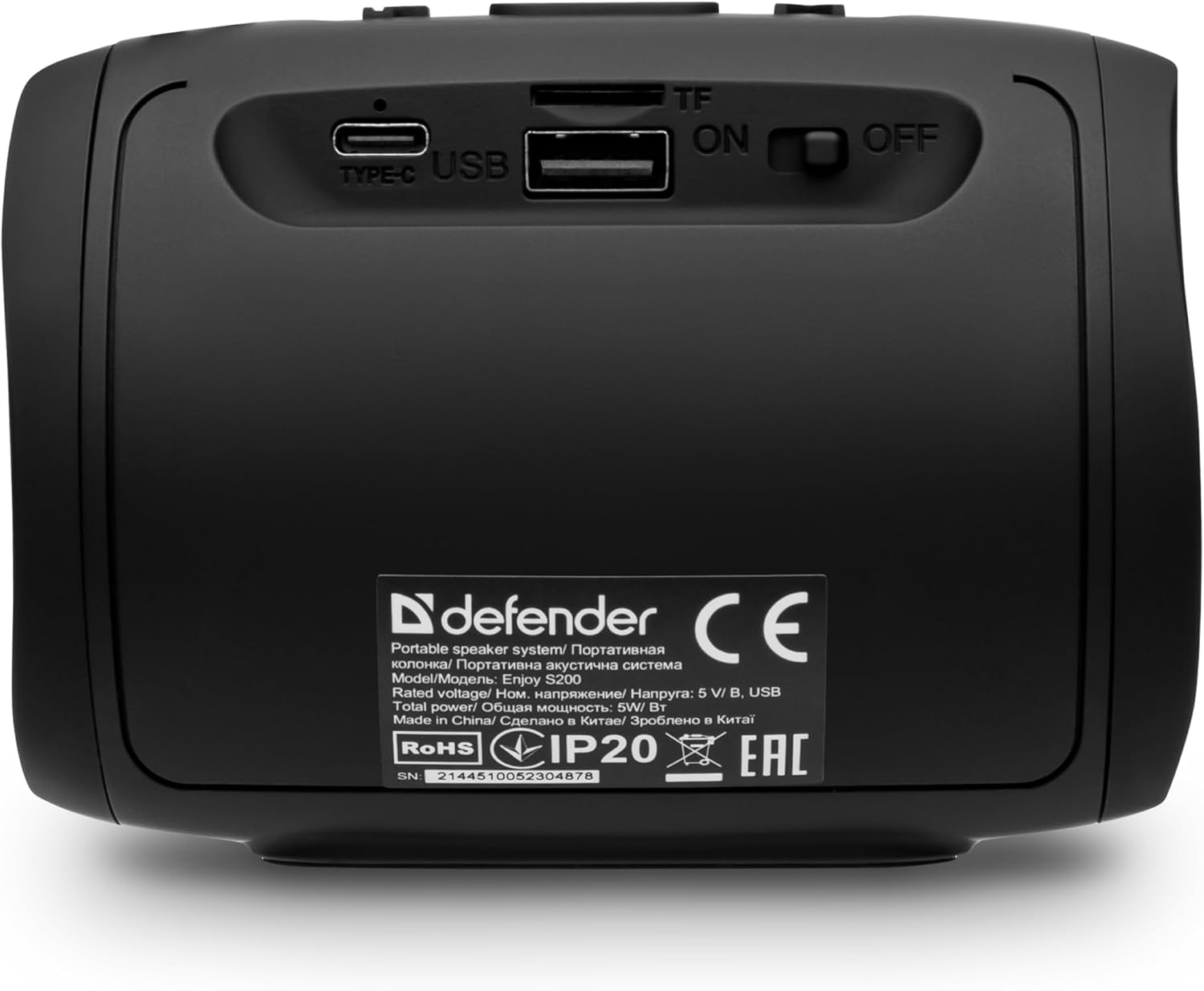
រូបភាព៖ ខាងក្រោយ view of the Defender Enjoy S200 speaker, showing the Type-C charging port, USB port, TF (microSD) card slot, and the ON/OFF power switch.
៤ ការភ្ជាប់ប៊្លូធូស
- ត្រូវប្រាកដថាឧបករណ៍បំពងសម្លេងត្រូវបានបើក និងនៅក្នុងរបៀបផ្គូផ្គងប៊្លូធូស (បង្ហាញដោយអំពូល LED បញ្ចេញពន្លឺ)។
- នៅលើឧបករណ៍របស់អ្នក (ស្មាតហ្វូន ថេប្លេត។ល។) បើកប៊្លូធូស និងស្វែងរកឧបករណ៍ដែលមាន។
- Select "Defender Enjoy S200" from the list of devices.
- Once paired, the speaker will emit a confirmation sound, and the LED will stop flashing.
3.4 ការផ្គូផ្គងស្តេរ៉េអូឥតខ្សែ (TWS)
To pair two Defender Enjoy S200 speakers for stereo sound:
- ត្រូវប្រាកដថាឧបករណ៍បំពងសំឡេងទាំងពីរត្រូវបានបើក និងមិនបានភ្ជាប់ទៅឧបករណ៍ប៊្លូធូសណាមួយឡើយ។
- On one speaker (this will be the primary speaker), press and hold the TWS button (often indicated by a double-arrow icon) until you hear a pairing tone.
- The two speakers will automatically search and connect to each other. A confirmation tone will sound once connected.
- ឥឡូវនេះ សូមភ្ជាប់ឧបករណ៍របស់អ្នកទៅឧបករណ៍បំពងសម្លេងចម្បងតាមរយៈប៊្លូធូសដូចដែលបានពិពណ៌នានៅក្នុងផ្នែកទី 3.3។ សំឡេងនឹងចាក់ជាស្តេរ៉េអូតាមរយៈឧបករណ៍បំពងសម្លេងទាំងពីរ។

Image: A visual representation of two Defender Enjoy S200 speakers pairing wirelessly to create a True Wireless Stereo system, alongside icons for Bluetooth 5.3, MP3 player, FM receiver, and hands-free calling.
4. សេចក្តីណែនាំប្រតិបត្តិការ
4.1 Button Functions (Refer to top panel controls)
- ប៊ូតុងថាមពល៖ Long press to power on/off. Short press to play/pause in music mode, or answer/end calls.
- កម្រិតសំឡេងឡើង (+)៖ Short press to increase volume. Long press for next track/station.
- កម្រិតសំឡេងចុះក្រោម (-): Short press to decrease volume. Long press for previous track/station.
- ប៊ូតុងរបៀប (M)៖ Short press to switch between Bluetooth, FM Radio, USB, and MicroSD modes.
- ប៊ូតុងពន្លឺ LED៖ Short press to cycle through LED light modes or turn off the LED.
4.2 ការចាក់ប៊្លូធូស
After successful Bluetooth pairing (Section 3.3), open your music application on your device and begin playback. Use the speaker's volume buttons or your device's volume controls to adjust the audio level.
របៀបវិទ្យុ FM 4.3
- Press the 'M' (Mode) button until you hear the FM radio prompt.
- Long press the Play/Pause button to automatically scan and save available FM stations.
- Use the Volume Up (+) and Volume Down (-) buttons (long press) to navigate between saved stations.
4.4 USB/MicroSD Playback
- Insert a USB flash drive or a microSD card (up to 32GB) containing MP3 audio files into the respective port on the back of the speaker.
- Press the 'M' (Mode) button until the speaker automatically switches to USB or MicroSD mode and begins playback.
- Use the speaker's control buttons for play/pause, next track, and previous track.
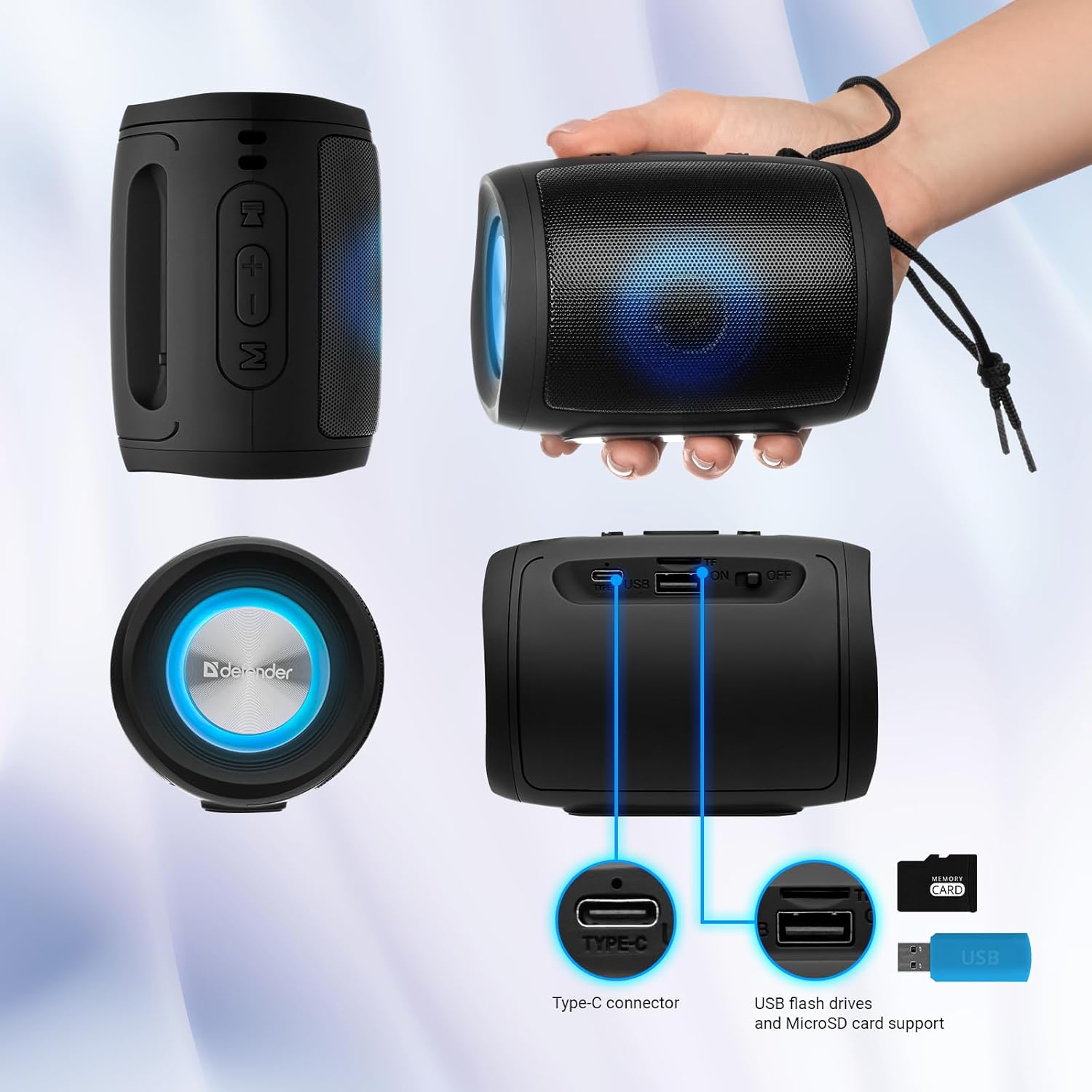
Image: A detailed diagram illustrating the Type-C connector, USB flash drive port, and MicroSD card slot on the Defender Enjoy S200 speaker.
4.5 ការហៅទូរសព្ទដោយមិនប្រើដៃ
When connected to your smartphone via Bluetooth, the speaker's built-in microphone allows for hands-free calls.
- ឆ្លើយការហៅទូរសព្ទ៖ ចុចប៊ូតុងលេង/ផ្អាក។
- បញ្ចប់ការហៅទូរសព្ទ៖ ចុចប៊ូតុងលេង/ផ្អាក។
- បដិសេធការហៅទូរសព្ទ៖ ចុចប៊ូតុង Play/Pause ឱ្យយូរ។
5. ការថែទាំ
- ការសម្អាត៖ ប្រើក្រណាត់ទន់ និងស្ងួត ដើម្បីសម្អាតផ្ទៃរបស់ឧបករណ៍បំពងសំឡេង។ កុំប្រើសារធាតុសម្អាត ឬសារធាតុរំលាយ។
- ការផ្ទុក៖ ទុកធុងបាសក្នុងកន្លែងត្រជាក់ និងស្ងួតឆ្ងាយពីពន្លឺព្រះអាទិត្យដោយផ្ទាល់ និងសីតុណ្ហភាពខ្លាំង។
- ធន់នឹងទឹក៖ The speaker has an IP20 rating, meaning it is protected against solid objects larger than 12.5mm but has no protection against water. Avoid exposure to rain, splashes, or immersion in water.
- ការថែរក្សាថ្ម៖ ដើម្បីពន្យារអាយុថ្ម សូមសាកពេញធុងបាសមុនពេលប្រើលើកដំបូង ហើយបញ្ចូលវាម្ដងទៀតយ៉ាងហោចណាស់ម្ដងក្នុងរយៈពេលបីខែ បើមិនបានប្រើជាប្រចាំ។
6. ការដោះស្រាយបញ្ហា
- គ្មានថាមពល៖ Ensure the speaker is charged. Connect the Type-C cable and allow it to charge for a few minutes before attempting to power on again.
- គ្មានសំឡេង៖ Check the volume levels on both the speaker and your connected device. Ensure the speaker is in the correct mode (Bluetooth, FM, USB, MicroSD).
- បញ្ហានៃការផ្គូផ្គងប៊្លូធូស៖ Ensure the speaker is in pairing mode. Turn off Bluetooth on your device and turn it back on. Try unpairing and re-pairing the speaker. Move closer to the speaker to ensure you are within the 10-meter range.
- ការទទួលវិទ្យុ FM មិនល្អ៖ Ensure you are in an area with good signal. The charging cable can sometimes act as an antenna; try connecting it for improved reception.
- USB/MicroSD Not Playing: ធានាបាននូវសំឡេង files are in a compatible format (e.g., MP3). Check that the USB drive or microSD card is inserted correctly and is not corrupted.
7. លក្ខណៈបច្ចេកទេស
| ឈ្មោះម៉ូដែល | សូមរីករាយជាមួយ S200 |
| លេខម៉ូដែលធាតុ | 65200 |
| ម៉ាក | ខ្សែការពារ |
| បច្ចេកវិទ្យាតភ្ជាប់ | ប៊្លូធូស 5.3, USB |
| បច្ចេកវិទ្យាទំនាក់ទំនងឥតខ្សែ | Bluetooth, Radio Frequency |
| ប្រភេទឧបករណ៍បំពងសំឡេង | ពហុព័ត៌មាន |
| ទំហំធុងបាស | ៤.៧៥ អ៊ីញ |
| ទិន្នផលថាមពល | 5 វ៉ាត់ |
| របៀបបញ្ចេញសំឡេង | ស្តេរ៉េអូ |
| ប្រភពថាមពល | ដំណើរការដោយថ្ម (រួមបញ្ចូលថ្មលីចូម-អ៊ីយ៉ុង 1) |
| លក្ខណៈពិសេស | Integrated Microphone, USB Port, Portable Bluetooth, LED Light, FM Radio, MicroSD Card Support, TWS |
| ទំហំផលិតផល (L x W x H) | 8 x 11 x 8 សង់ទីម៉ែត្រ |
| ទម្ងន់ | ២១៩ ក្រាម។ |
| ជួរអតិបរមា | 10 ម៉ែត្រ |
| ការវាយតម្លៃ IP | IP20 |
8. ការធានា និងការគាំទ្រ
8.1 ព័ត៌មានធានា
ព័ត៌មានលម្អិតនៃការធានាជាក់លាក់ជាធម្មតាត្រូវបានផ្តល់ជូនជាមួយនឹងឯកសារទិញរបស់អ្នក ឬនៅលើផ្លូវការរបស់អ្នកផលិត website. Please refer to these resources for information regarding warranty coverage and duration.
8.2 ជំនួយអតិថិជន
For technical assistance, troubleshooting beyond this manual, or inquiries about your Defender Enjoy S200 speaker, please contact Defender Global customer support. Contact information can usually be found on the product packaging, the manufacturer's webគេហទំព័រ ឬបង្កាន់ដៃទិញរបស់អ្នក។