
1. សេចក្តីផ្តើម
This manual provides detailed instructions for the proper use and maintenance of your LEAP PC3860 Stopwatch. Please read this manual thoroughly before operating the device to ensure optimal performance and longevity. This stopwatch is designed for accurate timekeeping in various activities, including sports, laboratory work, and other events requiring precise timing.
2. ផលិតផលលើសview
The LEAP PC3860 Stopwatch features a clear digital display and multiple functions for versatile time measurement. It is equipped with a durable casing and a lanyard for convenient portability.

រូបភាពទី 1: ខាងមុខ view of the LEAP PC3860 Stopwatch, showing the digital display and control buttons. A black lanyard is attached to the bottom.
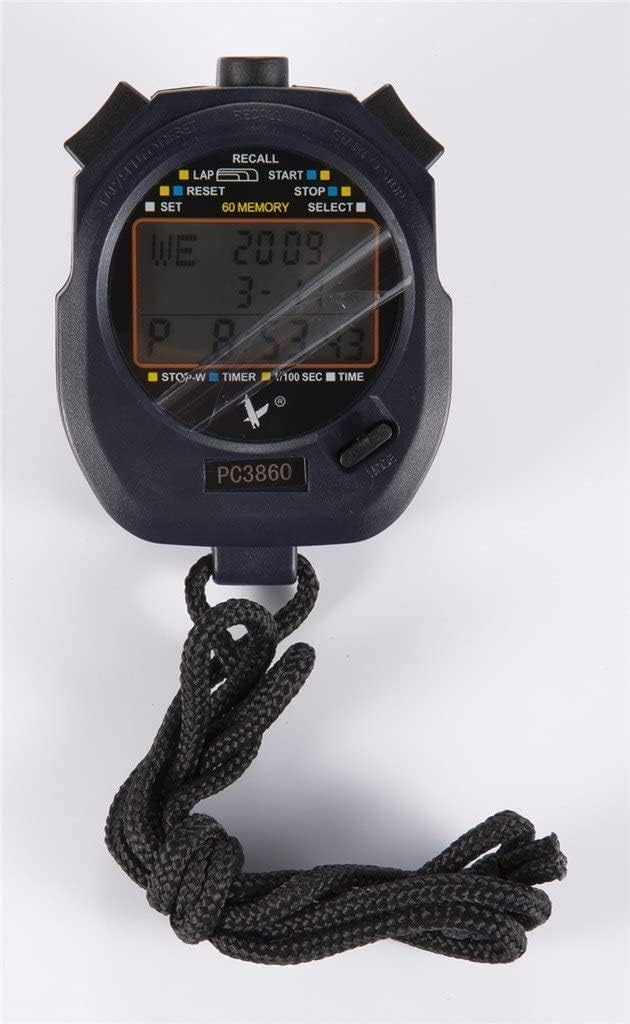
រូបភាពទី 2៖ ការបិទជិត view of the LEAP PC3860 Stopwatch display, highlighting the various indicators for LAP, START, STOP, RESET, SELECT, SET, and 60 MEMORY functions.
សមាសធាតុសំខាន់ៗ៖
- បង្ហាញ៖ Digital screen showing time, lap, split, and other mode information.
- ប៊ូតុងចាប់ផ្តើម/បញ្ឈប់៖ Initiates and pauses timing.
- LAP/RESET Button: Records lap times and resets the stopwatch.
- MODE/SELECT Button: Switches between different operating modes and selects settings.
- ប៊ូតុងកំណត់៖ Used for adjusting time and date in របៀបពេលវេលា.
- ប៊ូតុងរំលឹក៖ Accesses stored memory records.
- ខ្សែចង៖ សម្រាប់ការយកតាមខ្លួនប្រកបដោយសុវត្ថិភាព។
3. រៀបចំ
3.1 ការបើកថាមពលដំបូង
Upon first use, or after a battery replacement, the stopwatch may require initial setup. Remove any protective film from the display.
3.2 ការកំណត់ពេលវេលា និងកាលបរិច្ឆេទ
- ចុច របៀប/ជ្រើសរើស button repeatedly until the stopwatch is in របៀបពេលវេលា (displaying the current time).
- ចុចឱ្យជាប់ SET button until the time digits begin to flash.
- ប្រើ ចាប់ផ្តើម/បញ្ឈប់ ប៊ូតុងដើម្បីកែតម្រូវតួលេខភ្លឹបភ្លែតៗ (ម៉ោង នាទី វិនាទី)។
- ប្រើ LAP/កំណត់ឡើងវិញ button to move to the next digit or setting (e.g., month, day, year).
- ធ្វើជំហានទី 3 និងទី 4 ម្តងទៀតរហូតដល់ការកំណត់ដែលចង់បានទាំងអស់ត្រូវបានកំណត់រចនាសម្ព័ន្ធ។
- ចុច SET ចុចប៊ូតុងម្តងទៀតដើម្បីចេញពីរបៀបការកំណត់។
4. សេចក្តីណែនាំប្រតិបត្តិការ
4.1 របៀបប្តូរ
ចុច របៀប/ជ្រើសរើស ប៊ូតុងដើម្បីរំកិលតាមរបៀបដែលមាន៖ របៀបពេលវេលា, របៀបបញ្ឈប់នាឡិកា, និង របៀបឧបករណ៍កំណត់ពេលវេលា.
4.2 Stopwatch Mode (Timing Events)
- Ensure the stopwatch is in របៀបបញ្ឈប់នាឡិកា. The display will typically show '00:00:00'.
- ចុច ចាប់ផ្តើម/បញ្ឈប់ ប៊ូតុងដើម្បីចាប់ផ្តើមពេលវេលា។
- To pause the timing, press the ចាប់ផ្តើម/បញ្ឈប់ button again. The time will freeze on the display.
- To resume timing from the paused point, press the ចាប់ផ្តើម/បញ្ឈប់ ប៊ូតុងម្តងទៀត។
- To stop and finalize the timing, press the ចាប់ផ្តើម/បញ្ឈប់ ប៊ូតុង។
- ដើម្បីកំណត់នាឡិកាកំណត់ម៉ោងឡើងវិញទៅសូន្យ សូមចុច LAP/កំណត់ឡើងវិញ ប៊ូតុងខណៈពេលដែលនាឡិកាបញ្ឈប់ត្រូវបានបញ្ឈប់។
4.3 Lap and Split Timing
The PC3860 stopwatch supports lap and split timing, allowing you to record intermediate times during an event.
- In របៀបបញ្ឈប់នាឡិកា, ចុច ចាប់ផ្តើម/បញ្ឈប់ ប៊ូតុងដើម្បីចាប់ផ្តើមពេលវេលា។
- To record a lap time, press the LAP/កំណត់ឡើងវិញ button while the stopwatch is running. The lap time will be displayed briefly, and the main timer will continue running in the background.
- Repeat step 2 for subsequent laps. The stopwatch can store up to 60 lap/split records.
- To stop the overall timing, press the ចាប់ផ្តើម/បញ្ឈប់ ប៊ូតុង។
- ទៅ view recorded lap and split times, press the រំលឹកឡើងវិញ ប៊ូតុង។ ប្រើ ចាប់ផ្តើម/បញ្ឈប់ និង LAP/កំណត់ឡើងវិញ ប៊ូតុងដើម្បីរុករកតាមរយៈកំណត់ត្រាដែលបានរក្សាទុក។
- ចុច រំលឹកឡើងវិញ button again to exit memory recall mode.
- To clear all stored memory, ensure the stopwatch is stopped and not in recall mode, then press and hold the LAP/កំណត់ឡើងវិញ ប៊ូតុង។
4.4 Timer Mode (Countdown)
- ចុច របៀប/ជ្រើសរើស button until you reach របៀបឧបករណ៍កំណត់ពេលវេលា. The display will show a countdown time, or '00:00:00' if not set.
- ដើម្បីកំណត់ពេលវេលារាប់ថយក្រោយ សូមចុចឱ្យជាប់ SET ប៊ូតុងរហូតដល់លេខភ្លឹបភ្លែតៗ។
- ប្រើ ចាប់ផ្តើម/បញ្ឈប់ ប៊ូតុងដើម្បីកែតម្រូវតួលេខភ្លឹបភ្លែតៗ (ម៉ោង នាទី វិនាទី)។
- ប្រើ LAP/កំណត់ឡើងវិញ ប៊ូតុងដើម្បីផ្លាស់ទីទៅលេខបន្ទាប់។
- ចុច SET button again to confirm the countdown time.
- ចុច ចាប់ផ្តើម/បញ្ឈប់ ប៊ូតុងដើម្បីចាប់ផ្តើមការរាប់ថយក្រោយ។
- To pause the countdown, press the ចាប់ផ្តើម/បញ្ឈប់ ប៊ូតុង។ ចុចម្តងទៀតដើម្បីបន្ត។
- When the countdown reaches zero, an alarm will sound (if enabled).
- To reset the timer to the preset time, press the LAP/កំណត់ឡើងវិញ button while the timer is stopped.
5. ការថែទាំ
5.1 ការសម្អាត
To clean the stopwatch, use a soft, dry cloth. For stubborn dirt, a slightly damp cloth with mild soap can be used, followed by immediate drying. Avoid using abrasive cleaners, solvents, or harsh chemicals, as these can damage the display or casing.
5.2 ការផ្ទុក
Store the stopwatch in a cool, dry place away from direct sunlight and extreme temperatures. If storing for an extended period, consider removing the battery to prevent leakage, although specific battery type information is not provided.
5.3 ការជំនួសថ្ម
When the display becomes dim or unresponsive, the battery may need replacement. This typically requires opening the back casing of the stopwatch. It is recommended to have battery replacement performed by a qualified technician to avoid damaging the internal components or compromising water resistance (if applicable).
6. ការដោះស្រាយបញ្ហា
- ការបង្ហាញគឺទទេ ឬស្រអាប់៖
Check the battery. If the battery is low, replace it. Ensure the stopwatch is not exposed to extreme cold, which can temporarily affect LCD performance. - ប៊ូតុងមិនឆ្លើយតប៖
Try resetting the stopwatch by removing and reinserting the battery (if accessible). Ensure no debris is lodged around the buttons. - ពេលវេលា/កាលបរិច្ឆេទមិនត្រឹមត្រូវ៖
Follow the instructions in Section 3.2 to reset the time and date. - Stopwatch not timing accurately:
Ensure the stopwatch is in របៀបបញ្ឈប់នាឡិកា and has been reset before starting a new timing session. If issues persist, contact customer support.
7. លក្ខណៈបច្ចេកទេស
| លក្ខណៈ | លម្អិត |
|---|---|
| ម៉ាក | លោត |
| លេខម៉ូដែល | PC3860 (19280086-101) |
| ប្រភេទបង្ហាញ | ឌីជីថល |
| សម្ភារៈ | Fiber, Metal |
| ទម្ងន់ | ០៩ គីឡូក្រាម |
| វិមាត្រកញ្ចប់ | 17.78 x 10.16 x 3.05 សង់ទីម៉ែត្រ |
| លក្ខណៈពិសេស | Stopwatch, 60 Memory |
| UPC | 748079196933 |
8. ការធានា និងការគាំទ្រ
LEAP products are manufactured to high-quality standards. For information regarding warranty coverage, please refer to the warranty card included with your purchase or contact the retailer where the product was acquired. For technical support or further assistance, please reach out to the official LEAP customer service channels, typically found on the product packaging or the brand's official webគេហទំព័រ។