
Maxcom MM471
Maxcom MM471 Senior Portable Phone User Manual
1. សេចក្តីផ្តើម
This manual provides detailed instructions for the safe and efficient use of your Maxcom MM471 Senior Portable Phone. Designed with ease of use in mind, this device features large characters, big buttons, and an ergonomic design, making it ideal for seniors. Please read this manual thoroughly before operating your phone.

រូបភាពទី 1: ផ្នែកខាងមុខ view of the Maxcom MM471 Senior Portable Phone.
2. រៀបចំ
2.1 មាតិកាកញ្ចប់
ត្រូវប្រាកដថាធាតុទាំងអស់មាននៅក្នុងកញ្ចប់៖
- Maxcom MM471 Senior Portable Phone
- ថ្ម
- អាដាប់ទ័រសាកថ្ម
- សៀវភៅណែនាំអ្នកប្រើប្រាស់
2.2 ការបញ្ចូលស៊ីមកាត និងថ្ម
The Maxcom MM471 supports dual SIM cards. Follow these steps to install your SIM card(s) and battery:
- Turn off the phone and disconnect it from any power source.
- យកគម្របខាងក្រោយរបស់ទូរសព្ទចេញដោយប្រុងប្រយ័ត្ន។
- Insert your SIM card(s) into the designated slot(s) with the gold contacts facing down.
- បញ្ចូលថ្ម ធានាថាទំនាក់ទំនងតម្រឹមត្រឹមត្រូវ។
- ជំនួសគម្របខាងក្រោយរហូតទាល់តែវាចុចចូលកន្លែងដោយសុវត្ថិភាព។

រូបភាពទី 2: ខាងក្រោយ view with battery and SIM card area.
2.3 ការសាកថ្ម
មុនពេលប្រើលើកដំបូង សូមសាកថ្មទូរស័ព្ទឱ្យពេញ៖
- Connect the charging adapter to the phone's charging port or place the phone in its charging dock.
- ដោតអាដាប់ទ័រទៅក្នុងព្រីភ្លើង។
- សូចនាករថ្មនៅលើអេក្រង់នឹងបង្ហាញស្ថានភាពសាក។
- នៅពេលសាកពេញ សូមផ្តាច់ឆ្នាំងសាក។
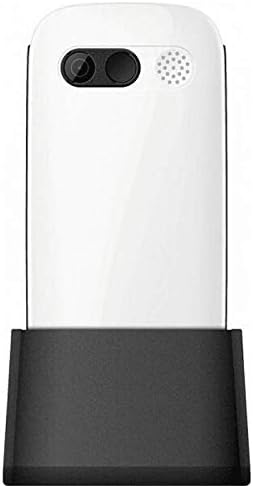
Figure 3: Phone in charging dock.
3. សេចក្តីណែនាំប្រតិបត្តិការ
3.1 ការបើក/បិទ
- ដើម្បីបើកដំណើរការ៖ ចុចឱ្យជាប់ ថាមពល/បញ្ចប់ការហៅ ប៊ូតុងរហូតដល់អេក្រង់ភ្លឺ។
- ដើម្បីបិទថាមពល៖ ចុចឱ្យជាប់ ថាមពល/បញ្ចប់ការហៅ button until the power-off options appear, then select 'Power Off'.
3.2 ការហៅទូរសព្ទ
- ពីអេក្រង់ដើម សូមបញ្ចូលលេខទូរស័ព្ទដោយប្រើប៊ូតុងចុច។
- ចុច ហៅ ប៊ូតុង (ប៊ូតុងពណ៌បៃតង) ដើម្បីចាប់ផ្តើមការហៅ។
- ដើម្បីបញ្ចប់ការហៅទូរសព្ទសូមចុច ថាមពល/បញ្ចប់ការហៅ ប៊ូតុង (ប៊ូតុងក្រហម)។
៤.១ ការទទួលការហៅទូរសព្ទ
- When a call comes in, the phone will ring and display the caller's number or name.
- ចុច ហៅ button (green button) to answer.
- ដើម្បីបដិសេធការហៅសូមចុចប៊ូតុង ថាមពល/បញ្ចប់ការហៅ ប៊ូតុង (ប៊ូតុងក្រហម)។
៤.៣ ការផ្ញើ និងទទួលសារ
- រុករកទៅម៉ឺនុយ 'សារ' ពីអេក្រង់មេ។
- Select 'New Message' to compose a text message.
- Enter the recipient's number and your message.
- ចុច 'ផ្ញើ'។
- សារដែលបានទទួលនឹងបង្ហាញនៅក្នុង 'ប្រអប់ទទួល' របស់អ្នក។
២.៤ ការគ្រប់គ្រងទំនាក់ទំនង
The phonebook can store up to 300 names.
- Go to the 'Contacts' or 'Phonebook' menu.
- Select 'Add New Contact' to save a new number.
- បញ្ចូលឈ្មោះ និងលេខទូរស័ព្ទ បន្ទាប់មករក្សាទុក។
- To call a contact, select their name from the list and press the ហៅ ប៊ូតុង។
3.6 ការប្រើប្រាស់ប៊្លូធូស
ដើម្បីភ្ជាប់ទៅឧបករណ៍ប៊្លូធូស៖
- ចូលទៅកាន់ 'ការកំណត់' > 'ប៊្លូធូស'។
- បើក 'បើក' ប៊្លូធូស។
- ជ្រើសរើស 'ស្វែងរក devices' to find available Bluetooth accessories.
- Select the desired device and pair them.
3.7 ការប្រើប្រាស់ពិល
The phone includes a built-in flashlight for convenience.
- To turn on the flashlight, locate the dedicated flashlight button (if available) or access it through the 'Tools' menu.
- Press the button or select the option again to turn it off.
4. ការថែទាំនិងការថែទាំ
To ensure the longevity and optimal performance of your Maxcom MM471 phone, follow these maintenance guidelines:
- ការសម្អាត៖ ប្រើក្រណាត់ទន់ និងស្ងួត ដើម្បីសម្អាតផ្ទៃទូរស័ព្ទ។ ជៀសវាងសារធាតុសម្អាតរាវ ឬវត្ថុសំណឹក។
- សីតុណ្ហភាព៖ កុំដាក់ទូរសព្ទក្នុងសីតុណ្ហភាពខ្លាំង (ក្តៅ ឬត្រជាក់) ឬពន្លឺថ្ងៃដោយផ្ទាល់ក្នុងរយៈពេលយូរ។
- សំណើម៖ Keep the phone dry. Do not immerse it in water or expose it to high humidity.
- ការផ្ទុក៖ When not in use for a long time, store the phone in a cool, dry place with the battery partially charged.
- ផលប៉ះពាល់៖ ជៀសវាងការធ្លាក់ទូរសព្ទ ឬធ្វើឲ្យវារងការប៉ះទង្គិចខ្លាំង។
5. ការដោះស្រាយបញ្ហា
If you encounter issues with your phone, refer to the table below for common problems and solutions:
| បញ្ហា | មូលហេតុដែលអាចកើតមាន | ដំណោះស្រាយ |
|---|---|---|
| ទូរស័ព្ទមិនបើកទេ។ | ថ្មអស់ហើយ ឬមិនបានបញ្ចូលត្រឹមត្រូវ។ | សាកថ្ម។ ត្រូវប្រាកដថាបញ្ចូលថ្មបានត្រឹមត្រូវ។ |
| មិនអាចធ្វើការឬទទួលការហៅទូរសព្ទ | No network signal, SIM card not inserted, or SIM card faulty. | Check network coverage. Reinsert SIM card(s). Contact your service provider. |
| គុណភាពហៅទូរសព្ទខ្សោយ | Weak network signal, interference. | ផ្លាស់ទីទៅតំបន់ដែលមានសញ្ញាល្អជាង។ ជៀសវាងការរារាំង។ |
| ថ្មអស់លឿន | Excessive usage, background applications, old battery. | បន្ថយពន្លឺអេក្រង់។ បិទកម្មវិធីដែលមិនបានប្រើ។ សូមពិចារណាជំនួសថ្មប្រសិនបើវាចាស់។ |
| បន្ទះចុចមិនឆ្លើយតប | បញ្ហាកម្មវិធី, ការខូចខាតរាងកាយ។ | Restart the phone. If the problem persists, contact support. |
6. លក្ខណៈបច្ចេកទេស
Key technical details of the Maxcom MM471 Senior Portable Phone:
- ម៉ូដែល៖ MM471
- ម៉ាក៖ Maxcom
- ពណ៌៖ ស
- ការតភ្ជាប់៖ ប៊្លូធូស
- ការគាំទ្រស៊ីមកាត៖ ស៊ីមពីរ
- សមត្ថភាពសៀវភៅទូរស័ព្ទ៖ ឈ្មោះចំនួន ៥០
- ពេលនិយាយ៖ រហូតដល់ 14 ម៉ោង។
- ចំណុចប្រទាក់៖ ប៊ូតុងរាងកាយ
- លក្ខណៈពិសេស៖ Large characters, Big buttons, Ergonomic design, Speaker, Flashlight
7. ការធានា និងព័ត៌មានជំនួយ
For detailed warranty information, please refer to the warranty card included with your product or visit the official Maxcom website. For technical support or service inquiries, please contact your retailer or the manufacturer's customer service department.
Ask a question about this manual
Ask about setup, troubleshooting, compatibility, parts, safety, or missing instructions. Manuals+ will review the question and use this page’s manual context to help answer it.