
1. សេចក្តីណែនាំ និងព័ត៌មានសុវត្ថិភាព
Thank you for choosing the ANENG V8 Digital Multimeter. This device is designed for safe and accurate measurement of AC/DC voltage, AC/DC current, resistance, capacitance, frequency, temperature, diode, continuity, and battery testing. Please read this manual thoroughly before use to ensure proper operation and to prevent potential hazards.
1.1 ការប្រុងប្រយ័ត្នសុវត្ថិភាព
- Always ensure the multimeter is in good working condition before use. Inspect test leads for damage.
- កុំអនុវត្ត voltage or current that exceeds the maximum rated values for the multimeter.
- អនុវត្តការប្រុងប្រយ័ត្នខ្លាំងនៅពេលធ្វើការជាមួយវ៉ុលtagលើសពី 36V DC ឬ 25V AC RMS ព្រោះវាអាចបង្កគ្រោះថ្នាក់ឆក់។
- តែងតែផ្តាច់ថាមពលទៅសៀគ្វី ហើយបញ្ចេញវ៉ុលខ្ពស់ទាំងអស់។tage capacitors មុនពេលវាស់ភាពធន់ ការបន្ត diodes ឬ capacitance ។
- ត្រូវប្រាកដថាកុងតាក់រ៉ូតារីសស្ថិតនៅក្នុងទីតាំងត្រឹមត្រូវសម្រាប់ការវាស់វែងដែលចង់បាន មុនពេលភ្ជាប់ការធ្វើតេស្តនាំទៅសៀគ្វី។
- Do not operate the multimeter in explosive gas, vapor, or dusty environments.
- សូមប្តូរថ្មភ្លាមៗ នៅពេលដែលសូចនាករថ្មទាបលេចឡើង ដើម្បីធានាបាននូវការអានត្រឹមត្រូវ។
2. ផលិតផលលើសview
2.1 មាតិកាកញ្ចប់
The ANENG V8 Digital Multimeter package typically includes the following items:
- ANENG V8 Digital Multimeter
- តេស្តនាំមុខ (ក្រហម និងខ្មៅ)
- ការស៊ើបអង្កេតសីតុណ្ហភាព
- កាបូបស្ពាយ
- សៀវភៅណែនាំអ្នកប្រើប្រាស់

Image: ANENG V8 Digital Multimeter with its standard accessories, including test leads, a temperature probe, and a protective carrying case.
2.2 ការត្រួតពិនិត្យ និងការបង្ហាញ
The multimeter features an 8000-count LCD backlight display for clear readings in various lighting conditions. Key controls include a rotary switch for function selection and buttons for range, data hold, and other features.

រូបភាព៖ លម្អិត view of the multimeter's front panel, highlighting the LCD screen, the central rotary selector, and various control buttons.
3. រៀបចំ
3.1 ការដំឡើងថ្ម
The ANENG V8 Digital Multimeter is powered by batteries. To install or replace batteries:
- ត្រូវប្រាកដថាឧបករណ៍វាស់ស្ទង់ម៉ាល់ទីម៉ែត្រត្រូវបានបិទ ហើយផ្តាច់ខ្សែសាកល្បងទាំងអស់។
- កំណត់ទីតាំងគម្របប្រអប់ថ្មនៅខាងក្រោយឧបករណ៍។
- ប្រើទួណឺវីសដើម្បីដោះវីសដែលភ្ជាប់គម្របថ្ម។
- ដោះគម្រប។
- Insert new batteries, observing the correct polarity (+ and -) as indicated inside the compartment. The device typically uses AA batteries.
- ជំនួសគម្របថ្ម ហើយធានាវាដោយវីស។
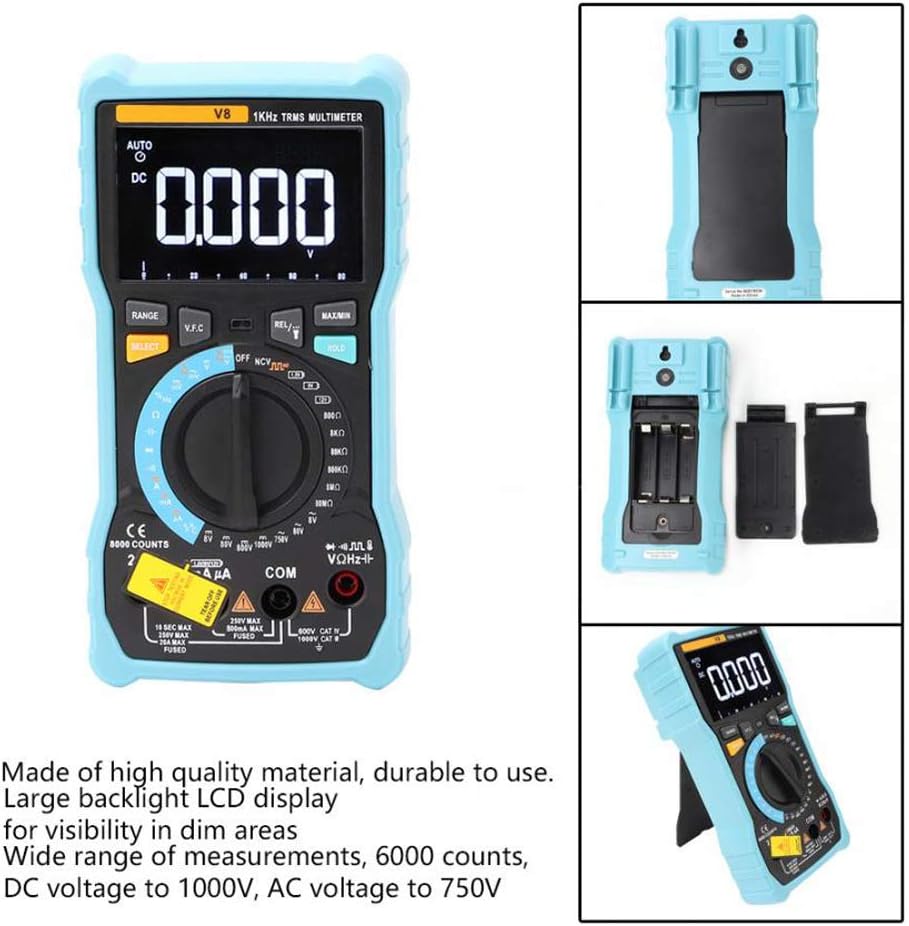
រូបភាព៖ ខាងក្រោយ view of the multimeter with the battery compartment open, illustrating the correct placement for three AA batteries.
4. សេចក្តីណែនាំប្រតិបត្តិការ
Before any measurement, ensure the test leads are correctly inserted into the input jacks and the rotary switch is set to the appropriate function.
4.1 Measuring DC/AC Voltage
- Set the rotary switch to the 'V–' (DC Voltage) or 'V~' (AC Voltage) ទីតាំង។
- Connect the red test lead to the 'VΩmA' jack and the black test lead to the 'COM' jack.
- ភ្ជាប់តេស្តនាំមុខស្របទៅនឹងសៀគ្វី ឬសមាសធាតុដែលអ្នកចង់វាស់។
- អាន voltagតម្លៃនៅលើអេក្រង់
៣.៥ ការវាស់ចរន្ត DC/AC
- Set the rotary switch to the 'A–' (DC Current) or 'A~' (AC Current) position. For milliampere (mA) ឬ microampere (µA) measurements, select the corresponding range.
- For current up to 800mA, connect the red test lead to the 'VΩmA' jack. For current up to 20A, connect the red test lead to the '20A' jack. Connect the black test lead to the 'COM' jack.
- Disconnect power to the circuit. Open the circuit where you want to measure current. Connect the multimeter in series with the circuit.
- បញ្ចូលថាមពលទៅសៀគ្វី ហើយអានតម្លៃចរន្តនៅលើអេក្រង់។
4.3 ការវាស់ស្ទង់ភាពធន់
- Set the rotary switch to the 'Ω' (Resistance) position.
- Connect the red test lead to the 'VΩmA' jack and the black test lead to the 'COM' jack.
- Ensure the circuit is de-energized and all capacitors are discharged. Connect the test leads across the component to be measured.
- អានតម្លៃធន់ទ្រាំនៅលើការបង្ហាញ។
4.4 NCV (Non-Contact Voltagង) ការរកឃើញ
- Set the rotary switch to the 'NCV' position.
- Move the top end of the multimeter near the conductor or outlet.
- The multimeter will emit an audible beep and the NCV indicator light will flash if AC voltage is detected, indicating the presence of live voltage ដោយគ្មានទំនាក់ទំនងរាងកាយ។
៤.១៨ ការវាស់សីតុណ្ហភាព
- Set the rotary switch to the '°C/°F' (Temperature) position.
- Connect the temperature probe to the 'VΩmA' and 'COM' jacks, observing polarity if applicable.
- Place the tip of the temperature probe on or near the object whose temperature you wish to measure.
- អានតម្លៃសីតុណ្ហភាពនៅលើអេក្រង់។
4.6 មុខងារផ្សេងទៀត។
- សមត្ថភាព៖ Set the rotary switch to the 'F' position. Connect leads across the discharged capacitor.
- Frequency/Duty Cycle: Set the rotary switch to the 'Hz/%' position. Connect leads to the signal source.
- ការធ្វើតេស្ត Diode៖ Set the rotary switch to the 'Diode' position. Connect leads across the diode.
- ការធ្វើតេស្តបន្ត៖ Set the rotary switch to the 'Continuity' position. Connect leads across the circuit. An audible beep indicates continuity.
- តេស្តថ្ម៖ Set the rotary switch to the 'Battery' position. Connect leads to the battery terminals (1.5V, 9V, or 12V).
- ការរក្សាទុកទិន្នន័យ៖ ចុចប៊ូតុង 'កាន់' ដើម្បីបង្កកការអានបច្ចុប្បន្ននៅលើអេក្រង់។ ចុចម្តងទៀតដើម្បីបញ្ចេញ។
- អំពូល Backlight/Flashlight៖ Press the backlight button to turn on/off the display backlight or flashlight.
- បិទដោយស្វ័យប្រវត្តិ៖ ម៉ាល់ទីម៉ែត្រនឹងបិទដោយស្វ័យប្រវត្តិបន្ទាប់ពីអសកម្មមួយរយៈ ដើម្បីសន្សំសំចៃថាមពលថ្ម។
5. ការថែទាំ
5.1 ការសម្អាត
លុបករណីជាមួយការផ្សាយពាណិជ្ជកម្មamp ក្រណាត់និងសាប៊ូស្រាល។ កុំប្រើសារធាតុសំណឹក ឬសារធាតុរំលាយ។ រក្សាស្ថានីយបញ្ចូលដោយមិនមានភាពកខ្វក់ និងសំណើម។
5.2 ការជំនួស Fuse
ប្រសិនបើមុខងារវាស់បច្ចុប្បន្នបរាជ័យ ហ្វុយហ្ស៊ីបអាចត្រូវការជំនួស។ យោងទៅលើលក្ខណៈពិសេសសម្រាប់ប្រភេទ fuse និងការវាយតម្លៃត្រឹមត្រូវ។ ការជំនួស fuse គួរតែត្រូវបានអនុវត្តដោយបុគ្គលិកដែលមានលក្ខណៈសម្បត្តិគ្រប់គ្រាន់ប៉ុណ្ណោះ។
5.3 ការផ្ទុក
When not in use for extended periods, remove the batteries to prevent leakage and store the multimeter in a dry, cool place.
6. ការដោះស្រាយបញ្ហា
- គ្មានការបង្ហាញ៖ ពិនិត្យមើលការដំឡើងថ្ម និងសាក។ ជំនួសថ្មប្រសិនបើចាំបាច់។
- ការអានមិនត្រឹមត្រូវ៖ Ensure the rotary switch is set to the correct function and range. Check test lead connections. Verify battery charge.
- ការវាស់វែងបច្ចុប្បន្នមិនដំណើរការ៖ Check the fuse. Replace if blown (refer to fuse replacement section).
- NCV រកមិនឃើញ៖ Ensure the NCV function is selected and the multimeter is close enough to the AC voltage ប្រភព។
7. លក្ខណៈបច្ចេកទេស
| ប៉ារ៉ាម៉ែត្រ | តម្លៃ |
|---|---|
| បង្ហាញ | 8000 រាប់ LCD ជាមួយ Backlight |
| ឌីស៊ីវ៉ុលtagអ៊ី (វី) | 8.000V / 80.00V / 800.0V / 1000V |
| ឌីស៊ីវ៉ុលtagអ៊ី (mV) | 800mV |
| វ៉ុលអេស៊ីtagអ៊ី (វី) | ៣៦ វី / ៤៨ វី / ៦០ វី |
| វ៉ុលអេស៊ីtagអ៊ី (mV) | 800mV |
| ចរន្ត DC (A) | 8.000A / 20.00A |
| ចរន្ត DC (mA) | 8.000mA / 80.00mA / 800.0mA |
| ចរន្ត DC (µA) | 800µA / 8000µA |
| ចរន្តអគ្គិសនី AC (ក) | 8.000A / 20.00A |
| ចរន្តអគ្គិសនី AC (mA) | 8.000mA / 80.00mA / 800.0mA |
| ចរន្ត AC (µA) | 800µA / 8000µA |
| ការតស៊ូ | 800.0Ω / 8.000kΩ / 80.00kΩ / 800.0kΩ / 8.000MΩ / 80.00MΩ |
| សមត្ថភាព | 9.999nF / 99.99nF / 999.9nF / 9.999µF / 99.99µF / 999.9µF / 9.999mF / 99.99mF |
| ប្រេកង់ | 9.999Hz / 99.99Hz / 999.9Hz / 9.999kHz / 99.99kHz / 999.9kHz / 9.999MHz |
| វដ្តកាតព្វកិច្ច | 1% ~ 99% |
| ជួរសីតុណ្ហភាព | -20°C ~ 1000°C (-4°F ~ 1832°F) |
| តេស្តថ្ម | ៣៦ វី / ៤៨ វី / ៦០ វី |
| ជួរ | សៀវភៅដៃ / ស្វ័យប្រវត្តិ |
| អត្រាធ្វើបច្ចុប្បន្នភាព | 3 ដង / វិនាទី |
| RMS ពិត | បាទ |
| ការរក្សាទុកទិន្នន័យ | បាទ |
| អំពូល Backlight / ពិល | បាទ |
| ការជូនដំណឹងអំពីថ្មទាប | បាទ |
| បិទដោយស្វ័យប្រវត្តិ | បាទ |
| សម្ភារៈ | ABS / PVC |
| ប្រភពថាមពល | ថាមពលថ្ម |
8. ការធានា និងការគាំទ្រ
This product is covered by a standard manufacturer's warranty against defects in materials and workmanship. Please refer to the warranty card included with your purchase for specific terms and conditions. For technical support or service inquiries, please contact your retailer or the manufacturer's customer service department.
9. វីដេអូផលិតផលផ្លូវការ
មិនមានវីដេអូផលិតផលផ្លូវការពីអ្នកលក់ដែលអាចរកបានសម្រាប់ការបង្កប់នៅពេលនេះទេ។