
TRACEABLE Excursion-Trac
សៀវភៅណែនាំអ្នកប្រើប្រាស់ទែម៉ូម៉ែត្រកត់ត្រាទិន្នន័យ Excursion-Trac ដែលអាចតាមដានបាន
Model: Excursion-Trac
សេចក្តីផ្តើម
The Traceable Excursion-Trac Data Logger Thermometer is designed for precise temperature monitoring and data recording. This device simultaneously displays current, minimum, and maximum temperatures, and features a rolling memory for extensive data storage. It is equipped with a submersible probe and offers customizable alarm functions to ensure critical temperature conditions are maintained and recorded.
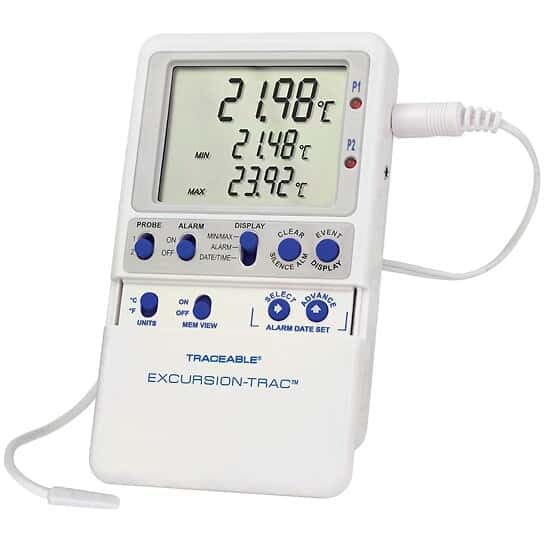
Image: The Traceable Excursion-Trac Data Logger Thermometer, showing its digital display and connected bullet probe.
មាតិកាកញ្ចប់
ផ្ទៀងផ្ទាត់ថាធាតុទាំងអស់មានវត្តមាននៅពេលវេចខ្ចប់៖
- Traceable Excursion-Trac Data Logger Thermometer Unit
- Bullet Probe with 10-ft (3-m) Cable
- USB Flash Drive
- Flip-Open Stand
- Hook-and-Loop Strips
- Magnetic Strips
- Wall-Mount Receptacle
- ថ្ម (ដំឡើងជាមុន ឬដាច់ដោយឡែក)
- NIST-Traceable Calibration Certificate with Data
រៀបចំ
- ការដំឡើងថ្ម៖ If batteries are not pre-installed, open the battery compartment on the back of the unit and insert the specified batteries, observing correct polarity.
- ការតភ្ជាប់ការស៊ើបអង្កេត៖ Connect the bullet probe cable to the designated port on the thermometer unit. Ensure a secure connection.
- ទីតាំងដំបូង៖ Position the thermometer unit using the flip-open stand for a benchtop, or utilize the hook-and-loop strips, magnetic strips, or wall-mount receptacle for secure placement. The 10-ft (3-m) submersible micro-cable allows the probe to be placed in the desired monitoring location, even permitting doors to close over the cable.
- បើកថាមពល៖ Press the power button (if available) or ensure the unit is active. The display should illuminate, showing current temperature readings.
សេចក្តីណែនាំប្រតិបត្តិការ
ប្រតិបត្តិការមូលដ្ឋាន
- បង្ហាញ៖ The LCD simultaneously shows the current temperature, minimum recorded temperature (MIN), and maximum recorded temperature (MAX).
- ឯកតា៖ Use the 'UNITS' button to toggle between Celsius (°C) and Fahrenheit (°F) temperature scales.
- ការចងចាំ View: The 'MEM VIEW' function allows review នៃទិន្នន័យដែលបានរក្សាទុក។
ការកត់ត្រាទិន្នន័យ
- The device features rolling memory, capable of retaining the most recent 525,600 temperature observations.
- ការផ្ទេរទិន្នន័យ៖ To transfer recorded data, insert the provided USB flash drive into the unit's USB port. The data will be saved as a CSV file, accessible on any computer without special software.
- ជម្រះអង្គចងចាំ៖ After downloading data and alarm events, the memory can be cleared to continue recording new data. Refer to the device's specific buttons (e.g., 'CLEAR') for this function.
មុខងាររោទិ៍
- The thermometer allows setting limits for and storing up to 10 unique alarm events.
- ការកំណត់ម៉ោងរោទិ៍៖ Use the 'ALARM' and 'SELECT/ADVANCE' buttons to set desired high and low temperature alarm thresholds.
- Smart-Alarm Function: The Smart-Alarm provides both visual and audible alerts. It continues to alert even if conditions return to the normal temperature range, ensuring that any excursion is noted.
- សំឡេងរោទិ៍ស្ងាត់៖ An 'ALARM SILENCE' button is available to temporarily mute audible alerts.
ថែទាំ
- ការសម្អាត៖ ជូតសម្អាតគ្រឿងជាមួយការផ្សាយពាណិជ្ជកម្មamp cloth. Do not submerge the main unit in water. The bullet probe is submersible and can be cleaned as needed.
- ការជំនួសថ្ម៖ When the battery indicator appears or the unit fails to power on, replace the batteries. Refer to the battery compartment for the correct battery type.
- ការថែរក្សាការស៊ើបអង្កេត៖ Handle the probe and its cable with care to prevent damage. Avoid sharp bends or excessive pulling on the cable.
ការដោះស្រាយបញ្ហា
| បញ្ហា | មូលហេតុដែលអាចកើតមាន | ដំណោះស្រាយ |
|---|---|---|
| ឯកតាមិនបើក ឬអេក្រង់ទទេ។ | ថ្មងាប់ ឬដំឡើងមិនត្រឹមត្រូវ។ | ប្តូរថ្ម ធានាប៉ូលត្រឹមត្រូវ។ |
| ការអានសីតុណ្ហភាពមិនត្រឹមត្រូវ។ | Probe not properly connected or damaged. | Ensure probe is securely connected. Inspect probe and cable for visible damage. |
| Data not transferring to USB drive. | USB drive not properly inserted or full. | Re-insert USB drive. Ensure the drive has sufficient space. Try a different USB drive if available. |
| Alarm not sounding or not clearing. | Alarm settings incorrect or alarm silenced. | Verify alarm thresholds. Check if the alarm has been manually silenced. |
លក្ខណៈបច្ចេកទេស
| លក្ខណៈ | លម្អិត |
|---|---|
| លេខម៉ូដែល | Excursion-Trac |
| ជួរសីតុណ្ហភាព | –58 to 158 Degrees Fahrenheit (-50 to 70 Degrees Celsius) |
| ដំណោះស្រាយ | 0.01 ដឺក្រេ |
| ភាពត្រឹមត្រូវ | 0.25 អង្សាសេ |
| សមត្ថភាពកត់ត្រាទិន្នន័យ | 525,600 temperature observations (rolling memory) |
| ការតភ្ជាប់ | USB (for CSV data transfer) |
| ប្រភេទបង្ហាញ | អេក្រង់ LCD |
| លក្ខណៈពិសេស | Alarm (Smart-Alarm function) |
| ប្រភេទនៃការស៊ើបអង្កេត | Bullet Probe, Submersible, 10-ft (3-m) cable |
| សម្ភារៈ | ផ្លាស្ទិច |
| ការថែរក្សាផលិតផល | ជូតស្អាត |
| វិញ្ញាបនប័ត្រ | NIST-ការក្រិតតាមខ្នាតដែលអាចតាមដានបាន។ |
ការគាំទ្រ និងការធានា
For technical assistance, product inquiries, or warranty information, please contact the manufacturer, Cole-Parmer, or visit their official website. Specific warranty details were not provided in the product data.
ក្រុមហ៊ុនផលិត៖ COLE-PARMER
ម៉ាក៖ គួរឱ្យអស់សំណើច
ការគាំទ្រតាមអ៊ីនធឺណិត៖ www.coleparmer.com
Ask a question about this manual
Ask about setup, troubleshooting, compatibility, parts, safety, or missing instructions. Manuals+ will review the question and use this page’s manual context to help answer it.