
1. ផលិតផលលើសview
The TP-Link Archer T4U Plus is an AC1300 Dual Band Wireless USB Adapter designed to provide high-speed Wi-Fi connectivity for desktop computers. It supports the 802.11ac Wi-Fi standard, offering speeds of up to 867 Mbps on the 5 GHz band and 400 Mbps on the 2.4 GHz band. Equipped with dual high-gain antennas and a USB 3.0 interface, it aims to enhance wireless range and data transfer efficiency.

The TP-Link Archer T4U Plus USB WiFi Adapter, featuring two high-gain antennas and a USB 3.0 cable for connection to a computer.
2. មាតិកាកញ្ចប់
ផ្ទៀងផ្ទាត់ថាកញ្ចប់របស់អ្នកមានធាតុដូចខាងក្រោម៖
- អាដាប់ទ័រ USB ឥតខ្សែ AC1300 Dual-Gain High-Gain Wireless (Archer T4U Plus)
- ខ្សែ USB 3.0 ប្រវែង 1 ម៉ែត្រ
- ការណែនាំអំពីការដំឡើងរហ័ស
- Resource CD (for drivers)
3. ការណែនាំអំពីការដំឡើង
3.1 ការដំឡើងផ្នែករឹង
- ស្រាយអាដាប់ធ័រ៖ Carefully remove the Archer T4U Plus adapter and its USB cable from the packaging.
- ភ្ជាប់ខ្សែ USB៖ Connect one end of the provided 1-meter USB 3.0 cable to the USB 3.0 port on the Archer T4U Plus adapter.
- ភ្ជាប់ទៅកុំព្យូទ័រ៖ Plug the other end of the USB 3.0 cable into an available USB 3.0 port on your desktop computer. For optimal performance, use a USB 3.0 port (typically blue inside).
- ដាក់អាដាប់ទ័រ៖ Place the adapter in a location that allows for good signal reception, ideally away from obstructions. The adjustable antennas can be rotated and angled for best performance.

The Archer T4U Plus adapter shown connected to a USB port via its included cable, illustrating its desktop placement.
3.2 ការដំឡើងកម្មវិធីបញ្ជា
The Archer T4U Plus requires drivers to function correctly. Drivers can be installed via the included Resource CD or by downloading them from the TP-Link webគេហទំព័រ។
For Windows Operating Systems (Windows 11/10/8.1/8/7/XP):
- ការប្រើប្រាស់ស៊ីឌីធនធាន៖ Insert the Resource CD into your computer's CD-ROM drive. Follow the on-screen instructions to install the drivers.
- Downloading from TP-Link Webគេហទំព័រ៖ If your computer lacks a CD-ROM drive, visit the official TP-Link support website, search for "Archer T4U Plus", and download the latest drivers for your specific Windows version. Run the downloaded installer and follow the prompts.
- Automatic Installation (Windows 10/11): In some cases, Windows 10 or 11 may automatically detect and install the necessary drivers upon connecting the adapter. Verify installation in Device Manager under "Network Adapters".
For Mac OS (10.15 and earlier):
- Downloading from TP-Link Webគេហទំព័រ៖ ចូលទៅកាន់ការគាំទ្រ TP-Link ផ្លូវការ website, search for "Archer T4U Plus", and download the latest drivers for your Mac OS version.
- ដំឡើង Drivers៖ បើកឯកសារដែលបានទាញយក file and follow the installation instructions. You may need to restart your computer after installation.
4. សេចក្តីណែនាំប្រតិបត្តិការ
4.1 ការភ្ជាប់ទៅបណ្តាញឥតខ្សែ
Once the drivers are successfully installed, you can connect to a Wi-Fi network:
- ចូលប្រើការកំណត់បណ្តាញ៖
- វីនដូ៖ ចុចលើរូបសញ្ញា Wi-Fi នៅក្នុងថាសប្រព័ន្ធ (ជ្រុងខាងក្រោមស្តាំនៃអេក្រង់)។
- Mac OS៖ ចុចលើរូបសញ្ញា Wi-Fi នៅក្នុងរបារម៉ឺនុយ (ជ្រុងខាងលើស្តាំនៃអេក្រង់)។
- ជ្រើសរើសបណ្តាញ៖ A list of available wireless networks will appear. Select your desired network (SSID).
- បញ្ចូលពាក្យសម្ងាត់៖ If prompted, enter the Wi-Fi password (security key) for your network.
- ភ្ជាប់៖ ចុច "ភ្ជាប់" ដើម្បីបង្កើតការតភ្ជាប់ឥតខ្សែ។
ប្រតិបត្តិការប្រេកង់ពីរ ៣.៥
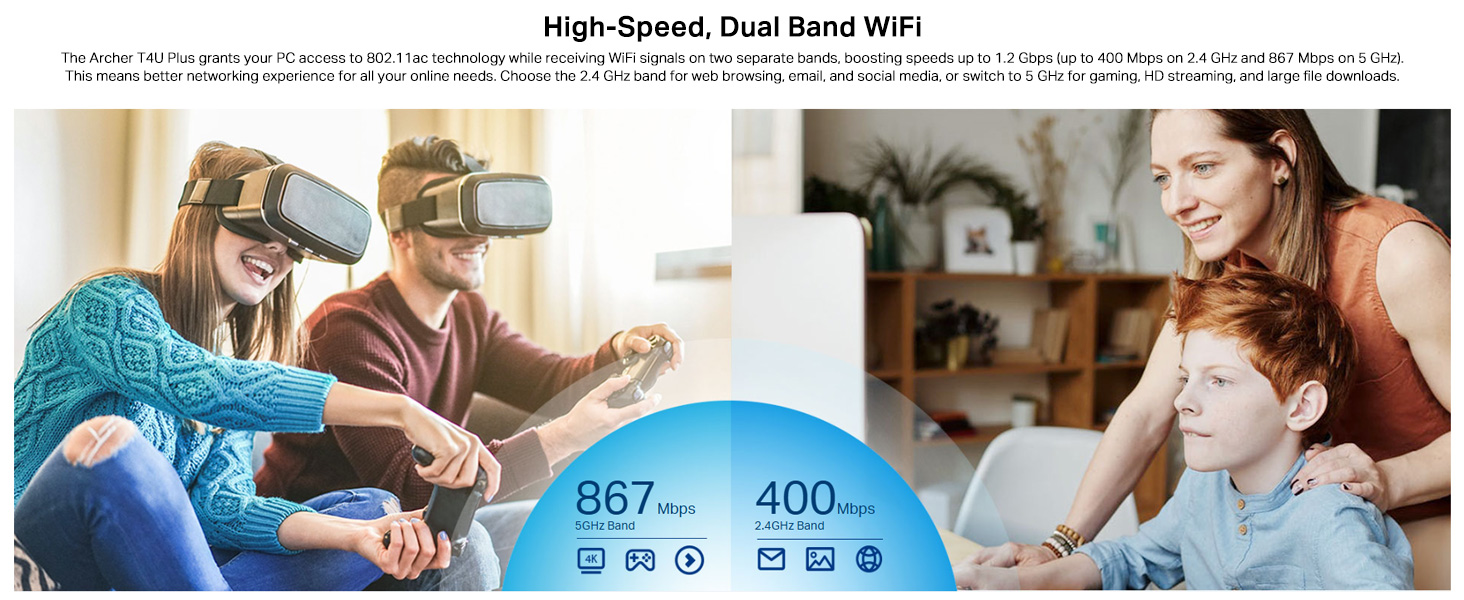
The Archer T4U Plus supports both 2.4 GHz and 5 GHz Wi-Fi bands. You can choose the band that best suits your needs:
- 2.4 GHz Band៖ Offers broader coverage and better penetration through walls, suitable for general internet use like web ការរុករក និងអ៊ីមែល។
- 5 GHz Band៖ Provides faster speeds and less interference, ideal for bandwidth-intensive activities such as online gaming, HD video streaming, and large file ការផ្ទេរ។
Your router may broadcast separate SSIDs for each band (e.g., "MyWiFi_2.4GHz" and "MyWiFi_5GHz"). Select the appropriate network from the available list.

An image illustrating the dual-band capabilities of the adapter, showing 867 Mbps on the 5GHz band for activities like 4K streaming and gaming, and 400 Mbps on the 2.4GHz band for web ការរុករក និងអ៊ីមែល។
4.3 Enhanced Coverage and MU-MIMO
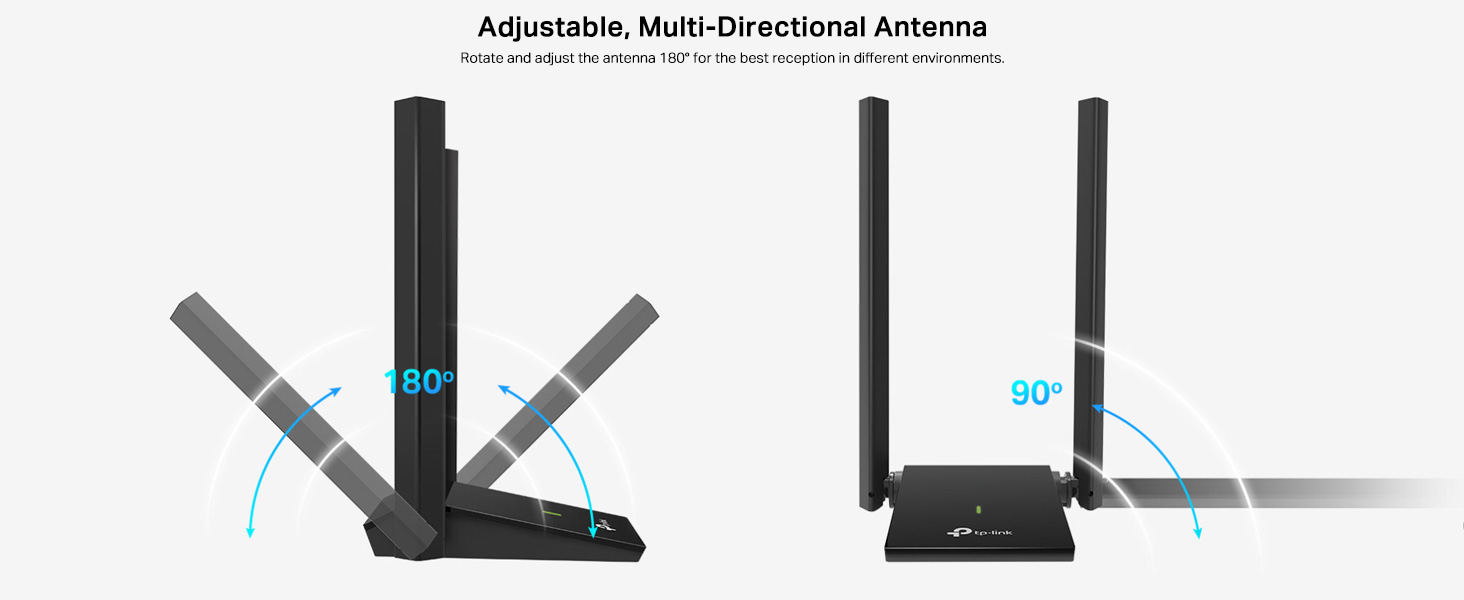
The dual high-gain antennas are designed to improve signal transmission and reception, extending your wireless coverage. For optimal performance, adjust the antennas to point towards your wireless router.
Illustrates the flexibility of the adapter's antennas, which can be rotated 180 degrees and adjusted 90 degrees for optimal signal reception.
The adapter also supports MU-MIMO technology. When used with a compatible MU-MIMO router, this technology allows the adapter to communicate with multiple devices simultaneously, improving network throughput and efficiency.
A visual representation of MU-MIMO technology, showing how the Archer T4U Plus adapter, when paired with a compatible router, can communicate with multiple devices simultaneously for improved network efficiency.
5. ការថែទាំ
- រក្សាបច្ចុប្បន្នភាពកម្មវិធីបញ្ជា៖ ពិនិត្យមើលការគាំទ្រ TP-Link ជាប្រចាំ webគេហទំព័រសម្រាប់កម្មវិធីបញ្ជាចុងក្រោយបំផុត ដើម្បីធានាបាននូវដំណើរការល្អបំផុត និងភាពឆបគ្នា។
- សម្អាតឧបករណ៍៖ ប្រើក្រណាត់ទន់ និងស្ងួតដើម្បីសម្អាតអាដាប់ទ័រ។ ជៀសវាងការប្រើទឹកសម្អាត ឬសារធាតុរំលាយ។
- ទីតាំងត្រឹមត្រូវ៖ Ensure the adapter is placed in a well-ventilated area and not covered, to prevent overheating.
- ការតភ្ជាប់សុវត្ថិភាព៖ Ensure the USB cable is securely connected to both the adapter and your computer to prevent intermittent disconnections.
6. ការដោះស្រាយបញ្ហា
- គ្មានការភ្ជាប់ Wi-Fi៖
- Ensure the adapter is properly connected to a USB port.
- Verify that the drivers are correctly installed. Check Device Manager (Windows) or System Information (Mac OS) for the adapter's status.
- ចាប់ផ្ដើមកុំព្យូទ័រ និងរ៉ោតទ័ររបស់អ្នកឡើងវិញ។
- ព្យាយាមភ្ជាប់ទៅរន្ធ USB ផ្សេង។
- ល្បឿន Wi-Fi យឺត៖
- Ensure you are connected to the 5 GHz band if available and your router supports it, for faster speeds.
- Adjust the adapter's antennas for better signal reception.
- កាត់បន្ថយការស្ទះរាងកាយរវាងអាដាប់ទ័រ និងរ៉ោតទ័ររបស់អ្នក។
- ពិនិត្យមើលការជ្រៀតជ្រែកពីឧបករណ៍ផ្សេងទៀត (ឧទាហរណ៍ មីក្រូវ៉េវ ទូរស័ព្ទឥតខ្សែ)។
- Update your adapter's drivers to the latest version.
- ការផ្តាច់ទំនាក់ទំនងញឹកញាប់៖
- Ensure the USB cable is not loose.
- សាកល្បងរន្ធ USB ផ្សេង ល្អជាងច្រក USB 3.0 ។
- Check for updated drivers.
- Ensure the adapter is not overheating.
- បញ្ហាដំឡើងកម្មវិធីបញ្ជា៖
- Disable any antivirus or firewall software temporarily during installation.
- Download drivers directly from the official TP-Link webគេហទំព័រសម្រាប់ប្រព័ន្ធប្រតិបត្តិការជាក់លាក់របស់អ្នក។
- For Linux users, specific driver installation steps may be required, often involving command-line instructions. Refer to community forums or TP-Link's support for detailed guidance.
7. លក្ខណៈបច្ចេកទេស
| លក្ខណៈ | ការពិពណ៌នា |
|---|---|
| ម៉ាក | TP-Link |
| លេខម៉ូដែល | Archer T4U Plus |
| ចំណុចប្រទាក់ផ្នែករឹង | USB 3.0 |
| ស្តង់ដារឥតខ្សែ | 802.11ac |
| អត្រាផ្ទេរទិន្នន័យ | 1300 Mbps (867 Mbps on 5GHz, 400 Mbps on 2.4GHz) |
| អង់តែន | អង់តែនពីរដែលមានកម្លាំងខ្ពស់ 5dBi |
| ប្រព័ន្ធប្រតិបត្តិការ | Windows 11/10/8.1/8/7/XP, Mac OS 10.15 and earlier |
| វិមាត្រ (L x W x H) | 8.4L x 15.6W x 1.9H សង់ទីម៉ែត្រ |
| ទំងន់ធាតុ | 100 ក្រាម។ |
| ពណ៌ | ខ្មៅ |
8. ការធានា និងជំនួយបច្ចេកទេស
8.1 ព័ត៌មានធានា
ផលិតផលនេះភ្ជាប់មកជាមួយ ការធានារបស់ក្រុមហ៊ុនផលិតរយៈពេល 3 ឆ្នាំ។. សូមរក្សាភស្តុតាងនៃការទិញរបស់អ្នកសម្រាប់ការទាមទារធានា។
8.2 ជំនួយបច្ចេកទេស
For technical assistance, driver downloads, or further inquiries, please contact TP-Link support:
- TP-Link India Private Limited
- អាស័យដ្ឋាន៖ Green Industrial Park, Dongri Pada, Poman, Kaman-Bhiwandi Road, Vasai East, Palghar, Maharashtra – 401208
- Toll Free Contact: ១២៣ ៤
- ជំនួយអ៊ីមែល៖ support.in@tp-link.com
- ក្រុមហ៊ុនផលិត៖ TP-Link Corporation, South Building, No.5 Keyuan Road, Central Zone, Science & Technology Park, Nanshan, Shenzhen, P.R. China
For the most up-to-date support information and resources, please visit the official TP-Link webគេហទំព័រ។