
1. ផលិតផលលើសview
The Riello MG569 BWZG is a sophisticated control unit designed for reliable and efficient operation of Riello gas burners. This unit manages the ignition, flame supervision, and safety functions of the burner, ensuring optimal performance and adherence to safety standards. It is a direct replacement for several older models, offering enhanced functionality and compatibility.
1.1 ភាពឆបគ្នា។
This control unit is compatible with the following Riello burner series:
- BS1-911T1, BS1D-915T1
- BS2-912T1, BS2D-916T1
- BS3-913T1, BS3D-917T1
- BS4-914T1, BS4D-918T1
It also replaces previous control unit models including 3002949, 3002967, 569SE, 568SE, 566SE rev3, 566SE rev2, 566SE rev1, and 525SE/G.
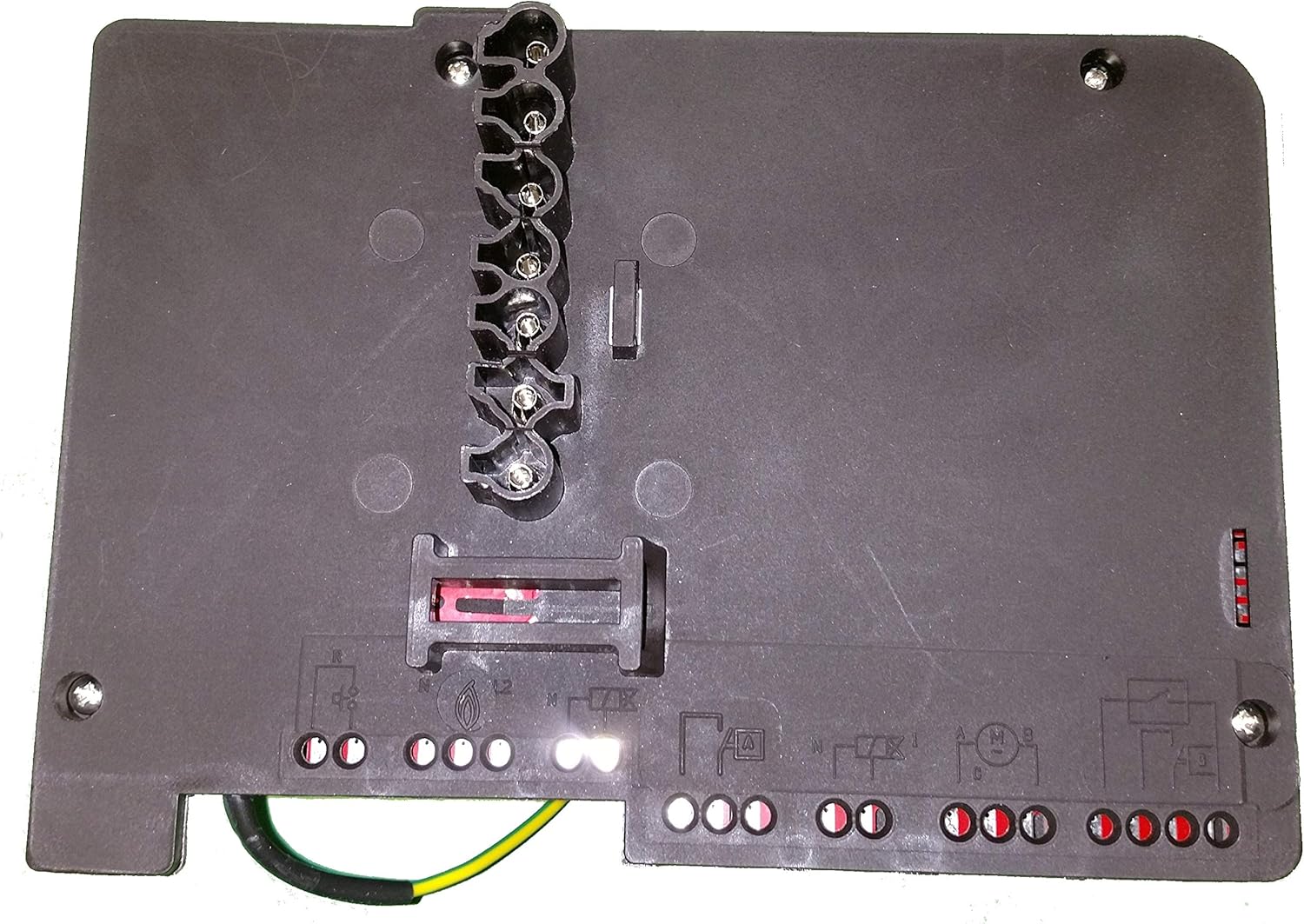
រូបភាពទី 1: កំពូល view of the Riello MG569 BWZG Control Unit, illustrating the various terminal connections for power, ignition, and burner components.
2. ការដំឡើងនិងការដំឡើង
Installation of the Riello MG569 BWZG control unit requires specialized knowledge of electrical systems and burner operation. It is strongly recommended that installation be performed by a qualified and certified technician to ensure safety and proper functionality.
2.1 ការប្រុងប្រយ័ត្នសុវត្ថិភាព
- ផ្តាច់ថាមពល៖ Always ensure the main power supply to the burner system is disconnected before beginning any installation or maintenance work.
- ផ្ទៀងផ្ទាត់ភាពត្រូវគ្នា៖ Confirm that the MG569 BWZG unit is the correct replacement or component for your specific Riello burner model.
- Follow Wiring Diagrams: Refer to the specific wiring diagrams provided with your burner system and the control unit for accurate connections. Incorrect wiring can lead to damage or hazardous conditions.
- លក្ខខណ្ឌបរិស្ថាន៖ Install the unit in a dry, protected environment, away from excessive heat, moisture, or corrosive substances.
2.2 ជំហានដំឡើង (ទូទៅ)
- យកឯកតាចាស់ចេញ៖ Carefully disconnect and remove the existing control unit, noting all wiring connections.
- Mount New Unit: Securely mount the Riello MG569 BWZG control unit in the designated position.
- ភ្ជាប់ខ្សែភ្លើង៖ Connect all electrical wires according to the burner's wiring diagram. This typically includes connections for power supply (L1, N), ignition transformer, flame sensor, motor, and fuel valve. Ensure all connections are tight and secure.
- ការដាក់ដី៖ Verify that the unit and burner system are properly grounded to prevent electrical hazards.
- ការត្រួតពិនិត្យបឋម៖ Before restoring power, double-check all connections for correctness and security.
- ស្តារថាមពលឡើងវិញ៖ Carefully restore power to the burner system.
- ប្រតិបត្តិការសាកល្បង៖ Initiate a test firing sequence to ensure the burner ignites and operates correctly, and that all safety features are functioning.

រូបភាពទី 2: មួយទៀត view of the Riello MG569 BWZG Control Unit, highlighting the terminal block for electrical connections and mounting screw locations.
3. សេចក្តីណែនាំប្រតិបត្តិការ
The Riello MG569 BWZG control unit operates automatically once installed and powered. Its primary function is to manage the burner's ignition sequence, flame supervision, and shutdown procedures in case of malfunction.
3.1 Normal Operation Sequence
- ការចាប់ផ្តើម៖ Upon receiving a call for heat, the control unit initiates a pre-purge cycle to clear the combustion chamber.
- ការបញ្ឆេះ៖ After pre-purge, the ignition transformer is activated, creating a spark, and the fuel valve opens to allow fuel into the combustion chamber.
- ការរកឃើញអណ្តាតភ្លើង៖ The flame sensor (e.g., photocell or ionization probe) detects the presence of a flame. If a flame is established within the safety time, the ignition spark is cut off, and the burner continues to operate.
- កំពុងរត់៖ The burner operates under the supervision of the control unit, which continuously monitors the flame.
- បិទ៖ When the call for heat ends, the fuel valve closes, and the burner shuts down. A post-purge cycle may follow.
3.2 ភ្លើងសញ្ញា
The control unit may feature indicator lights (LEDs) to signal its operational status or fault conditions. Consult your burner's specific documentation for a detailed explanation of these indicators. Typically, a steady green light indicates normal operation, while a flashing or red light signifies a fault.
4. ការថែទាំ
Regular maintenance is crucial for the longevity and safe operation of your burner system and its control unit. All maintenance should be performed by a qualified service technician.
4.1 កាលវិភាគថែទាំដែលបានណែនាំ
- ការត្រួតពិនិត្យប្រចាំឆ្នាំ៖ Have a qualified technician inspect the entire burner system, including the control unit, flame sensor, ignition electrodes, and fuel lines, at least once a year.
- ការសម្អាត៖ Ensure the control unit and its connections are free from dust, dirt, and moisture. Do not use abrasive cleaners or solvents.
- ការត្រួតពិនិត្យការតភ្ជាប់៖ Periodically, a technician should verify that all electrical connections to the control unit are secure and free from corrosion.
ចំណាំ៖ The control unit itself is a sealed component and is not user-serviceable. Any internal issues require replacement of the unit.
5. ការដោះស្រាយបញ្ហា
This section provides general guidance for common issues. For detailed diagnostics, consult a qualified technician.
| បញ្ហា | មូលហេតុដែលអាចកើតមាន | សកម្មភាព |
|---|---|---|
| Burner does not start / No ignition |
|
|
| Burner ignites but immediately shuts down (flame failure) |
|
|
| Control unit shows a fault code/light |
|
|
6. លក្ខណៈបច្ចេកទេស

រូបភាពទី 3: ចំហៀង view of the Riello MG569 BWZG Control Unit, displaying the product label with key technical specifications.
| លក្ខណៈ | លម្អិត |
|---|---|
| លេខម៉ូដែល | MG569 BWZG |
| ក្រុមហ៊ុនផលិត | រីឡូ |
| វ៉ុលtage | 210-230V ~ 50/60Hz |
| ហ្វុយស៊ីប | T4A 250V~ |
| វ៉ុលបញ្ឆេះtage | ៨៥kVpk |
| បច្ចុប្បន្ន | ៥ អាវុធ |
| UPC | 748810822879 |
| ភាពឆបគ្នា។ | Riello BS1, BS2, BS3D, BS4D series burners |
| Replaces Models | 3002949, 3002967, 569SE, 568SE, 566SE rev3, 566SE rev2, 566SE rev1, 525SE/G |
7. ព័ត៌មានធានា
Specific warranty terms for the Riello MG569 BWZG control unit are typically provided by the seller or manufacturer at the time of purchase. Please retain your proof of purchase for warranty claims.
Information regarding the availability of spare parts is currently unavailable. For any spare part inquiries, please contact your supplier or an authorized Riello service center.
៥.៧. ជំនួយអតិថិជន
For technical assistance, service, or further information regarding the Riello MG569 BWZG control unit, please contact:
- Your authorized Riello dealer or installer.
- An authorized Riello service center.
- The manufacturer directly via their official webគេហទំព័រ ឬឆានែលទំនាក់ទំនង។
When contacting support, please have your product model number (MG569 BWZG) and any relevant purchase details ready.