
សេចក្តីផ្តើម
អរគុណសម្រាប់ការទិញasing the Klip Xtreme BluWave II KWS-616 2.1 Channel Stereo System. This system is designed to provide a rich audio experience for music, games, and movies. It features Bluetooth connectivity, USB and SD card playback, and an auxiliary input for versatile audio sources. Please read this manual thoroughly before operating the device to ensure proper use and to maximize your listening experience.
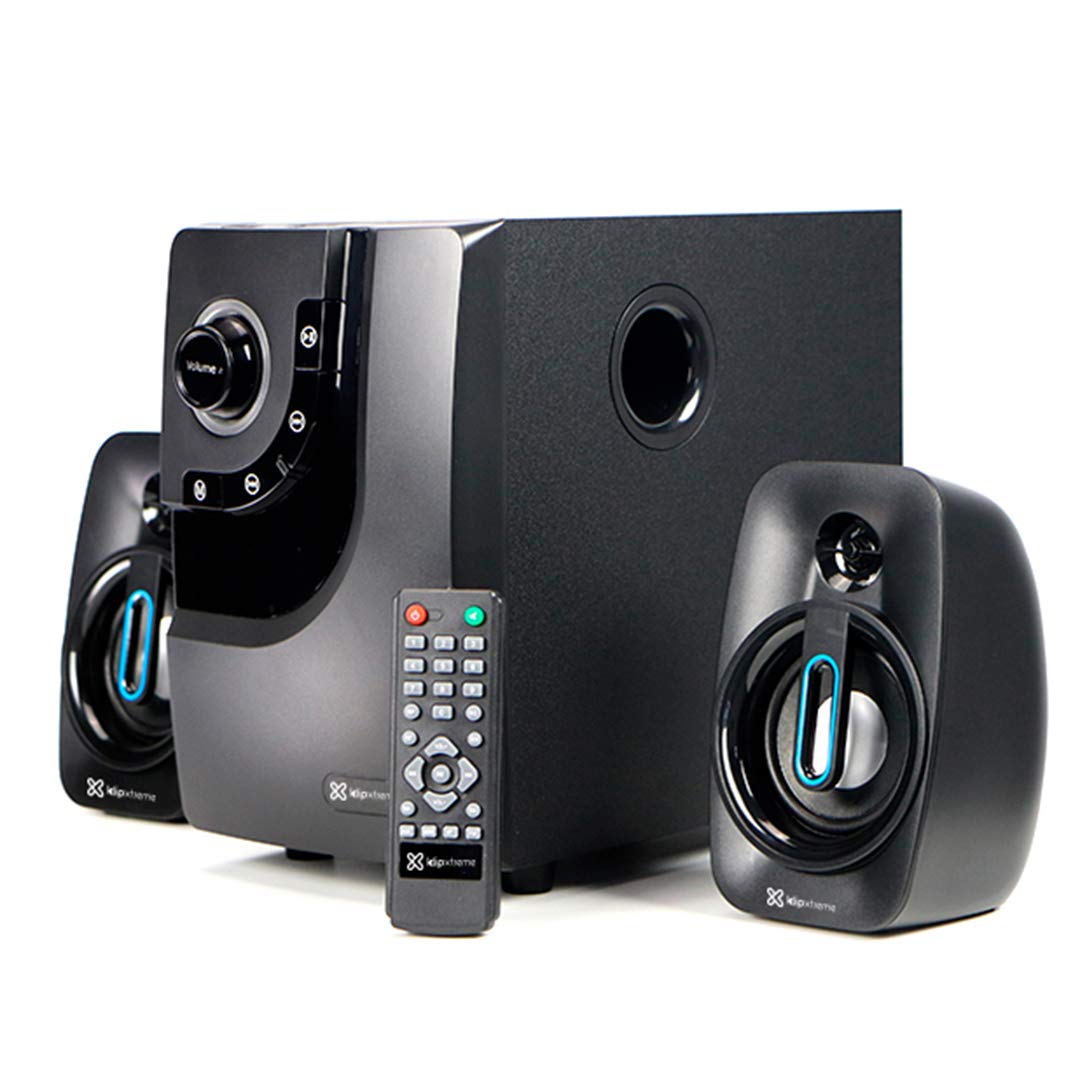
Image: The Klip Xtreme BluWave II KWS-616 system, including the subwoofer, two satellite speakers, and remote control, shown with its packaging and connecting cables.
មាតិកាកញ្ចប់
សូមប្រាកដថាធាតុទាំងអស់មាននៅក្នុងកញ្ចប់៖
- Subwoofer Unit
- ឧបករណ៍បំពងសម្លេងផ្កាយរណប (x2)
- ការបញ្ជាពីចម្ងាយ
- ខ្សែអូឌីយ៉ូ 3.5mm
- សៀវភៅណែនាំអ្នកប្រើ (ឯកសារនេះ)

Image: The Klip Xtreme BluWave II KWS-616 system components, including the subwoofer, satellite speakers, remote, and cables, displayed alongside its retail packaging.
ផលិតផលលើសview
Subwoofer Front Panel Controls

រូបភាព៖ លម្អិត view of the subwoofer's front panel, showing the volume knob with blue LED illumination, mode button, playback controls, and digital display.
- ប៊ូតុងកម្រិតសំឡេង៖ Rotate to adjust the master volume. Press to change input mode (Bluetooth, USB, SD, AUX).
- ប៊ូតុងបាស៖ លៃតម្រូវកម្រិតបាស។
- ការគ្រប់គ្រងការចាក់ឡើងវិញ៖ ចាក់/ផ្អាក, បទមុន, បទបន្ទាប់។
- បង្ហាញឌីជីថល: Shows current mode, track number, or volume level.
ការតភ្ជាប់បន្ទះខាងក្រោយរបស់ Subwoofer

Image: The rear panel of the subwoofer, displaying input and output ports, power switch, and AC power input.
- Input (R/L): ការបញ្ចូលស្តេរ៉េអូ RCA សម្រាប់ភ្ជាប់ប្រភពអូឌីយ៉ូខាងក្រៅ។
- Output (R/L): Connects to the satellite speakers.
- ច្រក USB៖ សម្រាប់ដ្រាយវ៍ USB flash ។
- រន្ធដោតកាត SD៖ For SD memory cards.
- កុងតាក់ថាមពល៖ Turns the system ON or OFF.
- ការបញ្ចូល AC៖ Connects to the power cord.
រៀបចំ
២.២. ការតភ្ជាប់វាគ្មិន
- Connect the cables from the satellite speakers to the "Output (R/L)" ports on the rear panel of the subwoofer. Ensure correct polarity.
- Position the satellite speakers to the left and right of your listening area for optimal stereo separation. The subwoofer can be placed on the floor or a sturdy surface.
2. ការតភ្ជាប់ថាមពល
- Ensure the power switch on the rear of the subwoofer is in the OFF position.
- Connect the AC power cord to the "AC Input" on the subwoofer's rear panel.
- Plug the other end of the power cord into a standard wall outlet (110V/220V 60Hz/50Hz auto-sensing).
សេចក្តីណែនាំប្រតិបត្តិការ
បើក/បិទថាមពល
Flip the power switch on the rear panel of the subwoofer to the ON position to power on the system. Flip it to the OFF position to power off.
Volume and Bass Control
- កម្រិតសំឡេង៖ Rotate the large knob on the front of the subwoofer or use the volume buttons on the remote control to adjust the overall volume.
- បាស៖ Use the dedicated bass knob on the front of the subwoofer or the bass control buttons on the remote to adjust the bass intensity.
របៀបបញ្ចូល
Press the Volume knob on the front panel or the "Mode" button on the remote control to cycle through available input modes: Bluetooth, USB, SD, and AUX.
ប៊្លូធូសដាក់គូ
- Switch the system to Bluetooth mode. The digital display will show "BT" and an indicator light may flash, indicating it's in pairing mode.
- នៅលើឧបករណ៍ដែលបើកដំណើរការ Bluetooth របស់អ្នក (ស្មាតហ្វូន ថេប្លេត កុំព្យូទ័រ) សូមបើក Bluetooth ហើយស្វែងរកឧបករណ៍ដែលមាន។
- Select "Klip Xtreme KWS-616" (or similar name) from the list of devices.
- Once paired, the system will confirm the connection, and you can begin playing audio from your device. The effective wireless range is approximately 33 feet (10 meters).
ការចាក់ USB/SD
- Insert a USB flash drive or an SD card containing audio files into the respective port on the subwoofer's rear panel.
- Switch the system to USB or SD mode. The system will automatically detect and begin playing audio files.
- Use the playback controls on the front panel or remote control to play, pause, skip tracks, or adjust volume.
ការតភ្ជាប់ AUX
- Connect one end of the provided 3.5mm audio cable to the "Input (R/L)" RCA ports on the subwoofer (using an adapter if necessary).
- Connect the other end of the 3.5mm audio cable to the headphone jack or audio output of your external audio device (e.g., TV, DVD player, gaming console, MP3 player).
- Switch the system to AUX mode.
- ចាក់សំឡេងពីឧបករណ៍ដែលអ្នកបានភ្ជាប់។
មុខងារបញ្ជាពីចម្ងាយ
The included remote control provides convenient access to all major functions:
- ថាមពល៖ Turns the system on/off (standby).
- របៀប៖ Cycles through input sources (Bluetooth, USB, SD, AUX).
- កម្រិតសំឡេង +/-៖ លៃតម្រូវកម្រិតសំឡេងមេ។
- បាស +/-៖ លៃតម្រូវកម្រិតបាស។
- បិទសំឡេង៖ បិទ/បើកសំឡេង។
- លេង/ផ្អាក៖ Controls playback for USB/SD/Bluetooth.
- មុន/បន្ទាប់៖ Skips tracks for USB/SD/Bluetooth.
ថែទាំ
- Keep the system away from direct sunlight, heat sources, and moisture.
- Clean the exterior surfaces with a soft, dry cloth. Do not use abrasive cleaners or solvents.
- ត្រូវប្រាកដថាមានខ្យល់ចេញចូលត្រឹមត្រូវនៅជុំវិញឧបករណ៍បំពងសំឡេង (subwoofer) ដើម្បីការពារការឡើងកំដៅខ្លាំងពេក។
- Do not block the subwoofer's bass port.
ការដោះស្រាយបញ្ហា
| បញ្ហា | ដំណោះស្រាយដែលអាចកើតមាន |
|---|---|
| គ្មានអំណាច |
|
| គ្មានសំឡេង |
|
| ការផ្គូផ្គងប៊្លូធូសបរាជ័យ |
|
| សំឡេងខូច |
|
លក្ខណៈបច្ចេកទេស

Image: The Klip Xtreme BluWave II KWS-616 subwoofer and satellite speakers displayed with rulers to indicate their physical dimensions.
| ប្រភេទឧបករណ៍ | 2.1 speaker system with Bluetooth technology |
| ទិន្នផលថាមពលអតិបរមា (RMS) | 40W (ថាមពលកំពូល 80W) |
| ការបញ្ចូល AC | 110V/220V 60Hz/50Hz (autosensing) |
| Satellite Driver Unit | ៤.១៣ អ៊ីញ (១០៥ ម.ម) |
| ថាមពល RMS ផ្កាយរណប | 10W each (20W total) |
| Satellite Frequency Response | 120Hz-18kHz |
| Satellite Impedance | 8Ω |
| Subwoofer Driver Unit | ៤.១៣ អ៊ីញ (១០៥ ម.ម) |
| ថាមពល RMS របស់ Subwoofer | 20 វ៉ |
| ការឆ្លើយតបប្រេកង់ Subwoofer | 20Hz-150Hz |
| Subwoofer Impedance | 4Ω |
| សញ្ញាទៅសមាមាត្រសំលេងរំខាន | 60 dB |
| ការតភ្ជាប់ | Bluetooth, SD, USB, 3.5mm (via RCA input) |
| ជួរឥតខ្សែ | រហូតដល់ 33 ហ្វីត (10 ម៉ែត្រ) |
| វិមាត្រឧបករណ៍បំពងសំឡេង (WxHxD) | 6.1 x 9.8 x 10.8 អ៊ីង (15.5 x 24.9 x 27.4 សង់ទីម៉ែត្រ) |
| Satellite Dimensions (WxHxD) | 3.9 x 6.3 x 3.8 អ៊ីង (9.9 x 16.0 x 9.7 សង់ទីម៉ែត្រ) |
| ទំងន់ផលិតផល | 6.8 ផោន (3.08 គីឡូក្រាម) |
| ប្រវែងខ្សែ | 4.9 ហ្វីត (1.5 ម៉ែត្រ) |
| លេខម៉ូដែល | KWS-616 |
ការធានា និងការគាំទ្រ
The Klip Xtreme BluWave II KWS-616 system comes with a ការធានារយៈពេលមួយឆ្នាំមានកំណត់ ចាប់ពីថ្ងៃទិញ។ ការធានានេះគ្របដណ្តប់លើពិការភាពនៃសម្ភារៈ និងការផលិតក្រោមការប្រើប្រាស់ធម្មតា។ វាមិនគ្របដណ្តប់លើការខូចខាតដែលបណ្តាលមកពីការប្រើប្រាស់ខុស គ្រោះថ្នាក់ ការកែប្រែដោយគ្មានការអនុញ្ញាត ឬមូលហេតុខាងក្រៅទេ។
For technical support or warranty claims, please contact your local Klip Xtreme authorized dealer or visit the official Klip Xtreme webគេហទំព័រសម្រាប់ព័ត៌មានទំនាក់ទំនង។