
1. រៀបចំ
This section guides you through the initial setup of your Apple iPhone 7, from unboxing to first use.
1.1 អ្វីដែលនៅក្នុងប្រអប់
Verify that all components are present in your iPhone 7 package:
- iPhone 7 Device
- រន្ទះទៅខ្សែ USB
- អាដាប់ទ័រថាមពលយូអេសប៊ី
- EarPods ជាមួយឧបករណ៍ភ្ជាប់រន្ទះ
- អាដាប់ទ័រ Jack កាស 3.5 ម.ម
- ឯកសារ (មគ្គុទ្ទេសក៍ចាប់ផ្តើមរហ័ស ព័ត៌មានសុវត្ថិភាព)
- ឧបករណ៍ដកស៊ីម

Image 1.1: The Apple iPhone 7 in Rose Gold, showcasing ការរចនារលោងរបស់វា។
1.2 ការបញ្ចូលស៊ីមកាត
- Locate the SIM tray on the right side of your iPhone.
- Insert the SIM eject tool into the small hole on the SIM tray and press firmly until the tray pops out.
- Place your nano-SIM card into the tray with the gold contacts facing down and the cut corner aligned.
- Carefully push the SIM tray back into the iPhone until it is flush with the side.
1.3 ការបើក និងដំឡើងដំបូង
To power on your iPhone, press and hold the Side button until the Apple logo appears. Follow the on-screen instructions to complete the initial setup, which includes selecting your language, connecting to Wi-Fi, setting up Touch ID, and signing in with your Apple ID.
1.4 ការសាកថ្មឧបករណ៍
Connect the Lightning to USB cable to the iPhone's Lightning port and the USB power adapter. Plug the adapter into a wall outlet. The battery icon on the screen will indicate charging status. For optimal battery life, use the provided Apple charging accessories.
2. សេចក្តីណែនាំប្រតិបត្តិការ
This section details the basic functions and features of your iPhone 7.
2.1 បើក និងបិទ
- ដើម្បីបើកដំណើរការ៖ ចុចឲ្យជាប់ប៊ូតុង Side រហូតដល់ឡូហ្គោ Apple លេចឡើង។
- ដើម្បីបិទថាមពល៖ Press and hold the Side button until the 'Slide to Power Off' slider appears. Drag the slider to the right.
- To Force Restart: Press and hold both the Volume Down button and the Side button simultaneously until the Apple logo appears.
2.2 ការរុករកមូលដ្ឋាន
- ប៊ូតុងដើម៖ Press once to return to the Home screen. Double-press to open the App Switcher. Press and hold to activate Siri.
- លេខសម្គាល់ទូច៖ Use your fingerprint to unlock your iPhone and make purchases. Set up in Settings > Touch ID & Passcode.
- 3D Touch: Press firmly on the display to access shortcuts and contextual menus. This feature allows for new interactions based on pressure.
- មជ្ឈមណ្ឌលត្រួតពិនិត្យ៖ Swipe up from the bottom edge of the screen to access quick settings and controls.
- មជ្ឈមណ្ឌលជូនដំណឹង៖ អូសចុះក្រោមពីគែមខាងលើនៃអេក្រង់ដើម្បី view ការជូនដំណឹង។
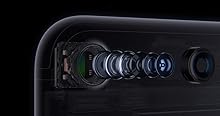
Image 2.1: Illustration of 3D Touch functionality on the iPhone 7 screen.
2.3 មុខងារកាមេរ៉ា
The iPhone 7 features a 12-megapixel iSight camera. Open the Camera app to capture photos and videos.
- របៀបរូបថត៖ Swipe left or right to switch between Photo, Portrait, Square, Pano, Video, Slo-mo, and Time-lapse modes.
- ការថតវីដេអូ 4K៖ The camera supports 4K video recording at 30 frames per second. Adjust video settings in Settings > Camera > Record Video.
- កាមេរ៉ាខាងមុខ៖ Tap the camera switch icon to use the 7-megapixel FaceTime HD camera for selfies and video calls.
2.4 ធន់នឹងទឹក និងធូលី
The iPhone 7 is splash, water, and dust resistant and was tested under controlled laboratory conditions with a rating of IP67 under IEC standard 60529. Resistance is not a permanent condition and might decrease as a result of normal wear. Do not attempt to charge a wet iPhone; refer to the user guide for cleaning and drying instructions. Liquid damage is not covered under warranty.
3. ការថែទាំ
Proper care and maintenance will help extend the life of your iPhone 7.
៥.១ ការសម្អាត iPhone របស់អ្នក
- Unplug all cables and turn off your iPhone before cleaning.
- ប្រើក្រណាត់ទន់ គ្មានជាតិសរសៃ ឃampened with water, to wipe the exterior surfaces.
- Avoid getting moisture in any openings. Do not use cleaning products or compressed air.
3.2 ការថែទាំថ្ម
The iPhone 7 uses a Lithium-Ion battery. To maximize battery lifespan:
- Avoid extreme ambient temperatures.
- Keep your software updated to the latest iOS version.
- Enable Low Power Mode when battery is low.
- For long-term storage, charge the device to about 50% and power it off.
3.3 ការធ្វើបច្ចុប្បន្នភាពកម្មវិធី
Regularly update your iPhone's operating system (iOS) to ensure optimal performance, security, and access to new features. Go to Settings > General > Software Update to check for and install available updates.
4. ការដោះស្រាយបញ្ហា
This section provides solutions to common issues you might encounter with your iPhone 7.
4.1 បញ្ហាទូទៅ និងដំណោះស្រាយ
- ឧបករណ៍មិនឆ្លើយតប៖ If your iPhone is frozen or unresponsive, perform a force restart (see Section 2.1).
- Apps Crashing or Not Opening: Close the app from the App Switcher and reopen it. If the issue persists, restart your iPhone. Ensure the app and iOS are updated.
- Wi-Fi or Cellular Connectivity Issues: Try toggling Wi-Fi or Cellular Data off and on in Control Center or Settings. Restart your router or contact your carrier if problems persist.
- អស់ថ្មលឿន៖ Check battery usage in Settings > Battery to identify apps consuming significant power. Reduce screen brightness, enable Low Power Mode, or disable background app refresh for non-essential apps.
4.2 កំណត់ឡើងវិញពីរោងចក្រ
If troubleshooting steps do not resolve your issue, you may consider a factory reset. Warning: This will erase all data and settings on your iPhone. Back up your device to iCloud or a computer before proceeding. Go to Settings > General > Transfer or Reset iPhone > Erase All Content and Settings.
5. លក្ខណៈបច្ចេកទេស
Key technical specifications for the Apple iPhone 7.
| លក្ខណៈ | លម្អិត |
|---|---|
| ម៉ាក | ផ្លែប៉ោម |
| ឈ្មោះម៉ូដែល | ទូរស័ព្ទ iPhone 7 |
| ប្រព័ន្ធប្រតិបត្តិការ | iOS 10 (at launch) |
| សមត្ថភាពផ្ទុកអង្គចងចាំ | 32 ជីកាបៃ |
| ទំហំអេក្រង់ | ៤.៧៥ អ៊ីញ |
| បច្ចេកវិទ្យាកោសិកា | 4G LTE |
| បច្ចេកវិទ្យាតភ្ជាប់ | ផ្លេកបន្ទោរ |
| ពណ៌ | Rose Gold (as per product variant) |
| កម្រិតធន់នឹងទឹក។ | ធន់នឹងទឹក (IP67) |
| ការពិពណ៌នាអំពីកាមេរ៉ា | 12 MP Rear, 7 MP Front |
| ការពិពណ៌នាអំពីថ្ម | លីចូម-អ៊ីយ៉ុង |
| ទំងន់ធាតុ | 4.8 អោន |
| វិមាត្រធាតុ (LxWxH) | 5.44 x 2.64 x 0.28 អ៊ីញ |
| សុវត្ថិភាពជីវមាត្រ | Fingerprint Recognition (Touch ID) |
6. ការធានា និងការគាំទ្រ
For detailed warranty information and technical support, please refer to Apple's official resources.
6.1 ការធានាផលិតផល
Your Apple iPhone 7 is covered by a limited warranty provided by Apple. The terms and conditions of this warranty, including duration and coverage, are available on Apple's official website or within the documentation included with your device. Please retain your proof of purchase for warranty claims.
6.2 ជំនួយអតិថិជន
If you require further assistance, have questions, or need to report an issue, please contact Apple Support:
- ការគាំទ្រតាមអ៊ីនធឺណិត៖ Visit the official Apple Support website for articles, troubleshooting guides, and contact options. support.apple.com/iphone
- Apple Store៖ Visit an authorized Apple Store for in-person assistance.