
សេចក្តីផ្តើម
អរគុណសម្រាប់ការទិញasing the STOGA Ubox STV040 Dual Lens Car DVR Camera. This manual provides detailed instructions for the proper installation, operation, and maintenance of your device. Please read this manual thoroughly before using the product to ensure optimal performance and safety.
មាតិកាកញ្ចប់
សូមពិនិត្យមើលមាតិកាកញ្ចប់នៅពេលបើក។ ប្រសិនបើមានរបស់របរណាមួយបាត់ ឬខូចខាត សូមទាក់ទងអ្នកលក់រាយរបស់អ្នក។
- 1 x STOGA Ubox STV040 Car DVR Camera
- 1 x ឆនំងរថយន្ត
- 1 x Car Mount
- 1 x External GPS Module
- 1 x សៀវភៅណែនាំអ្នកប្រើប្រាស់
ផលិតផលលើសview
Familiarize yourself with the components and features of your STOGA Ubox STV040 Car DVR Camera.

រូបភាពទី 1៖ ខាងមុខ view of the DVR camera with the display screen active.

រូបភាពទី 2៖ ខាងមុខ view detailing the dual wide-angle lenses and surrounding controls.
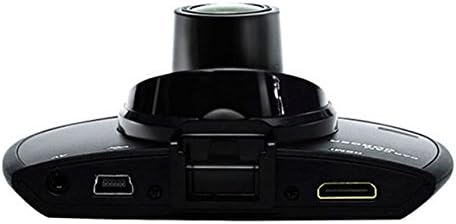
រូបភាពទី 3៖ កំពូល view illustrating the connectivity ports (HDMI, USB, AV).
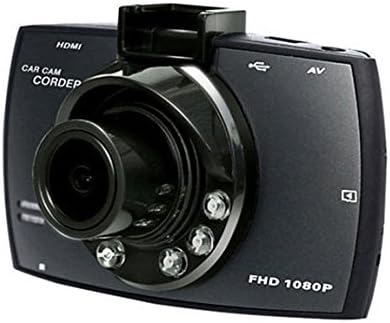
រូបភាពទី 4៖ Angled perspective of the DVR camera, showing its compact design.
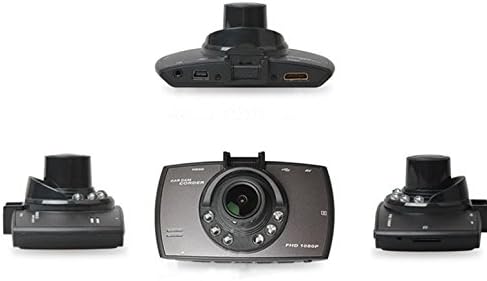
រូបភាពទី 5៖ ទូលំទូលាយ view of the DVR camera from various angles.
រៀបចំ
1. ការដំឡើង Micro SD Card
Insert a Micro SD card (Class 6 or higher, 4GB-32GB) into the designated slot on the DVR camera. Ensure the card is inserted correctly until it clicks into place. The device supports continuous loop recording and emergency event recording.
2. ការដំឡើងកាមេរ៉ា
- Attach the car mount to the windshield in a position that does not obstruct your view.
- Securely attach the DVR camera to the car mount.
- Adjust the camera angle to ensure both lenses capture the desired view (front and interior/side). The dual lenses are 180-degree rotatable.
3. ការតភ្ជាប់ថាមពល
Connect the car charger to the DVR camera's power input and plug the other end into your vehicle's 12V power outlet (cigarette lighter socket). The camera will typically power on automatically when the vehicle starts and power off when the vehicle is turned off.
4. GPS Module Connection (Optional)
Connect the external GPS module to the designated GPS port on the DVR camera. This enables GPS logging, recording location data along with video footage.
សេចក្តីណែនាំប្រតិបត្តិការ
បើក/បិទថាមពល
- ស្វ័យប្រវត្តិ៖ The camera powers on and starts recording automatically when the car engine starts. It powers off automatically when the engine is turned off.
- ហត្ថកម្ម: Press and hold the power button to manually turn the device on or off.
របៀបថត
- ការថតរង្វិលជុំ៖ The camera continuously records video in segments. When the memory card is full, it automatically overwrites the oldest unlocked footage.
- ការកត់ត្រាពេលមានអាសន្ន (G-Sensor)៖ The built-in G-Sensor detects sudden impacts or collisions. In such an event, the current video segment is automatically locked and protected from being overwritten.
ម៉ឺនុយរុករក
Use the control buttons located on the device to navigate through the menu options on the 2.0" TFT LCD screen. Adjust settings such as video resolution, date/time stamp, language (English, Chinese, Japanese, Russian), and G-Sensor sensitivity.
ការចាក់សារថ្មី
- Stop recording if currently active.
- Enter playback mode via the menu.
- ជ្រើសរើសវីដេអូដែលចង់បាន file for playback on the device screen.
- Alternatively, remove the Micro SD card and insert it into a computer to view files.
ការការពារពាក្យសម្ងាត់
The device supports password protection to prevent unauthorized access to recordings. Refer to the on-screen menu for setting up and managing this feature.
ថែទាំ
- ការសម្អាត៖ ប្រើក្រណាត់ទន់ និងស្ងួតដើម្បីសម្អាតកញ្ចក់កាមេរ៉ា និងអេក្រង់។ ជៀសវាងទឹកសម្អាតដែលមានជាតិស្អិត ឬសារធាតុរំលាយ។
- កាតអេសឌីខ្នាតតូច: Format the Micro SD card regularly (e.g., once a month) to ensure optimal performance and prevent data corruption. Back up important files មុនពេលធ្វើទ្រង់ទ្រាយ។
- សីតុណ្ហភាព៖ ជៀសវាងការដាក់ឧបករណ៍ឲ្យត្រូវនឹងសីតុណ្ហភាពខ្លាំង ពន្លឺព្រះអាទិត្យដោយផ្ទាល់ក្នុងរយៈពេលយូរ ឬសំណើមខ្ពស់។
- ការធ្វើបច្ចុប្បន្នភាពកម្មវិធីបង្កប់៖ ពិនិត្យមើលក្រុមហ៊ុនផលិត webគេហទំព័រជាប្រចាំសម្រាប់ការអាប់ដេតកម្មវិធីបង្កប់ណាមួយដែលអាចរកបាន ដើម្បីបង្កើនប្រសិទ្ធភាព និងបន្ថែមមុខងារ។
ការដោះស្រាយបញ្ហា
| បញ្ហា | មូលហេតុ / ដំណោះស្រាយដែលអាចកើតមាន |
|---|---|
| កាមេរ៉ាមិនបើកទេ។ |
|
| ការថតឈប់ដោយមិននឹកស្មានដល់។ |
|
| គុណភាពវីដេអូអន់។ |
|
| ជីភីអេសមិនដំណើរការទេ។ |
|
| ថ្មមិនកាន់បន្ទុកទេ។ |
|
លក្ខណៈបច្ចេកទេស
| លក្ខណៈ | លម្អិត |
|---|---|
| លេខម៉ូដែល | Ubox STV040 |
| បង្ហាញ | 2.0" TFT LCD (960 x 240 pixels) |
| កែវភ្នែក | Dual 140-degree A+ wide-angle, 180-degree rotatable |
| ឧបករណ៍ចាប់សញ្ញា | CMOS |
| ដំណោះស្រាយវីដេអូ | 1280 x 480 @ 30 fps, 640 x 480 @ 30 fps |
| ទម្រង់វីដេអូ | AVI |
| ទម្រង់រូបភាព | M-JPG |
| ចក្ខុវិស័យពេលយប់ | មុខងារចក្ខុវិស័យនៅអ៊ីនហ្វ្រារ៉េដ |
| ការផ្ទុក | Micro TF (SD HC) card, 4GB-32GB, Class 6 and above |
| ជីភីអេស | Supports external GPS module |
| G-Sensor | Integrated, supports emergency event recording lock |
| មីក្រូហ្វូន/ឧបករណ៍បំពងសម្លេង | រួមបញ្ចូលគ្នា |
| ទិន្នផល | CVBS (Video Output) |
| ថ្ម | 3.7V 700mA Lithium-Polymer battery |
| ភាពឆបគ្នានៃប្រព័ន្ធប្រតិបត្តិការ | វីនដូ 2000/XP/Vista/Windows 7 |
| ភាសាដែលគាំទ្រ | English, Chinese, Japanese, Russian |
ការធានា និងការគាំទ្រ
For warranty information and technical support, please refer to the documentation provided with your purchase or contact your retailer. Keep your purchase receipt as proof of purchase for warranty claims.
For further assistance, you may also visit the official STOGA website (if available) or contact their customer service department.