
1. សេចក្តីផ្តើម
This user manual provides essential information for the proper setup, operation, maintenance, and troubleshooting of your Ozone OES-BAS-22 Electronic Safe-Core. Please read this manual thoroughly before using the safe to ensure optimal performance and security. This electronic safe is designed to provide secure storage for your valuables.
2. ផលិតផលលើសview
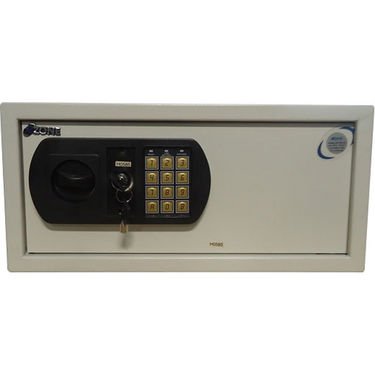
This image displays the front panel of the Ozone OES-BAS-22 Electronic Safe-Core, highlighting the electronic keypad, key override lock, and the overall compact design. The keypad allows for digital code entry, while the key provides an alternative access method.
3. រៀបចំ
3.1. ការដំឡើងថ្ម
- កំណត់ទីតាំងបន្ទប់ដាក់ថ្ម ជាធម្មតានៅផ្នែកខាងក្នុងនៃទ្វារសុវត្ថិភាព។
- បើកគម្របថ្ម។
- Insert the required number of batteries (usually AA or AAA, refer to the compartment label) ensuring correct polarity (+/-).
- បិទគម្របថ្មដោយសុវត្ថិភាព។
៥.២. ការកំណត់លេខកូដដំបូង
- With the safe door open, locate the reset button (often a small red or green button) on the inside of the door or near the battery compartment.
- Press the reset button. You should hear a beep or see an indicator light.
- On the keypad, enter your desired new code (typically 3-8 digits).
- Confirm the code by pressing the 'E' or '#' button.
- សាកល្បងលេខកូដថ្មីដោយបើកទ្វារ ដើម្បីធានាថាវាដំណើរការបានត្រឹមត្រូវ មុនពេលបិទសុវត្ថិភាព។
4. សេចក្តីណែនាំប្រតិបត្តិការ
4.1. Opening the Safe with Electronic Code
- Enter your personal code on the keypad.
- Press the 'E' or '#' button.
- Within 5 seconds of a successful code entry, turn the handle clockwise (or counter-clockwise, depending on model) to open the door.
4.2. Opening the Safe with Override Key
- កំណត់ទីតាំងរន្ធគ្រាប់ចុច ដែលជាធម្មតាលាក់នៅពីក្រោយគម្របតូចមួយនៅលើបន្ទះក្ដារចុច។
- Insert the override key and turn it.
- While holding the key turned, rotate the handle to open the safe door.
4.3. ការបិទ និងចាក់សោសុវត្ថិភាព
- បិទទ្វារសុវត្ថិភាពយ៉ាងរឹងមាំ។
- Turn the handle counter-clockwise (or clockwise) until the bolts are fully extended and the door is securely locked.
4.4. Changing Your Personal Code
- With the safe door open, press the reset button.
- Enter your new desired code (3-8 digits) on the keypad.
- ចុចប៊ូតុង 'E' ឬ '#' ដើម្បីបញ្ជាក់។
- Verify the new code by entering it with the door open before closing.
5. ការថែទាំ
- ការជំនួសថ្ម៖ Replace batteries annually or when the low battery indicator (if present) illuminates. Always use new, high-quality batteries of the specified type.
- ការសម្អាត៖ សម្អាតផ្នែកខាងក្រៅនៃសុវត្ថភាពដោយប្រើទន់ ឃamp cloth. Avoid abrasive cleaners or solvents that could damage the finish or keypad.
- ការផ្ទុកគន្លឹះ៖ Store override keys in a secure location away from the safe itself. Do not store them inside the safe.
- ការត្រួតពិនិត្យយន្តការ៖ Periodically check the locking bolts and door hinges for smooth operation. Do not lubricate the electronic lock mechanism.
6. ការដោះស្រាយបញ្ហា
| បញ្ហា | ដំណោះស្រាយ |
|---|---|
| សុវត្ថិភាពមិនបើកជាមួយលេខកូដទេ។ | Ensure batteries are fresh and correctly installed. Re-enter code carefully. Try the override key. |
| ក្តារចុចមិនឆ្លើយតបទេ។ | Check battery power. Replace batteries if necessary. Ensure no foreign objects are obstructing buttons. |
| សំឡេងរោទ៍មិននឹកស្មានដល់។ | This safe features a visual alarm. Ensure the safe is not being tampered with. If persistent, contact customer support. |
| ទ្វារមិនបិទ ឬចាក់សោត្រឹមត្រូវទេ។ | Check for any obstructions inside the safe or around the door frame. Ensure the handle is fully turned to engage bolts. |
7. លក្ខណៈបច្ចេកទេស
| លក្ខណៈ | លម្អិត |
|---|---|
| ម៉ាក | អូហ្សូន |
| គំរូ | OES-BAS-22 |
| ប្រភេទចាក់សោ | អេឡិចត្រូនិក |
| លក្ខណៈពិសេស | ចល័ត |
| ទំងន់ធាតុ | 12.2 គីឡូក្រាម (26.9 ផោន) |
| សំឡេងរោទិ៍ | មើលឃើញ |
| កម្រិតធន់នឹងទឹក។ | មិនធន់នឹងទឹក។ |
| UPC | 783942612165 |
| វិមាត្រកញ្ចប់ | 42.9 x 38 x 20 សង់ទីម៉ែត្រ |