
1. សេចក្តីផ្តើម
This manual provides essential instructions for the safe and efficient operation of your Sharp CD-DH950P 240W Mini-Component System. This system features a 5-disc CD changer, a cassette deck, an iPod/iPhone docking station, a USB host for digital audio playback, and an AM/FM tuner. Please read this manual thoroughly before using the system and retain it for future reference.
2. ព័ត៌មានសុវត្ថិភាព
- ប្រភពថាមពល៖ ភ្ជាប់ឧបករណ៍ទៅនឹងរន្ធ AC ដែលមានវ៉ុលជាក់លាក់ប៉ុណ្ណោះtage.
- ខ្យល់ចេញចូល៖ ធានាឱ្យមានខ្យល់ចេញចូលគ្រប់គ្រាន់។ កុំបិទរន្ធខ្យល់។
- ទឹក និងសំណើម៖ កុំឲ្យឧបករណ៍ត្រូវភ្លៀង សំណើម ឬសារធាតុរាវដែលស្រក់/ហៀរ។
- កំដៅ៖ ទុកអង្គភាពឱ្យឆ្ងាយពីប្រភពកំដៅដូចជា វិទ្យុសកម្ម ឧបករណ៍ចុះបញ្ជីកំដៅ ចង្ក្រាន ឬឧបករណ៍ផ្សេងទៀតដែលផលិតកំដៅ។
- ការសម្អាត៖ Unplug the unit from the wall outlet before cleaning. Use a soft, dry cloth.
- សេវាកម្ម៖ កុំព្យាយាមផ្តល់សេវាកម្មផលិតផលនេះដោយខ្លួនឯង។ សូមណែនាំសេវាកម្មទាំងអស់ដល់បុគ្គលិកសេវាកម្មដែលមានលក្ខណៈសម្បត្តិគ្រប់គ្រាន់។
3. មាតិកាកញ្ចប់
ផ្ទៀងផ្ទាត់ថាកញ្ចប់របស់អ្នកមានធាតុដូចខាងក្រោម៖
- Main Unit (CD-DH950P)
- វាគ្មិនខាងឆ្វេង
- វាគ្មិនស្តាំ
- ការបញ្ជាពីចម្ងាយជាមួយថ្ម
- អង់តែនរង្វិលជុំ AM
- អង់តែនវិទ្យុអេហ្វអឹម
- ខ្សែថាមពល
4. រៀបចំ
4.1 ការភ្ជាប់ឧបករណ៍បំពងសម្លេង
Connect the speaker wires from the main unit to the corresponding terminals on the back of each speaker. Ensure correct polarity (red to red, black to black) for optimal sound quality. The left speaker connects to the left speaker output, and the right speaker to the right speaker output.
4.2 Connecting the Antennas
- អង់តែនអេហ្វអឹមអេសៈ Connect the supplied FM wire antenna to the FM antenna terminal on the rear of the main unit. Extend the wire for better reception.
- អង់តែន AM៖ Connect the supplied AM loop antenna to the AM antenna terminals on the rear of the main unit. Position the antenna for best reception.
4.3 ការតភ្ជាប់ថាមពល
Plug the power cord into the AC IN jack on the rear of the main unit, then plug the other end into a standard AC wall outlet.
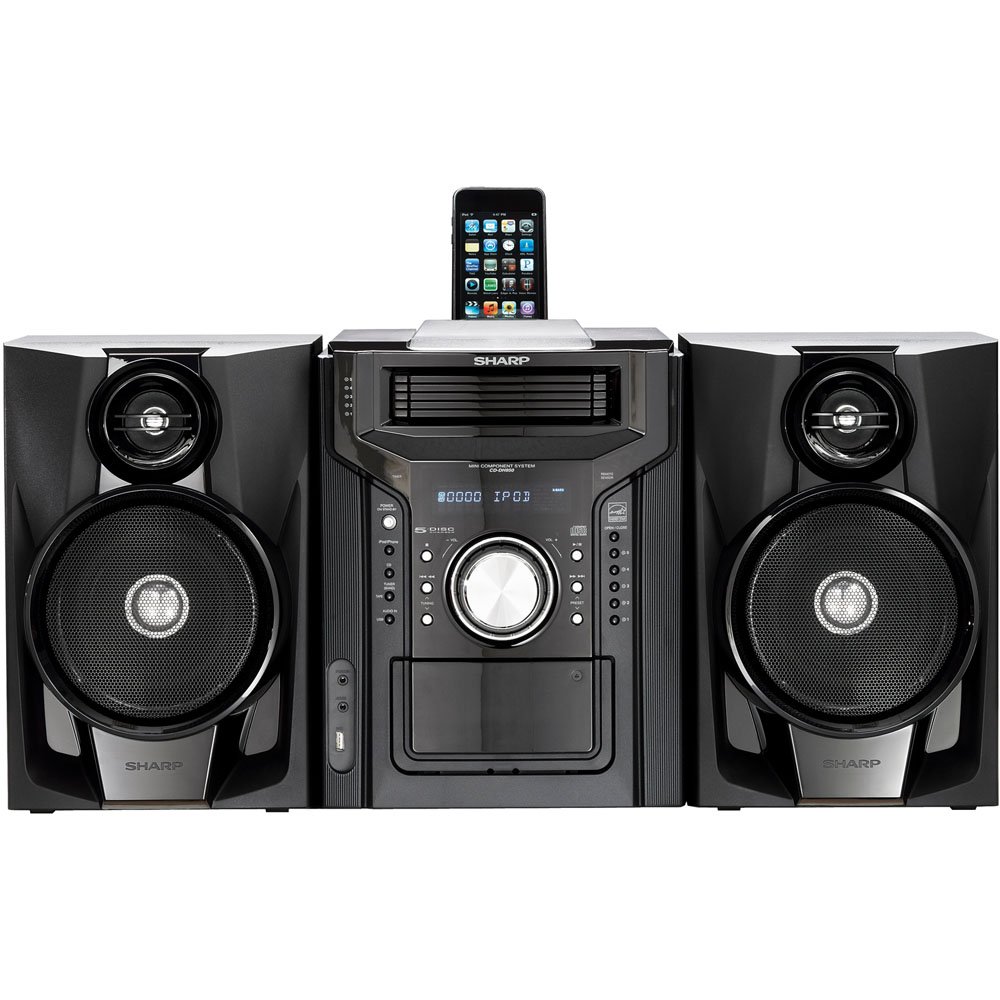
រូបភាពទី 4.3.1: សរុប view of the Sharp CD-DH950P Mini-Component System, showing the main unit flanked by two speakers, with an iPhone docked on top of the main unit.
5. សេចក្តីណែនាំប្រតិបត្តិការ
5.1 ការបើក/បិទថាមពល និងការគ្រប់គ្រងកម្រិតសំឡេង
- ចុច ថាមពល ប៊ូតុងនៅលើបន្ទះខាងមុខ ឬឧបករណ៍បញ្ជាពីចម្ងាយ ដើម្បីបើក ឬបិទឧបករណ៍។
- បង្វិល បរិមាណ ប៊ូតុងនៅលើបន្ទះខាងមុខឬប្រើ VOL +/- ប៊ូតុងនៅលើឧបករណ៍បញ្ជាពីចម្ងាយ ដើម្បីលៃតម្រូវកម្រិតសំឡេង។
5.2 ការចាក់ស៊ីឌី
This system features a 5-disc CD changer.
- ចុច បើក/បិទ ប៊ូតុងដើម្បីបើកថាសស៊ីឌី។
- Place up to five CDs on the disc trays, label side up.
- ចុច បើក/បិទ ម្តងទៀតដើម្បីបិទថាស។
- ចុច CD ដើម្បីជ្រើសរើសមុខងារស៊ីឌី។
- ចុច លេង/ផ្អាក ប៊ូតុងដើម្បីចាប់ផ្តើមការចាក់សារថ្មី
- ប្រើ រំលង buttons to navigate between tracks or discs.
5.3 Cassette Deck Operation
- ចុច TAPE OPEN/CLOSE button to open the cassette deck.
- បញ្ចូលកាសែតកាសែត។
- ចុច កាសែត button to select the cassette function.
- ចុច លេង ដើម្បីចាប់ផ្តើមចាក់ឡើងវិញ។
- To record, ensure the source is selected (e.g., CD, Tuner) and press the កត់ត្រា button on the cassette deck.
5.4 iPod/iPhone Docking
The system includes a top-mounted docking slot for compatible iPod and iPhone devices (30-pin connector).
- Carefully place your iPod or iPhone into the docking slot.
- The system will automatically switch to iPod/iPhone mode or you may need to press the iPod / iPhone ប៊ូតុង។
- Use the system's controls or your device's controls to play music. The device will also charge while docked.
5.5 USB Host Playback
Connect a USB storage device containing MP3 or WMA audio files to the USB port on the front panel.
- បញ្ចូលឧបករណ៍ USB ទៅក្នុងរន្ធ USB ។
- ចុច យូអេសប៊ី ដើម្បីជ្រើសរើសមុខងារ USB។
- Use the playback controls to navigate and play files.
ឧបករណ៍ចាប់សញ្ញា AM/FM ៤.៤
- ចុច TUNER button to select AM or FM radio.
- ប្រើ ការលៃតម្រូវ +/- ប៊ូតុងដើម្បីលៃតម្រូវទៅស្ថានីយ៍ដោយដៃ។
- To auto-scan, press and hold the ការលៃតម្រូវ +/- ប៊ូតុង។
- To store a preset, tune to the desired station, then press ការចងចាំ បន្តដោយលេខកំណត់ជាមុន។
ការបញ្ចូលសំលេង 5.7
Connect an external audio device (e.g., MP3 player, smartphone) to the AUDIO IN jack on the front panel using a 3.5mm stereo cable.
- Connect your device to the AUDIO IN jack.
- ចុច អូឌីយ៉ូក្នុង button to select this source.
- គ្រប់គ្រងការចាក់ឡើងវិញពីឧបករណ៍ដែលអ្នកបានភ្ជាប់។
6. ការថែទាំ
6.1 ការសម្អាតអង្គភាព
Wipe the exterior of the unit with a soft, dry cloth. Do not use abrasive cleaners, waxes, or solvents. Ensure the unit is unplugged before cleaning.
6.2 CD and Cassette Care
- Handle CDs by their edges to avoid fingerprints and scratches. Clean discs with a soft, lint-free cloth from the center outwards.
- Store cassette tapes away from strong magnetic fields and direct sunlight.
7. ការដោះស្រាយបញ្ហា
| បញ្ហា | មូលហេតុដែលអាចកើតមាន | ដំណោះស្រាយ |
|---|---|---|
| គ្មានអំណាច | ខ្សែថាមពលមិនបានភ្ជាប់; ព្រីភ្លើងមានបញ្ហា | ត្រូវប្រាកដថាខ្សែភ្លើងត្រូវបានដោតជាប់ល្អ។ សាកល្បងរន្ធដោតផ្សេង |
| គ្មានសំឡេង | Volume too low; Speakers not connected; Incorrect source selected | Increase volume; Check speaker connections; Select correct input source |
| ស៊ីឌីមិនលេង | Disc inserted incorrectly; Disc is dirty or scratched | Insert disc correctly (label side up); Clean or replace disc |
| ការទទួលវិទ្យុខ្សោយ | Antenna not positioned correctly; Weak signal | Adjust position of AM/FM antennas; Try auto-tuning or manual fine-tuning |
| iPod/iPhone not charging/playing | Device not properly docked; Device not compatible (e.g., newer connector) | Re-dock the device; Note that this system uses a 30-pin connector, newer devices may require an adapter (not included) |
8. លក្ខណៈបច្ចេកទេស
- ម៉ាក៖ ស្រួច
- ម៉ូដែល៖ CD-DH950P
- ថាមពលទិន្នផលសរុប៖ 240 Watts RMS (85W/ch FTC)
- ការកំណត់រចនាសម្ព័ន្ធវាគ្មិន៖ 2.1 ឆានែល
- ទ្រង់ទ្រាយអូឌីយ៉ូដែលគាំទ្រ៖ ស៊ីឌី, MP3, WMA
- សញ្ញាសមាមាត្រសំលេងរំខាន: 100 dB
- ឧបករណ៍ដែលត្រូវគ្នា៖ MP3 Player, Smartphone (via 30-pin dock or USB/Audio In)
- វិមាត្រ (L x W x H)៖ 27.6 x 13.6 x 13.5 អ៊ីញ
- ទំងន់ធាតុ៖ 24.4 ផោន
- UPC៖ 074000369863, 074000369290
9. ព័ត៌មានធានា
This product is covered by a 1-year limited warranty from the date of purchase. Please refer to the warranty card included with your product for full terms and conditions, or contact Sharp customer service for details.
10. ការគាំទ្រ
For further assistance, technical support, or service inquiries, please contact Sharp customer service. Contact information can typically be found on the Sharp official webគេហទំព័រ ឬនៅក្នុងឯកសារដែលបានផ្តល់ជាមួយផលិតផលរបស់អ្នក។