
Klip Xtreme KES-390
Klip Xtreme KES-390 Stereo Speakers 2.0 User Manual
Model: KES-390
1. សេចក្តីផ្តើម
អរគុណសម្រាប់ការទិញasing the Klip Xtreme KES-390 2.0 Stereo Speakers. These speakers are designed to provide a true stereo audio experience, offering flexibility in positioning each unit to optimize sound delivery. Please read this manual carefully to ensure proper setup, operation, and maintenance of your new speakers.
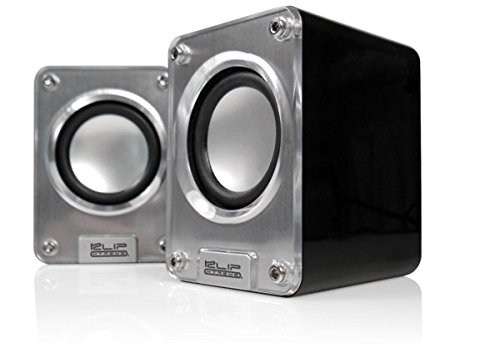
Image: Klip Xtreme KES-390 2.0 Stereo Speakers. The image shows two compact silver and black speakers positioned in front of a black laptop, highlighting their desktop use.
2. មាតិកាកញ្ចប់
ត្រូវប្រាកដថាធាតុទាំងអស់មាននៅក្នុងកញ្ចប់៖
- Klip Xtreme KES-390 2.0 Stereo Speakers (2 units)
- ខ្សែថាមពលយូអេសប៊ី
- ខ្សែអូឌីយ៉ូ 3.5mm
- ការណែនាំអ្នកប្រើប្រាស់
លក្ខណៈពិសេសនៃផលិតផល
- 2.0 Channel Stereo Speakers
- USB Powered for convenience
- High-quality stereophonic sound
- 3.5mm audio input for versatile connectivity
- ការរចនាបង្រួមនិងចល័ត
- Audio playback via USB and SD
4. ការណែនាំអំពីការដំឡើង
- ការកំណត់ទីតាំងឧបករណ៍បំពងសម្លេង៖ Place the two speaker units on a stable, flat surface. For optimal stereo separation, position them equidistant from your listening position.
- ថាមពលតភ្ជាប់៖ Connect the USB power cable from one of the speakers to an available USB port on your computer, laptop, or a USB wall adapter (not included). The speakers will power on automatically.
- Connecting Audio Source:
- តាមរយៈខ្សែអូឌីយ៉ូ 3.5 ម.ម៖ Connect one end of the included 3.5mm audio cable to the audio input jack on the speaker (usually marked "Audio In" or with a headphone icon). Connect the other end to the audio output jack of your device (e.g., computer, smartphone, MP3 player).
- Via USB/SD Card: Insert your USB flash drive or SD card into the designated slot on the speaker. The speaker should automatically detect and begin playing audio files. Refer to the operating instructions for specific playback controls.
- ការលៃតម្រូវកម្រិតសំឡេង៖ Adjust the volume using the volume control knob on the speaker or through your connected audio device.
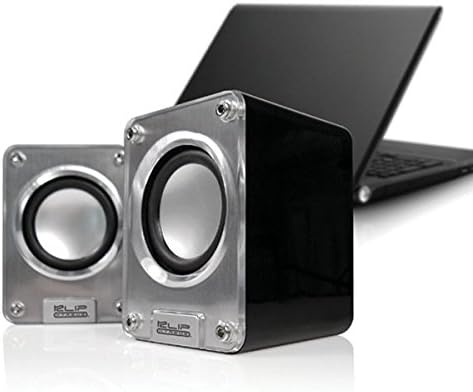
រូបភាព៖ ទិដ្ឋភាពជិតស្និទ្ធ view of the two Klip Xtreme KES-390 speakers, showing their silver speaker cones and black casing, ready for connection.
5. សេចក្តីណែនាំប្រតិបត្តិការ
5.1 បើក/បិទថាមពល
The speakers are powered on automatically when connected to a USB power source. Disconnect the USB cable to power them off.
5.2 ការគ្រប់គ្រងកម្រិតសំឡេង
Locate the volume control knob on one of the speaker units. Rotate it clockwise to increase the volume and counter-clockwise to decrease it. You can also control the volume from your connected audio device.
5.3 Audio Playback (3.5mm Input)
Once the 3.5mm audio cable is connected to your device, ensure your device's volume is turned up and playback is initiated. The sound will be output through the speakers.
5.4 ការចាក់ USB/SD Card
Insert the USB drive or SD card into the corresponding slot. The speakers should automatically detect and play compatible audio files. Use the integrated controls (if available) on the speaker to navigate tracks or adjust playback settings.
6. ការថែទាំ
- ការសម្អាត៖ Use a soft, dry cloth to clean the speaker surfaces. Do not use liquid cleaners or abrasive materials, as they may damage the finish.
- ការផ្ទុក៖ នៅពេលមិនប្រើប្រាស់ក្នុងរយៈពេលយូរ សូមទុកឧបករណ៍បំពងសម្លេងនៅកន្លែងត្រជាក់ ស្ងួត ឆ្ងាយពីពន្លឺព្រះអាទិត្យដោយផ្ទាល់ និងសីតុណ្ហភាពខ្លាំង។
- ការគ្រប់គ្រង៖ Avoid dropping the speakers or subjecting them to strong impacts.
7. ការដោះស្រាយបញ្ហា
| បញ្ហា | មូលហេតុដែលអាចកើតមាន | ដំណោះស្រាយ |
|---|---|---|
| គ្មានសំឡេង |
|
|
| សំឡេងខូច |
|
|
| Speakers not recognized (USB/SD playback) |
|
|
8. លក្ខណៈបច្ចេកទេស
| លក្ខណៈ | លម្អិត |
|---|---|
| ម៉ាក | ក្លីប Xtreme |
| គំរូ | ខេស -២ .២ |
| ប្រភេទឧបករណ៍បំពងសំឡេង | 2.0 Channel Stereo Speakers |
| បច្ចេកវិទ្យាតភ្ជាប់ | USB (for power), 3.5mm Audio Jack (for input), USB/SD Card (for playback) |
| ថាមពលបញ្ចេញអូប៉ាល័រអតិបរមា | 48 វ៉ាត់ |
| ប្រភពថាមពល | យូអេសប៊ីផ្តល់ជូន |
| ប្រភេទម៉ោន | ម៉ោនលើតុ |
| សម្ភារៈ | អាគ្រីលីក |
| ពណ៌ | ប្រាក់ |
| ទំងន់ធាតុ | 453 ក្រាម។ |
| UPC | 798304071054 |
| ASIN | B002KXZD02 |
9. ការធានា និងការគាំទ្រ
For warranty information, please refer to the warranty card included with your product or contact your retailer. For technical support or service inquiries, please visit the official Klip Xtreme webគេហទំព័រ ឬទាក់ទងផ្នែកសេវាកម្មអតិថិជនរបស់ពួកគេ។
Ask a question about this manual
Ask about setup, troubleshooting, compatibility, parts, safety, or missing instructions. Manuals+ will review the question and use this page’s manual context to help answer it.