
សេចក្តីផ្តើម
The Altec Lansing VS4221 is a 2.1 speaker system designed to provide enhanced audio for computers, gaming systems, and other compatible devices. This system includes two satellite speakers and one subwoofer, offering a balanced audio experience with clear highs, rich mids, and deep bass. It features a wireless remote for convenient control and multiple input options for versatile connectivity.
មាតិកាកញ្ចប់
Before beginning setup, please verify that all components are present in the package:
- One (1) Altec Lansing VS4221 Subwoofer
- Two (2) Altec Lansing VS4221 Satellite Speakers
- ឧបករណ៍បញ្ជាពីចម្ងាយឥតខ្សែមួយ (1)
- One (1) Remote Control Caddy
- Audio Input Cables (color-coded)
- ខ្សែថាមពល
ការណែនាំអំពីការដំឡើង
- ការកំណត់ទីតាំងឧបករណ៍បំពងសម្លេង៖ Place the subwoofer on the floor, ideally near a wall or in a corner for optimal bass response. Position the two satellite speakers on either side of your listening area, such as on a desk or shelf. The satellite speakers feature pivoting stands, allowing you to adjust their angle to direct sound towards your ears.
- ការភ្ជាប់ឧបករណ៍បំពងសម្លេងផ្កាយរណបទៅនឹងឧបករណ៍បំពងសម្លេង Subwoofer៖ Connect the cables from the satellite speakers to the corresponding output jacks on the back of the subwoofer. Ensure a secure connection.
- ការភ្ជាប់ទៅប្រភពអូឌីយ៉ូ៖
- For computers, MP3 players, or devices with a 3.5mm headphone jack: Use the provided 3.5mm audio cable to connect the audio output of your device to the 3.5mm input jack on the subwoofer.
- For televisions or video gaming systems with RCA outputs: Use RCA cables (not necessarily included, but the system supports them) to connect the audio output of your TV or gaming system to the RCA input jacks on the subwoofer. The cables are color-coded for easy installation (typically red for right, white for left).
- ការភ្ជាប់ទៅថាមពល៖ Plug the power cable into the subwoofer's power input, then plug the other end into a standard electrical outlet.
- ការបើកដំណើរការដំបូង៖ Turn on the speaker system using the power button, which may be located on the subwoofer or controlled via the wireless remote.
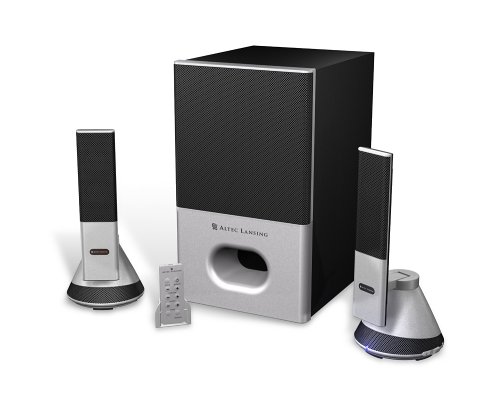
Image: The Altec Lansing VS4221 2.1 Speaker System, showing the subwoofer and two satellite speakers. The satellite speakers are designed with pivoting stands for directional sound.
សេចក្តីណែនាំប្រតិបត្តិការ
ការប្រើប្រាស់ឧបករណ៍បញ្ជាពីចម្ងាយឥតខ្សែ
The VS4221 system includes a wireless remote control for convenient adjustment of audio settings. Place the remote in its caddy when not in use to prevent misplacement.
- ថាមពល/រង់ចាំ៖ Press the power button on the remote to turn the system on or put it into standby mode.
- កម្រិតសំឡេងមេ៖ Use the volume up (+) and volume down (-) buttons to adjust the overall sound level.
- ការគ្រប់គ្រងបាស៖ Adjust the bass level to your preference using the dedicated bass control buttons.
- ការគ្រប់គ្រងសំឡេងបី៖ Adjust the treble level for crisp high frequencies using the dedicated treble control buttons.
- សំឡេងៈ Activate or deactivate the loudness feature to enhance bass and treble at lower volumes.
ការប្រើកាសប៊្លុក
A headphone jack is integrated into the system, typically on one of the satellite speakers or the remote caddy. Plugging in headphones will mute the speakers, allowing for private listening. Unplugging headphones will restore audio through the speakers.
ថែទាំ
- ការសម្អាត៖ ប្រើក្រណាត់ទន់ស្ងួតដើម្បីសម្អាតផ្ទៃនៃឧបករណ៍បំពងសម្លេង និងឧបករណ៍បំពងសម្លេង subwoofer។ ជៀសវាងការប្រើទឹកសម្អាត ឬសម្ភារៈសំណឹក ព្រោះវាអាចបំផ្លាញផ្ទៃ ឬសមាសធាតុខាងក្នុង។
- ទីតាំង៖ Ensure the speakers are placed on stable surfaces to prevent accidental falls. Avoid placing them in direct sunlight, near heat sources, or in areas with high humidity.
- ការគ្រប់គ្រងខ្សែកាបៈ Keep cables organized and untangled to prevent damage and ensure proper connectivity.
ការដោះស្រាយបញ្ហា
| បញ្ហា | មូលហេតុដែលអាចកើតមាន | ដំណោះស្រាយ |
|---|---|---|
| មិនមានសំឡេងពីឧបករណ៍បំពងសំឡេងទេ។ |
|
|
| សំឡេងខូចឬមិនច្បាស់។ |
|
|
| Wireless remote not responding. |
|
|
លក្ខណៈបច្ចេកទេស
| លក្ខណៈ | លម្អិត |
|---|---|
| លេខម៉ូដែល | VS4221 |
| ប្រភេទឧបករណ៍បំពងសំឡេង | 2.1 Speaker System (Two Satellite Speakers, One Subwoofer) |
| របៀបបញ្ចេញសំឡេង | ស្តេរ៉េអូ |
| ថាមពលទិន្នផលអតិបរមារបស់ Speaker | 35 វ៉ាត់ |
| សញ្ញាសមាមាត្រសំលេងរំខាន | 80 dB |
| កម្មវិធីបញ្ជាឧបករណ៍បំពងសំឡេង | 3-inch down-firing |
| Satellite Speaker Drivers | Micro Drivers (for highs), 3-inch Midrange Driver (concealed) |
| បច្ចេកវិទ្យាតភ្ជាប់ | Wired (3.5mm, RCA inputs) |
| វិធីសាស្រ្តត្រួតពិនិត្យ | Wireless Remote Control, Built-in Controls |
| ឧបករណ៍ដែលត្រូវគ្នា។ | Smartphone, Tablet, Laptop, MP3 Player, Desktop, Television, Projector |
| ប្រភពថាមពល | AC |
| ទំងន់ធាតុ | 12.3 ផោន |
| ពណ៌ | ខ្មៅ |
| UPC | 021986941538 |
ការធានា និងការគាំទ្រ
The Altec Lansing VS4221 speaker system comes with a ការធានាមានកំណត់. For specific details regarding warranty coverage, duration, and terms, please refer to the warranty card included with your product or visit the official Altec Lansing webគេហទំព័រ។
For technical support, troubleshooting assistance beyond this manual, or service inquiries, please contact Altec Lansing customer support through their official channels. Keep your purchase receipt and product model number (VS4221) readily available when seeking support.